
Key takeaways
- Build a calm smart home control desk with mounts, automatic lighting, tidy charging storage, a protected admin laptop, and a clear view of home wireless.
A connected house runs best when it has a home base. Scattered apps, remotes in three drawers, chargers tangled behind the couch, and a router blinking in a closet make every small problem feel bigger than it is. A dedicated smart home control desk fixes that. It is one calm corner where the household’s connected devices are managed, charged, checked, and put away, and where the invisible wireless environment is treated as something worth looking at rather than guessing about.
This guide pulls together five practical pieces that turn an ordinary desk or shelf corner into that control point. There is a clamp mount that puts a control tablet or camera exactly where it belongs, sensor bulbs that handle the lighting layer automatically, a hook rail that gives remotes and chargers a visible parking spot, a structured case that protects the laptop used for network administration, and a handheld spectrum analyzer that shows what the home’s airwaves are actually doing. Together they cover mounting, lighting, storage, computing, and visibility, which are the five jobs a control desk quietly does every day.
As an Amazon Associate, we earn from qualifying purchases.
ULANZI Super Clamp

Every control desk needs a screen or camera at the right height and angle, and the ULANZI super clamp is the simplest way to get one there without drilling, stands that eat surface space, or a wobbly stack of books. The clamp grips a desk edge, shelf lip, or pole and holds a tablet, small monitor, phone, or compact camera on an adjustable arm or ball head, so the household dashboard sits at eye level where a glance actually reaches it.
For smart home duty, that flexibility matters more than it first seems. A control tablet mounted beside the main workspace can show camera feeds, lighting scenes, and lock status all day without competing for the primary screen. A camera clamped above a doorway-facing desk gains a clear view of an entry. Because the clamp is not permanent, the setup can move when furniture moves, and renters can build a proper control corner without leaving holes in the wall.
Specs
- Clamp-style mount for desk edges, shelves, and poles
- Adjustable positioning for tablets, phones, and compact cameras
- Standard threaded mounting points for arms and ball heads
- Tool-free installation and removal
- Compact footprint that keeps desk surface clear
The clamp also suits temporary jobs: holding a phone steady during a support call, propping a tablet near the router during configuration, or mounting a small light for a camera’s night view. It turns “somewhere on the desk” into “exactly here, every time.”
HEKEE Dusk to Dawn Light Bulbs A19

Lighting is usually the first layer of a smart home, and it is also the layer that generates the most daily friction when it depends on apps, voice commands, and everyone remembering scenes. HEKEE dusk to dawn bulbs take a simpler route: a built-in light sensor switches the bulb on when ambient light falls and off when daylight returns. No hub, no schedule programming, no account. The bulb itself pays attention.
Placed in porch fixtures, hallway lamps, garage lights, and the lamp beside the control desk, these bulbs create a dependable automatic layer underneath whatever smarter controls the household also uses. The control desk benefits directly: the corner stays evenly lit in the evening without anyone thinking about it, camera feeds from that room keep consistent illumination, and the house presents the lived-in look of lights that respond to darkness on their own.
Specs
- A19 bulb shape with standard screw base
- Built-in dusk to dawn light sensor
- Automatic on at nightfall, off at daylight
- No hub, app, or Wi-Fi connection required
- Suitable for indoor fixtures and covered outdoor fixtures
Because the bulbs work independently, they keep functioning during internet outages and router restarts, which is exactly when a household leans on its basics. They also make a sensible first recommendation for relatives who want some automation without a learning curve. From the control desk’s perspective, they are the layer that never needs managing, freeing attention for the devices that do.
SANY DAYO Jewelry Organizer 30 Hooks

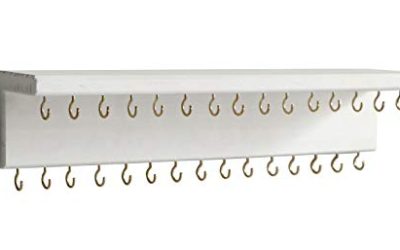
A connected house accumulates small physical things: remote controls, charging cables, USB drives with firmware files, spare batteries, earbuds, a label maker, keys for the smart lock’s manual override. The SANY DAYO organizer, built as a 30-hook rail for jewelry, turns out to be an excellent parking system for exactly this clutter. Thirty hooks on a wall-mounted or over-door rail give every small item a visible, reachable home near the control desk.
Visibility is the real feature. A remote that hangs on the same hook every day stops getting lost between cushions. Charging cables looped on labeled hooks stop tangling into the drawer knot every household knows. Spare cables for guests, the cable for the rarely used camera, and the short cord for the desk hub each get a hook of their own, so the control desk surface stays clear for actual work.
Specs
- 30 hooks for hanging small items
- Wall-mount or over-door hanging design
- Open layout keeps contents visible at a glance
- Works for remotes, cables, chargers, keys, and accessories
- Frees drawer and desk surface space
The rail also helps the household share the system. When everything has a hook, anyone can return an item to the right place without instructions, and a quick glance shows what is missing before it becomes a search. For a control corner that other family members use, that shared order is worth as much as any gadget on the desk.
tomtoc Laptop Case

Behind every tidy smart home is a less glamorous job: administration. Router settings, firmware updates, device dashboards that only open properly in a desktop browser, and the occasional factory reset all happen on a real computer. The tomtoc laptop case protects the machine assigned to that work, whether it lives at the control desk full time or travels between the desk, the router closet, and the couch.
The case’s structured padding and corner protection suit a laptop that gets carried around the house more than most. It is the machine taken onto the roof-adjacent attic hatch to check an access point, balanced near a tangle of Ethernet during a switch upgrade, and slid into a drawer between sessions. A slim profile keeps it easy to store at the control desk, while interior organization holds the admin essentials: a short Ethernet cable, a USB drive, and a notebook of network notes.
Specs
- Padded, structured protection for laptops
- Reinforced corners for bump and drop defense
- Slim profile for desk drawers and shelves
- Interior pockets for cables and small accessories
- Smooth zippers and a carry handle for moving around the house
Keeping the admin laptop protected and always in the same place shortens every troubleshooting session. When a camera drops offline at an inconvenient moment, the household’s fix-it machine is charged, cased, and exactly where the control desk routine says it should be.
Seesii TinySA Ultra Spectrum Analyzer

Most smart home problems are invisible. A camera stutters, a plug misses commands, a video call degrades at the same hour every evening. The Seesii TinySA Ultra makes the invisible part visible: it is a compact handheld spectrum analyzer that displays the radio activity around the home, so crowded Wi-Fi channels, interfering devices, and noisy bands show up as evidence rather than suspicions.
From the control desk, that evidence changes how decisions get made. Instead of moving the router on a hunch, the household can see which part of the spectrum is congested and choose a clearer channel with confidence. A baby monitor, an aging microwave, or a neighbor’s powerful network can reveal itself as the spike on the screen that appears exactly when the problems do. For a house full of wireless devices competing for airtime, that clarity prevents hours of random unplugging.
Specs
- Handheld spectrum analyzer with color display
- Scans a wide range of radio frequencies
- Shows signal strength and interference patterns visually
- Rechargeable battery for walk-around measurements
- Compact size for storage at the control desk
The analyzer rewards a simple habit: when something wireless misbehaves, measure first. Walk it from room to room, compare readings near the router and near the struggling device, and let the display narrow the suspects. It turns the control desk from a place that reacts to problems into a place that understands them.
How to Choose
Start with the layout. A control desk does not need much space, but it needs a fixed one: a corner where the dashboard screen, the charging rail, and the admin laptop always live. Mount the display or camera first, using a clamp, because sight lines decide where everything else should go. The screen should be readable from the room’s main seat and from the doorway, so status checks happen in passing rather than as a chore.
Next, separate the automatic layer from the managed layer. Sensor bulbs and other self-running devices should cover the basics, lighting that follows darkness, so the household is never dependent on an app for fundamentals. Reserve active management for the things that genuinely change: cameras, locks, climate, and media. The fewer daily decisions the system demands, the calmer the corner stays.
Then plan storage before buying more devices. Thirty hooks sound like a lot until remotes, cables, chargers, and spare parts each claim one, and that is precisely the point. Every connected device added to the house should arrive with a parking spot and a charging plan. A control desk that grows this way stays tidy at twenty devices instead of collapsing at eight.
Protect the admin machine as part of the system, not an afterthought. A cased laptop, a labeled USB drive, and written notes on the network layout belong together at the desk. When the internet drops during a storm, the household that can find its own documentation calmly is the household that recovers fastest.
Finally, budget attention for the invisible layer. Wireless problems are the most common and the least diagnosable by feel. A spectrum view, even checked only when trouble appears, keeps the household from blaming devices that are actually victims of interference.
Frequently Asked Questions
Does a smart home control desk need a dedicated room?
No. A corner of a living room, a section of hallway shelving, or one end of a home office desk is enough. The essentials are a mounted display, a parking rail for small items, and a consistent home for the admin laptop. What matters is that the spot is fixed, so the routine of checking and charging happens in the same place every day.
Are sensor bulbs a replacement for smart bulbs?
They solve different problems. Sensor bulbs handle automatic basics, turning on at dusk and off at dawn without any network at all, which makes them dependable during outages. Smart bulbs add color, dimming, and scenes. Many households use both: sensor bulbs for porches and hallways, smart bulbs where mood and control matter, all supervised from the same control desk.
Why keep a separate laptop for home administration?
Router dashboards, firmware tools, and device recovery utilities often work best, or only, on a full computer browser. A designated laptop keeps those tools, notes, and cables together, avoids disturbing a work machine, and means the household’s fix-it kit is always charged and findable. A protective case keeps that machine safe as it travels to wherever the network hardware lives.
Is a spectrum analyzer too technical for a household?
The basics are approachable. The display shows where radio energy is strong and where it is quiet, and comparing readings between rooms quickly reveals congestion and interference. Deeper features exist for hobbyists, but a household only needs the simple habit of measuring when a wireless device misbehaves, instead of guessing. That single habit resolves many smart home mysteries.
Final Verdict
A connected house feels smart when it feels calm, and calm comes from a home base. The ULANZI clamp puts the dashboard where eyes naturally land, the HEKEE sensor bulbs run the lighting layer without asking for attention, the SANY DAYO rail gives every remote and cable a visible home, the tomtoc case keeps the admin laptop protected and ready, and the Seesii TinySA Ultra turns wireless guesswork into evidence. None of these pieces demands a renovation or a new platform. Set them up in one corner, keep the routines simple, and the whole household’s connected life gets easier to see, easier to fix, and easier to share.
Product and ASIN Reference
| Product | ASIN |
|---|---|
| ULANZI super clamp | B09C882D4M |
| HEKEE dusk to dawn light bulbs A19 | B07HGZMYZ4 |
| SANY DAYO jewelry organizer 30 hooks | B07QFZSVQW |
| tomtoc laptop case | B073TVX735 |
| Seesii TinySA Ultra spectrum analyzer | B0BBGK9QJB |
FAQ
Does a smart home control desk need a dedicated room?
Are sensor bulbs a replacement for smart bulbs?
Why keep a separate laptop for home administration?
Is a spectrum analyzer too technical for a household?
More from Amazon
Programs that pair well with the guide above. Offers and eligibility are set by Amazon and may change.
Free shipping on eligible items, Prime Video and more. Eligible new members can start with a free trial.
Start a Prime free trialAudiobooks and podcasts to listen to on the go. Eligible new members can start with a free trial.
Try Audible freeAd-free music streaming. Eligible new subscribers can start with a free trial.
Try Music Unlimited freeA free business account with business pricing and bulk-buying tools for work, shop or home office.
Create a business accountAs an Amazon Associate we earn from qualifying purchases.









Write Your Review
No reviews yet. Be the first to share your experience!