Key takeaways
- Pros: compact and unobtrusive on a monitor bezel; simple physical controls; good color accuracy for skin tones
- Cons: lower max output than panel-style lights; USB-powered only, no battery option
Good overhead or desk-lamp lighting helps you see your keyboard, but it rarely flatters your face on a webcam. A dedicated video-call light sits at eye level, fills in shadows under your chin and eyes, and gives you a consistent, professional look on every call regardless of the time of day or the window behind you. When shopping, pay attention to brightness (measured in lumens), adjustable color temperature (so you can match daylight or warm indoor light), CRI (color rendering index — higher means more natural skin tones), and mounting options (monitor clip, desk stand, or tripod).
Logitech Litra Glow
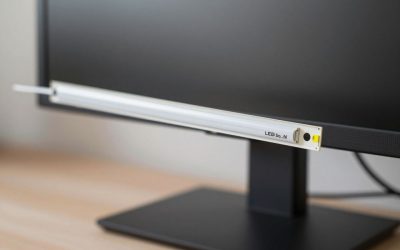
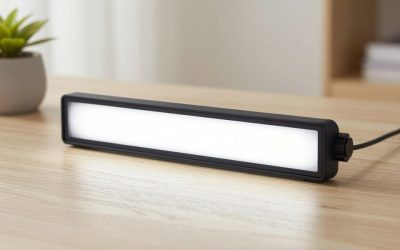
The Litra Glow is a small, plug-and-play LED panel built specifically for webcam lighting. It ships with a three-way mount that clips onto a monitor, clamps to a desk, or screws onto a tripod. Color temperature runs 2700K–6500K with a CRI around 93, and brightness/color are adjusted with physical buttons on the unit or the Logi Tune app.
- Pros: compact and unobtrusive on a monitor bezel; simple physical controls; good color accuracy for skin tones
- Cons: lower max output than panel-style lights; USB-powered only, no battery option
Elgato Key Light Air MK.2
A step up in both size and output, the Key Light Air MK.2 is a full LED panel rated up to roughly 2100 lumens at full power, with a 2900K–7000K range and CRI above 94. It’s controlled entirely through the Elgato Control Center app or Stream Deck, with no physical dial, and mounts via standard 1/4″ threads or an included MagSafe ring.
- Pros: very bright for its size; precise app-based dimming and color control; works well as a general room fill light too
- Cons: no on-device buttons, so the app is required for every adjustment; larger footprint than clip-on lights
Neewer 18-Inch LED Ring Light
This is the classic large ring-light form factor repurposed for desk use — an 18-inch ring with roughly 240 LED bulbs, a 3200K–5600K adjustable range, and a stand that usually includes a phone/camera holder in the center of the ring. It produces soft, shadow-free light because the source wraps around the lens itself.
- Pros: very even, flattering light with minimal harsh shadows; large size works for streaming and content creation, not just calls
- Cons: takes up real desk space behind your monitor; stand footprint is bigger than a clip-on panel
Lume Cube Panel Mini
The Panel Mini is built for portability: it runs on an internal rechargeable battery so it doesn’t need to stay tethered to a USB port, putting out around 300 lumens across a 2700K–7500K range with a CRI above 96. It mounts via a standard cold-shoe/DSLR-style shoe, so it clips onto monitor mounts, tripods, or camera rigs.
- Pros: battery power means no cable clutter on your desk; excellent color accuracy; genuinely portable between a desk setup and a laptop on the go
- Cons: lower max brightness than the mains-powered options above; battery needs periodic recharging
Logitech Litra Beam
The Litra Beam sits between the compact Litra Glow and the larger Key Light Air in Logitech’s own lineup — a wider 17.8-inch panel that spreads light more evenly across the face than the Glow’s smaller housing, while still offering Bluetooth and USB connectivity for app-based control through Logitech G HUB. It cleared UL safety testing for all-day use, which matters if the light stays on through back-to-back calls, and favorite brightness/color presets can be saved and recalled instantly instead of re-dialing settings each session.
- Pros: wider, more even spread than compact clip-on lights; Bluetooth control works even if the desk USB ports are full; UL-tested for continuous all-day operation
- Cons: bigger footprint than the Litra Glow, so it needs a stand or clamp rather than just resting on a monitor bezel
How to Choose
If you mainly join video calls and want something unobtrusive, a clip-on panel like the Litra Glow is the simplest fit. If you also record video or stream and want more punch, the Key Light Air or a ring light gives you more usable brightness. If your desk setup changes often or you work from different locations, battery-powered options like the Lume Cube avoid being tied to a specific outlet. If you want a middle ground — more even coverage than a small clip-on but without the Key Light Air’s full app dependency — the Litra Beam’s wider panel and physical/app hybrid control cover that gap.
Placement matters as much as the light itself. Position any of these lights slightly above eye level and a little off to one side (roughly 30–45 degrees from the camera) rather than dead-center behind the lens — direct, head-on light flattens facial features and can wash out the image, while an angled source creates subtle, natural-looking shadow definition. If your room already has a window or overhead light contributing color, match the video light’s color temperature to that ambient source rather than defaulting to the coolest setting, or you’ll get a visible color mismatch between your face and the background. Finally, consider how long you’re actually on camera each day: a light left running for multiple back-to-back meetings benefits from a model that’s rated for continuous use (like the Litra Beam or Key Light Air) rather than one designed for shorter recording sessions.
FAQ
Do I need a ring light, or is a panel light enough for video calls?
A panel light is usually enough for calls — ring lights mainly help when the light source also needs to sit directly behind the camera lens for close-up, shadow-free shots.
What color temperature should I use for video calls?
Most people look natural around 4000K–5000K, which sits between warm indoor light and cool daylight; adjustable lights let you dial this in to match your room.
Can these lights double as general desk lighting?
Larger panels and ring lights can supplement room lighting, but they’re optimized for facing the camera, not for reading or close task work on your desk.
How many lumens do I actually need for a video call?
Most home offices only need 150–300 lumens of supplemental light pointed at the face; the 2000+ lumen panels like the Key Light Air are overkill for calls alone but useful if you also record video in a dim room.
Will a video light cause glare on my glasses?
It can if the light sits directly in front of your eyes — angling the light slightly to the side (as recommended above) and avoiding maximum brightness usually eliminates visible lens glare during calls.
More from Amazon
Programs that pair well with the guide above. Offers and eligibility are set by Amazon and may change.
Free shipping on eligible items, Prime Video and more. Eligible new members can start with a free trial.
Start a Prime free trialAudiobooks and podcasts to listen to on the go. Eligible new members can start with a free trial.
Try Audible freeAd-free music streaming. Eligible new subscribers can start with a free trial.
Try Music Unlimited freeA free business account with business pricing and bulk-buying tools for work, shop or home office.
Create a business accountAs an Amazon Associate we earn from qualifying purchases.

Write Your Review
No reviews yet. Be the first to share your experience!