Our Top Picks
A mechanical keyboard is one of the few desk upgrades you feel on every single keystroke, all day. Here are five real, currently available options worth considering for a home office setup, covering a range of budgets and layouts.
Our top picks
1. Keychron K8 Pro

A tenkeyless (no number pad) wireless mechanical keyboard that’s become a default recommendation for home offices that want Bluetooth/2.4GHz wireless, hot-swappable switches, and a QMK/VIA software layer for remapping keys — without paying premium-board prices. It’s a solid middle-ground pick for anyone who wants to try different switches without committing to a soldered board.
2. Keychron Q1 Pro
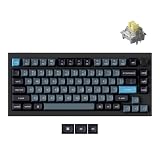
A step up in build quality — a gasket-mounted aluminum case, hot-swap sockets, and wireless connectivity, aimed at people who want a premium typing feel and full QMK/VIA customization without soldering. It’s a frequently cited pick for serious productivity typing, and the aluminum case noticeably changes the sound and feel compared to plastic-cased budget boards.
3. Logitech MX Mechanical
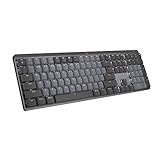
Built specifically for an office environment rather than gaming — quieter low-profile switches, a more compact footprint, and Logitech’s Flow software for working across multiple computers with one keyboard. If a louder mechanical board isn’t practical in a shared space or near video calls, this is the category leader for a quieter typing experience that’s still genuinely mechanical.
4. Logitech G915 TKL
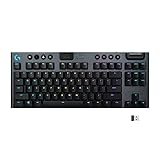
A low-profile wireless mechanical keyboard that trades the taller switch housings of traditional mechanical boards for a slimmer profile closer to a laptop keyboard’s feel, while keeping real mechanical switches underneath. Good fit for anyone who finds standard mechanical keyboards sit too high off the desk.
5. NuPhy Air75 V2

A compact 75% layout wireless board aimed at people who want a satisfying out-of-the-box typing feel without needing to tune or lubricate switches themselves. The smaller footprint also frees up desk space for a mouse mat or notebook compared to full-size boards.
6. Epomaker TH108

A full-size 108-key wireless board with a built-in 10000mAh battery, hot-swappable switches, and a gasket-mount case that softens keystroke feel compared to a rigid tray-mount design. It’s a strong value pick if you specifically need a full number pad, which none of the TKL or 75% boards above include, without stepping up to Keychron’s or Logitech’s pricing.
How to choose between them
- Want to customize switches later: go with a hot-swap board like the K8 Pro or Q1 Pro.
- Working in a shared space or on video calls often: the MX Mechanical’s quieter switches matter more than any other spec.
- Prefer a lower-profile feel closer to a laptop keyboard: the G915 TKL.
- Want something that feels great immediately with no tinkering: the NuPhy Air75 V2.
- Tight budget but still want hot-swap flexibility: the K8 Pro is the most accessible entry point on this list.
- Need a full number pad for data entry or spreadsheets: the Epomaker TH108 is the only full-size option here, and it’s still hot-swappable.
A note on layout size
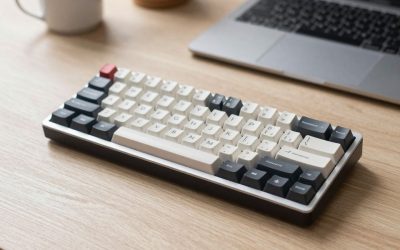
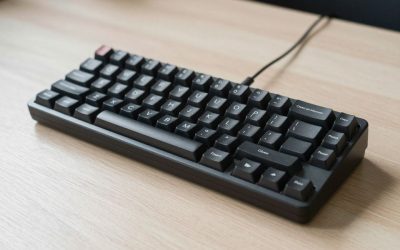
Full-size boards with a number pad take meaningfully more desk space — if you don’t use a numpad regularly, a tenkeyless (TKL) or 75% layout like most of the boards above frees up room for mouse movement without losing any keys you’d actually miss. If your work genuinely involves daily numeric entry, though, the space tradeoff of a full-size board like the TH108 is usually worth it over constantly switching to the top-row number keys.
Gasket mount vs. tray mount: why it affects feel
A detail that doesn’t show up in spec sheets but changes how a board feels under your fingers: tray-mount keyboards bolt the switch plate rigidly to the case, which transmits a firmer, sometimes harsher sound and feel with each keystroke. Gasket-mount designs, used in the Q1 Pro and TH108 above, sandwich the switch plate between layers of foam or silicone gasket material, letting the whole plate flex slightly on each press for a softer, more cushioned feel and a deeper, less clacky sound. If you’ve typed on a board that felt unexpectedly “mushy-but-good” compared to an older keyboard, gasket mounting is usually why.
FAQ
What does “hot-swappable” actually mean, and do I need it?
It means the switches plug into sockets rather than being soldered to the circuit board, so you can pull and replace them with your fingers or a simple tool. You don’t need it if you’re happy with the stock switches, but it’s valuable if you ever want to try a different switch feel without buying a whole new board.
Can I use any of these keyboards with both Mac and Windows?
Most modern mechanical keyboards, including the ones listed here, support switching between Windows and Mac key mapping (often via a physical switch or software toggle), though a few keycap legends may not perfectly match macOS-specific keys like Command.
How much does switch choice (linear vs. tactile vs. clicky) matter for a shared home office?
A lot, if other people are nearby — clicky switches are noticeably louder than linear or tactile ones, so a hot-swappable board gives you the option to switch to quieter switches later if noise becomes a household issue.
Do wireless mechanical keyboards add noticeable input lag compared to wired?
Modern 2.4GHz wireless modes on boards like these are generally fast enough that lag isn’t perceptible for typing or general use; competitive gaming is the one scenario where some users still prefer a wired connection for the lowest possible latency.
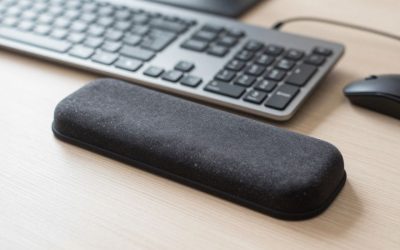
Whichever board you land on, pair it with a keyboard wrist rest if the case sits tall off the desk — it’s a small addition that makes a noticeable difference over a full workday.
FAQ
What does “hot-swappable” actually mean, and do I need it?
Can I use any of these keyboards with both Mac and Windows?
How much does switch choice (linear vs. tactile vs. clicky) matter for a shared home office?
Do wireless mechanical keyboards add noticeable input lag compared to wired?
More from Amazon
Programs that pair well with the guide above. Offers and eligibility are set by Amazon and may change.
Free shipping on eligible items, Prime Video and more. Eligible new members can start with a free trial.
Start a Prime free trialAudiobooks and podcasts to listen to on the go. Eligible new members can start with a free trial.
Try Audible freeAd-free music streaming. Eligible new subscribers can start with a free trial.
Try Music Unlimited freeA free business account with business pricing and bulk-buying tools for work, shop or home office.
Create a business accountAs an Amazon Associate we earn from qualifying purchases.


Write Your Review
No reviews yet. Be the first to share your experience!