Key takeaways
- Wrist rest
- Cleaning kit (brush + gel + cloth)
- Desk mat
A mechanical keyboard is the kind of purchase that quietly creates a small ecosystem of follow-up accessories. None of them are strictly required, but a few make a real difference to comfort, sound, and how long the board stays in good condition.
A wrist rest
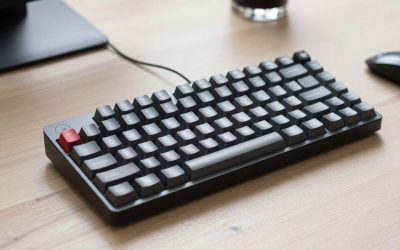
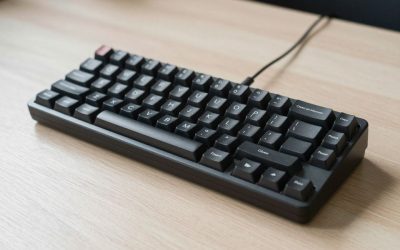
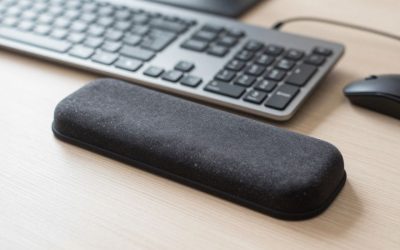
Mechanical keyboards — especially taller ones with aluminum cases — sit higher off the desk than most laptop or membrane keyboards. A wrist rest, like the layout-matched Glorious Wrist Rest sized to your specific board (60%, TKL, or full-size), keeps your wrists from resting at an upward angle against the desk edge during long typing sessions, which matters more the taller your specific board’s case is.
A keycap puller
Most boards ship with one, but it’s easy to lose. A dedicated keycap puller tool is cheap insurance for cleaning, keycap swaps, or just removing a stuck key without bending the stem — using fingers alone risks snapping a keycap’s mounting stem, especially on cheaper ABS plastic caps.
A cleaning kit
Crumbs, dust, and skin oil build up under the keycaps faster than most people expect. A basic keyboard cleaning kit — brush, cleaning gel, and microfiber cloth — handles the maintenance that keeps switches feeling consistent instead of gradually scratchy.
Switch lubricant (for hot-swap boards)
If your board is hot-swappable, a lubricant like Krytox GPL 205g0 lets you smooth out individual switches that have started to feel inconsistent, without replacing the whole board or even the whole set of switches. A small jar lasts for hundreds of switches, so it’s a small, inexpensive way to extend a board’s life well past the point most people would otherwise consider upgrading.
A deskmat
A full-desk desk mat for keyboard and mouse does double duty — it quiets the sound of a keyboard sliding or shifting slightly during fast typing, and it protects the desk surface from the oils and occasional spilled drink that eventually show up near any keyboard.
Extra keycaps (for boards with standard layouts)
If your board uses a standard layout (most Keychron, Royal Kludge, and similar boards do), an aftermarket PBT keycap set — such as a Tai-Hao PBT Double Shot set — is one of the more satisfying low-cost upgrades — it changes the sound profile, improves durability over stock ABS caps (which shine and smooth out with years of finger contact), and lets you personalize the board’s look without buying a new one.
A protective cover or travel case
If the keyboard lives on a desk that sees food, drinks, or pets nearby, a simple keyboard dust cover prevents the slow buildup that otherwise happens even when the board isn’t in use. For boards that travel between a home office and elsewhere, a padded keyboard carrying case protects switches and keycaps from the kind of bag-jostling that loosens keycaps over time.
What you probably don’t need right away
Custom artisan keycaps, a dedicated coiled USB cable, and premium carrying cases are genuinely nice but purely cosmetic or convenience upgrades — worth adding once you know you’re keeping the board long-term, not necessary on day one.
Budgeting the add-ons against the keyboard itself
It’s easy for accessories to creep up to a meaningful fraction of what you paid for the keyboard, so it helps to think of them in two tiers rather than buying everything at once. The first tier — wrist rest, cleaning kit, desk mat — is genuinely about comfort and upkeep, and together usually costs well under the keyboard itself. The second tier — lubricant, aftermarket keycaps, a travel case — is about refining and personalizing a board you already know you like, and makes more sense to add gradually over the first few months rather than all at checkout, since your preferences (switch feel, desired keycap color, whether the board ever actually leaves your desk) become clearer with real use.
A sensible starting kit
- Wrist rest
- Cleaning kit (brush + gel + cloth)
- Desk mat
That covers comfort, maintenance, and desk protection for under the cost of most keyboards themselves — everything else is a “nice to have” you can add once you know how the board fits into your daily setup.
FAQ
Do all mechanical keyboards support aftermarket keycaps?
Most do, as long as they use a standard Cherry-profile stem and a common layout, but boards with non-standard bottom rows (unusual spacebar or modifier key widths) may need a keycap set specifically sold as compatible with that board.
Is a desk mat necessary if I already have a mouse pad?
Not strictly — a desk mat is really about covering the keyboard’s footprint too, muffling sound and protecting the desk surface under both keyboard and mouse in one piece, which a mouse-pad-only setup doesn’t address.
How often should I replace a keyboard wrist rest?
There’s no fixed schedule; replace it when the foam has visibly compressed and no longer springs back, or when the fabric cover shows wear that’s uncomfortable against the skin — for most people that’s somewhere in the one-to-three-year range depending on daily use.
Should I buy accessories at the same time as the keyboard, or wait?
Waiting a few weeks is usually fine for everything except a wrist rest and cleaning kit, which are worth having from day one — the rest of the list (lube, aftermarket keycaps, travel case) benefits from knowing how the board actually fits your routine first.
Is a metal keycap puller better than the plastic ring tool that ships with most boards?
A wire-loop metal puller generally grips more securely and is less likely to slip off a keycap mid-pull than the basic plastic ring tool, which matters most on tightly-fit keycaps or boards you plan to disassemble often for cleaning or switch swaps.
FAQ
Do all mechanical keyboards support aftermarket keycaps?
Is a desk mat necessary if I already have a mouse pad?
How often should I replace a keyboard wrist rest?
Should I buy accessories at the same time as the keyboard, or wait?
Is a metal keycap puller better than the plastic ring tool that ships with most boards?
More from Amazon
Programs that pair well with the guide above. Offers and eligibility are set by Amazon and may change.
Free shipping on eligible items, Prime Video and more. Eligible new members can start with a free trial.
Start a Prime free trialAudiobooks and podcasts to listen to on the go. Eligible new members can start with a free trial.
Try Audible freeAd-free music streaming. Eligible new subscribers can start with a free trial.
Try Music Unlimited freeA free business account with business pricing and bulk-buying tools for work, shop or home office.
Create a business accountAs an Amazon Associate we earn from qualifying purchases.


Write Your Review
No reviews yet. Be the first to share your experience!