Our Top Picks
 On calls most of the day, want better low light and a privacy shutterLogitech Brio 500Check on Amazon
 Video calls are central to your job, want the best image quality availableLogitech MX Brio 705Check on Amazon
Most laptop and monitor webcams are an afterthought — low-light performance is poor, color looks washed out, and the field of view is either too tight or too wide. A dedicated webcam fixes all three in one purchase. Here are five real options worth considering.
Our top picks
1. Logitech C920s
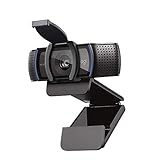
The long-running default recommendation for a reason: 1080p resolution, glass optics instead of plastic, reliable color accuracy, and hardware-level video compression that works consistently across Zoom, Google Meet, and Teams without extra software. It’s the webcam most people should start with before spending more.
2. Logitech Brio 500
A step up for anyone who’s on video calls most of the day — better low-light handling than the C920s, a wider field of view option, and a built-in privacy shutter that physically covers the lens when you’re not on a call, which is a nice feature for a webcam that’s going to be pointed at your face for eight hours a day.
3. Logitech MX Brio 705
The premium pick for a serious home office setup — true 4K resolution, AI-based face tuning that adjusts exposure automatically as lighting changes through the day, dual beamforming microphones, and the same physical privacy shutter as the Brio 500. Worth the extra cost if video calls are a core part of your job rather than occasional.
4. Anker PowerConf C200
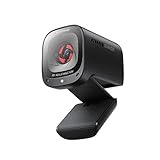
The budget-conscious pick — 2K resolution with autofocus, a 65-degree field of view wide enough to show your upper body and a bit of background rather than just a tight headshot, and dual microphones with noise reduction built in. A good fit if you want a clear upgrade over a laptop camera without spending at the premium tier.
5. Razer Kiyo Pro
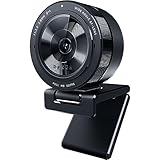
Built around a larger image sensor specifically for better performance in dim rooms — useful if your desk is in a space without strong natural light, or if you tend to take calls in the evening. It’s marketed toward streamers but the low-light handling makes it genuinely useful for anyone whose home office doesn’t get great daylight.
6. Insta360 Link 2

A different approach from the rest of this list — the Link 2 is a motorized PTZ (pan-tilt-zoom) webcam that physically pans and tilts to track you as you move around the frame, rather than relying on digital crop-and-zoom like most webcam “auto-framing” features. It also includes a DeskView mode that flips the camera down to show your hands and desk surface, useful for product demos, sketching, or showing physical documents on a call.
How to choose between them
- Just want a clear upgrade from a laptop camera: the C920s covers the basics reliably.
- On calls most of the day, want better low light and a privacy shutter: Brio 500.
- Video calls are central to your job, want the best image quality available: MX Brio 705.
- Budget-conscious but still want autofocus and a wider frame: Anker PowerConf C200.
- Dim room, bad natural light: Razer Kiyo Pro.
- Move around during calls, or need a desk/document view: Insta360 Link 2’s motorized tracking and DeskView mode.
A note on resolution
Most video call platforms cap incoming video at 1080p regardless of your camera’s native resolution, so a 4K webcam mainly pays off if you’re recording video separately or using a platform that explicitly supports higher resolution — for standard calls, a good 1080p or 2K camera is genuinely sufficient.
Mounting and field of view matter as much as the sensor
Most webcams clip onto a monitor’s top bezel, which works fine for a flat or lightly curved screen but can sit awkwardly on a very thin bezel or a tall monitor arm setup — check the clip’s opening range against your specific monitor before assuming it’ll fit. Field of view is the other spec worth reading closely: a narrow FOV (around 65-70 degrees) gives a tighter, more flattering headshot-style frame, while a wide FOV (90+ degrees) shows more of your room and upper body, which can be useful for presentations but also shows more background clutter than a narrow lens would. If your desk sits in a small or cluttered room, a narrower FOV is usually the more flattering and more private choice.
Whichever camera you choose, pair it with decent lighting — even the best webcam looks mediocre in a dim room, while a budget camera with good front-facing light can look surprisingly solid.
FAQ
Do I need a USB hub to use a dedicated webcam alongside other peripherals?
Only if your laptop or dock is already out of free USB ports — webcams typically use a single standard USB-A or USB-C connection and don’t require any special port type beyond what’s already on most computers.
Will a 4K webcam look better than 1080p even though most platforms cap the stream?
Not during the live call itself, but a higher native resolution sensor often still produces a sharper, less noisy 1080p image than a cheaper 1080p-native sensor, since it’s effectively downsampling from more detail.
Can I use a dedicated webcam to also record local video separately from calls?
Yes — most of these work with standard recording software (OBS, Camtasia, QuickTime, etc.) at their full native resolution, independent of whatever resolution cap your video-call platform applies to the live stream.
Do I need a tripod or can I rely on the included monitor clip?
The included clip covers most desk setups fine, but a small tripod is worth adding if you want to position the camera somewhere other than directly on top of your monitor, such as lower and slightly off to the side for a more flattering angle.
FAQ
Do I need a USB hub to use a dedicated webcam alongside other peripherals?
Will a 4K webcam look better than 1080p even though most platforms cap the stream?
Can I use a dedicated webcam to also record local video separately from calls?
Do I need a tripod or can I rely on the included monitor clip?
More from Amazon
Programs that pair well with the guide above. Offers and eligibility are set by Amazon and may change.
Free shipping on eligible items, Prime Video and more. Eligible new members can start with a free trial.
Start a Prime free trialAudiobooks and podcasts to listen to on the go. Eligible new members can start with a free trial.
Try Audible freeAd-free music streaming. Eligible new subscribers can start with a free trial.
Try Music Unlimited freeA free business account with business pricing and bulk-buying tools for work, shop or home office.
Create a business accountAs an Amazon Associate we earn from qualifying purchases.

Write Your Review
No reviews yet. Be the first to share your experience!