
Key takeaways
- Find the best extension cord for a desk far from the wall outlet, with length, routing, and safety tips plus five desk companions that finish the setup.
The best desk in the room is not always the desk nearest a wall outlet. Home offices grow where the light is good, where the door closes, or where the spare corner happens to be, and the outlet often sits several feet away on the wrong wall. An extension cord is the simple bridge between that outlet and the power strip under the desk, and choosing the right one matters more than it first appears. Length, routing, and a few basic safety habits decide whether the cord disappears quietly into the setup or becomes a tripping, tangling nuisance.
One point needs to be stated plainly before anything else: none of the five products below is itself an extension cord. They are companions around the desk — a light-duty wall rail, automatic sensor bulbs, a clamp mount, a padded laptop case, and electrolyte drops — the small supporting items that round out a workspace once power has been sorted. The guide portion explains how to choose and run the cord itself, and the product sections cover the companions honestly, including their limits.
As an Amazon Associate, we earn from qualifying purchases.
How to Choose an Extension Cord for a Desk
Match the Cord Length to the Real Distance
Measure the actual path the cord will travel, not the straight-line distance across the floor. A cord runs from the outlet, along the wall, around the desk leg, and up to the strip, and that path is always longer than it looks. Once the true distance is known, choose the shortest cord that covers it with a little slack. Excess cord is a real problem: loose loops pile up under the desk, collect dust, snag chair wheels, and create exactly the trip and tangle hazards the cord was supposed to avoid. Right-sized length keeps the run flat, tidy, and forgettable.
Route It Along the Wall, Never Across a Walkway
The safest route for a desk cord follows the room’s edges. Run it along the baseboard, behind furniture, and up the back leg of the desk, securing it with clips or a cover where it might shift. A cord should never cross a walkway, a doorway path, or the open floor where feet travel, because a cord underfoot is a fall waiting to happen and repeated stepping wears the jacket down. It should also never run under a rug or carpet: covering a cord hides damage from view, traps heat, and lets foot traffic crush it invisibly. If the only path crosses open floor, the better answer is usually to move the desk or use a different outlet, not to hide the cord.
Use One Cord for the Desk Strip, and Never Chain Cords
A desk setup normally needs exactly one extension cord: wall outlet to power strip, and everything on the desk plugs into that strip. Plugging one extension cord into another — chaining, or daisy-chaining — is a habit to avoid entirely. Each connection adds a loose point that can work free, overheat, or get kicked apart, and chained cords are a well-known household hazard. The same rule applies at the other end: do not plug a second strip into the first to gain more sockets. If the desk needs more outlets than one strip provides, the honest fix is a single strip with more outlets, fed by one cord of the right length.
Keep the Cord Away From Heat and Chair Wheels
Placement matters as much as length. Keep the cord clear of space heaters, radiators, and hot equipment vents, since sustained heat softens and ages cord insulation. Keep it out of the roll path of the desk chair as well; chair casters crossing a cord day after day will chew through the outer jacket eventually. Route the cord behind the desk or along the wall where wheels never travel, and check its condition every few months. A cord with a cracked, pinched, or frayed jacket should be replaced, not taped and forgotten.
Remember What an Extension Cord Actually Does
An extension cord moves power from one place to another. That is all it does. It does not add outlets safely beyond what the strip at its end provides, it does not raise the capacity of the wall circuit, and it does not turn a light-duty setup into a heavy-duty one. The total draw of everything on the desk still has to stay within the limits of the strip and the circuit behind it. Desk gear — a monitor, a laptop charger, a lamp — is modest in draw, which is why a single cord and strip serve most home offices well. High-draw appliances such as space heaters and kettles do not belong on a desk cord at all; they need a wall outlet of their own.
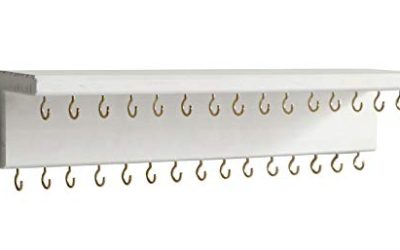
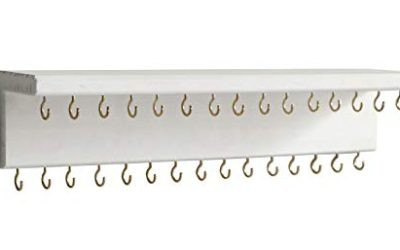
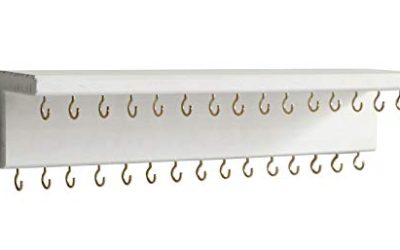
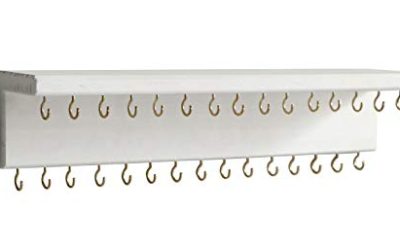
SANY DAYO Jewelry Organizer With 30 Hooks

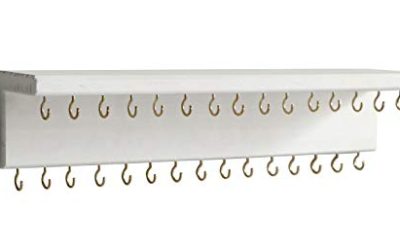
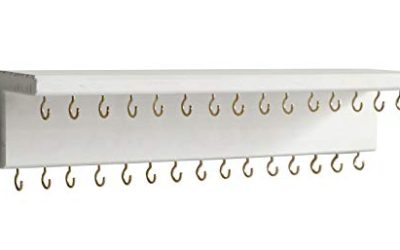
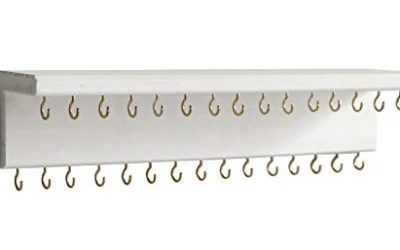
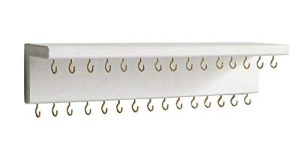
Once the desk has power, the small clutter problem remains: keys, lanyards, ID badges, and earbuds migrate across the desktop. The SANY DAYO organizer is a wall-mounted rail fitted with 30 hooks, sold as a jewelry organizer, and it earns a place beside a desk as a light-duty landing strip for exactly those small, light items. Hung on the wall beside the desk, it gives keys and lanyards a fixed home so they stop living on the work surface.
The honesty matters here: this is a light-duty rail for keys, lanyards, and light accessories only. It must never be treated as storage for consoles, drives, power bricks, heavy tools, or anything heavy — those belong on shelves and in drawers. Within its light-duty role, though, 30 hooks is generous capacity, and clearing the desktop makes the desk feel finished.
Specs
- Product type: wall-mounted hook rail jewelry organizer
- Hook count: 30 hooks
- Intended use: keys, lanyards, necklaces, and other light accessories
- Mounting: wall mounted beside a desk or door
HEKEE Dusk to Dawn Bulbs A19

The HEKEE bulbs are A19 bulbs with a built-in light sensor: they switch themselves on when the surroundings grow dark and off again when daylight returns. Around a home office, that makes them useful for a porch fitting, a hallway, or ambient evening light, so the walk to and from the desk is never done in the dark.
Two limits deserve plain statement. These are plain automatic sensor bulbs — explicitly not smart bulbs, with no app, no voice control, and no scheduling beyond their own sensor, and they are not task lighting for desk work, where a proper desk lamp is the right tool. Also, in windowless or heavily shaded rooms the sensor may read the gloom as night and the bulbs may stay on. Before fitting them in a covered or enclosed fixture, check the enclosed-fixture rating so the bulb is used within its stated limits.
Specs
- Product type: A19 sensor bulb
- Function: automatic dusk-to-dawn on and off via light sensor
- Control: sensor only, no app or smart features
- Best use: porch, hallway, and ambient evening light
- Note: check the enclosed-fixture rating before use in covered fittings
ULANZI Super Clamp

The ULANZI super clamp is a sturdy clamp with a mounting point, used to hold accessories such as a small light, a phone holder, or a camera on a desk edge, shelf, or pole. For a desk that has just been powered and arranged, it positions a small accessory exactly where it is wanted without drilling or permanent fixings, and moves again in seconds when the layout changes.
Its limits are simple and important. The clamp is a mount only — it has no light, phone, or camera of its own, and it supplies no power. It should never be clamped onto a monitor screen, which is not built to take clamping pressure. Pad the jaws when clamping finished wood or painted edges so the grip does not mark the surface, and check the hold after the first day, since a small settle is normal.
Specs
- Product type: super clamp mount
- Function: clamps to desk edges, shelves, and poles to hold accessories
- Includes: mount only, no light, phone, or camera
- Caution: never clamp a monitor screen; pad the jaws on finished surfaces
tomtoc Laptop Case

A desk with power sorted invites a simple routine: laptop on the desk while working, laptop away when the day ends. The tomtoc case is a padded soft case sized for a laptop, giving the machine a layer of cushioning against knocks in a bag or on a shelf, and a tidy place to live when it is not on the desk.
Describe it accurately and it serves well: it is a padded soft case, not a hard shell, so it softens bumps and scratches rather than standing up to crushing weight or drops, and it is not waterproof, so rain and spills remain a threat to anything inside. Fit is the detail to get right — check the internal dimensions against the laptop’s actual measurements before buying, rather than trusting the headline size class alone.
Specs
- Product type: padded laptop case
- Construction: soft padded shell, not a hard case
- Water resistance: not waterproof
- Fit note: check internal dimensions against the laptop before buying
Hi-Lyte Electrolyte Drops

Long desk sessions have a quiet habit of skipping water breaks, and Hi-Lyte electrolyte drops are a simple way to make a plain glass of water a little more appealing during the working day. A few drops go into a bottle or glass, and the bottle lives on a coaster at the corner of the desk — within reach, away from the keyboard, and nowhere near the power strip or the cord run.
The claims should stay modest, and here they do. Hi-Lyte is not a medicine, not an energy product, and not a treatment for anything; plain water is fine for most people, most of the time, and these drops are a preference, not a necessity. Follow the label directions rather than guessing, and anyone with a medical condition — particularly one involving fluid or mineral balance — should check with a clinician before using electrolyte products regularly.
Specs
- Product type: electrolyte drops for drinking water
- Use: add to water following label directions
- Claims: modest hydration support only; not a medicine, energy, or treatment product
- Note: plain water is fine for most people; check with a clinician if managing a medical condition
FAQ
How long should a desk extension cord be?
As short as the real route allows. Measure the path along the wall and up to the strip, add a little slack, and buy the closest length above that figure. Long spare loops create trip hazards, tangles, and dust traps, so extra length is a drawback, not a bonus.
Can an extension cord stay plugged in at a desk all the time?
A cord feeding a desk strip is commonly left in place, but it should be treated as a tidy, temporary run: routed along the wall, clear of heaters and chair wheels, never under a rug, and checked every few months for damage. For a truly permanent desk position, an added wall outlet is the better long-term answer.
Is it safe to plug a power strip into an extension cord?
Yes, that single connection — one cord, one strip — is the normal desk arrangement. What is not safe is chaining: cord into cord, or strip into strip. Keep it to one cord between the wall and the strip, and keep high-draw appliances off the desk cord entirely.
What should never be plugged into a desk extension cord?
High-draw heating appliances — space heaters, kettles, and similar gear — should go straight into a wall outlet, never onto a desk cord or strip. The desk run is for modest electronics: a monitor, laptop charger, and lamp.
Final Verdict
Choosing the best extension cord for a desk comes down to three habits: buy the length the route actually needs, run it along the wall where feet and wheels never go, and respect its limits — one cord, one strip, no chaining, no high-draw appliances. Do those things and the cord vanishes from attention, which is exactly what good cable management means. The five companions then finish the workspace in their own small ways: the SANY DAYO rail clears light items off the desktop, the HEKEE bulbs handle evening light automatically, the ULANZI clamp positions accessories without fixings, the tomtoc case gives the laptop a padded home, and the Hi-Lyte drops make the desk water bottle a little more inviting. Power first, tidiness second: the desk is ready.
Product and ASIN Reference
| Product | ASIN |
|---|---|
| SANY DAYO jewelry organizer 30 hooks | B07QFZSVQW |
| HEKEE dusk to dawn bulbs A19 | B07HGZMYZ4 |
| ULANZI super clamp | B09C882D4M |
| tomtoc laptop case | B073TVX735 |
| Hi-Lyte electrolyte drops | B01MXDAHIB |
FAQ
How long should a desk extension cord be?
Can an extension cord stay plugged in at a desk all the time?
Is it safe to plug a power strip into an extension cord?
What should never be plugged into a desk extension cord?
More from Amazon
Programs that pair well with the guide above. Offers and eligibility are set by Amazon and may change.
Free shipping on eligible items, Prime Video and more. Eligible new members can start with a free trial.
Start a Prime free trialAudiobooks and podcasts to listen to on the go. Eligible new members can start with a free trial.
Try Audible freeAd-free music streaming. Eligible new subscribers can start with a free trial.
Try Music Unlimited freeA free business account with business pricing and bulk-buying tools for work, shop or home office.
Create a business accountAs an Amazon Associate we earn from qualifying purchases.
Write Your Review
No reviews yet. Be the first to share your experience!