
Key takeaways
- Cable tie desk picks for a quiet begin: plain ties that bundle cords snugly without crushing them, plus five honest companions for a tidy desk.
A quiet begin at the desk has its own sound, or rather its own lack of one. The house is still, the kettle has not boiled yet, and the only thing between you and a gentle first hour of work is the small mess behind the monitor. A charging lead has slipped to the floor again. The lamp cord has wandered across the keyboard cable. The power strip sits in a knot that grew one lazy evening at a time. Plain cable ties undo all of that in a few silent minutes. The ties here are plain, generic, and unbranded — simple straps with no logo, no app, and no claims beyond holding a bundle together so the morning starts without a fuss.
One point needs stating plainly before anything else: none of the five products below is itself a cable tie. The ties themselves are plain generic straps you can pick up anywhere. What follows are five desk companions that make a tied-up desk work better through a quiet morning — a light-duty rail for the small things ties cannot hold, automatic bulbs that light the room before you arrive, a clamp mount that lifts one device off the surface, a padded case for the traveling laptop, and honest glassware for the water that keeps a long sit comfortable. Each comes with plain notes on what it does and does not do.
As an Amazon Associate, we earn from qualifying purchases.
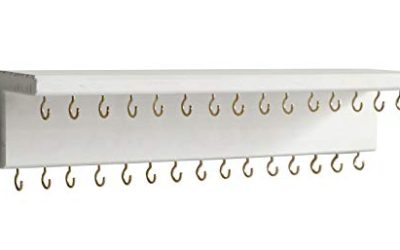
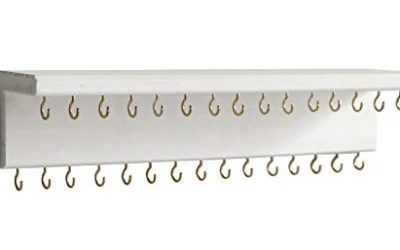
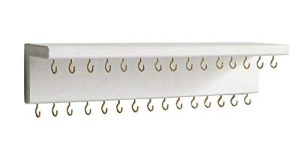
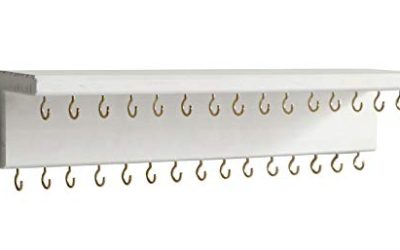
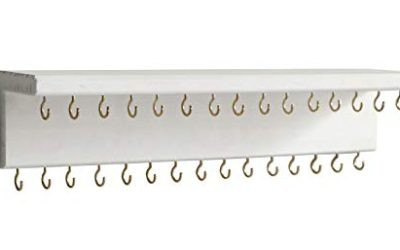
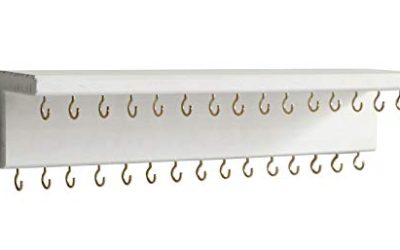
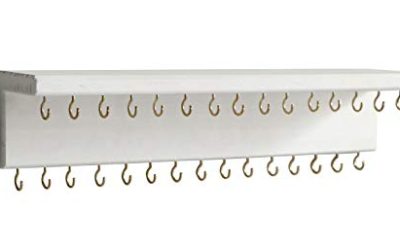
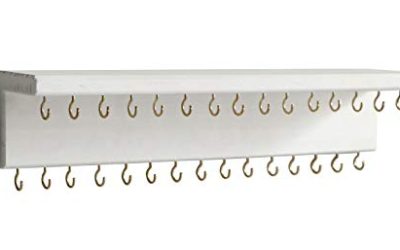
SANY DAYO Jewelry Organizer With 30 Hooks

The SANY DAYO organizer is a rail fitted with thirty small hooks, sold as a jewelry organizer for necklaces and bracelets. On a desk, repurposed honestly, it works as a light-duty rail for the small, light things that cable ties cannot manage on their own: a coiled earbud cord, a charging lead waiting its turn, keys, a lanyard, and even the bundle of spare ties itself. Each item hangs on its own hook, stays visible, and never slides down into the tangle behind the monitor.
The limits deserve the same plain statement as the uses. This rail is for light items only, and it must never hold consoles, drives, power bricks, heavy tools, or cartridges — those belong on a shelf or in a drawer with real support underneath, not on small hooks made for jewelry. Kept inside its light-duty role, the rail clears the desk surface of the little things that drift into the cable zone, and a clear surface is what lets the tied bundles below stay quiet and settled.
Specs
- Product type: hook rail organizer, sold as a jewelry organizer
- Hook count: 30 hooks
- Best role: light-duty hanging for cords, keys, lanyards, and small accessories
- Not for: consoles, drives, power bricks, heavy tools, or cartridges
HEKEE Dusk to Dawn Bulbs A19

The HEKEE bulbs are plain automatic sensor bulbs in the familiar A19 shape. A small sensor in each bulb reads the light around it, turning the bulb on when the room darkens and off again when daylight returns. For anyone who starts before sunrise, that means the corner lamp is already glowing softly when you sit down, and it switches itself off as the first light takes over. There are no timers to set and nothing to remember at either end of the day.
Be clear about what these bulbs are not. They are not smart bulbs: there is no app, no voice control, no color changing, and no dimming schedule. They are also not task lighting, because a focused desk lamp still handles close reading and detailed work better; these bulbs serve the room around the desk rather than the page in front of you. Two honest caveats apply. In windowless or garage rooms with little natural light, the sensor may read the space as permanent dusk and the bulb may stay on, so check on it rather than assuming. And before fitting any bulb into a fully enclosed fixture, check the enclosed-fixture rating for that fitting first.
Specs
- Product type: automatic dusk-to-dawn sensor bulb
- Base and shape: standard screw base, A19 household shape
- Behavior: turns on at dusk, off at dawn, fully automatic
- Not: smart bulbs, no app or voice control, not task lighting
- Caveat: may stay on in windowless or garage rooms; check enclosed-fixture rating
ULANZI Super Clamp

The ULANZI super clamp is a firm grip clamp with a threaded mounting point, built to hold accessories to a desk edge, a shelf, or a pole. In a cable-managed setup it earns its place by lifting one thing clear of the surface — a small lamp, a phone arm, or a camera — so that device’s cord runs in one short, tie-able line instead of wandering across the desk and tangling with everything else. A steady clamp means the cable path stays exactly where you tied it.
The honest description is short: the ULANZI is a mount only. It has no light of its own, no phone, and no camera — it simply grips and holds whatever compatible accessory you attach to it. That single job, done solidly, is the whole value. Tighten it onto a firm edge, confirm there is no wobble, route the accessory cord down the desk leg with a couple of ties, and that corner stays as quiet as the rest.
Specs
- Product type: clamp mount for accessories
- Role: grips desk edges, shelves, and poles to hold a lamp, phone arm, or camera
- Includes: the clamp itself only
- Not included: no light, no phone, no camera of its own
tomtoc Laptop Case

The tomtoc case is a padded soft case made to carry and protect a laptop between desk, bag, and meeting room. On a desk built around tidy cables, its quiet virtue is what it removes: the laptop’s charger lead, adapter, and loose extras can travel inside or alongside the case instead of living permanently in the bundle behind the monitor. When the laptop leaves, its cords leave with it, and the tied setup stays tied.
The honest notes matter here too. This is a padded soft case, not a hard shell, so it softens bumps and scratches rather than standing up to heavy knocks or weight stacked on top. It is also not waterproof, so a wet commute still calls for care. Before ordering, check the internal dimensions against your exact laptop, including its thickness, because a case that is even slightly small helps nobody. Measured properly, it is a calm, simple way to keep the traveling half of a desk setup separate from the fixed half.
Specs
- Product type: padded soft laptop case
- Protection: padding against bumps and scratches
- Not: a hard shell, not waterproof
- Fit note: check internal dimensions against your laptop before ordering
JoyJolt Faye Highball Glasses 13 oz, 6 Pack

The JoyJolt Faye highball glasses are a set of six tall glasses, each holding a generous pour of water, juice, or iced tea. Their place in a quiet-begin setup is simple: a full glass of water waiting at the side of the desk means fewer trips to the kitchen during the first focused hour, and fewer trips means the morning keeps its calm. The tall shape sits steadily and looks clean doing it.
The honest framing is equally simple. These are real glassware, and real glass can break, so they belong on a side table or a clear corner of the desk — never perched among the electronics, cards, and collections that a spill or a crack would ruin. Keep them away from the keyboard, the laptop, and any paperwork that matters. Treated as side-table glassware rather than desk clutter, the set does its one job well: keeping a drink close, quietly, for the whole morning.
Specs
- Product type: highball drinking glasses, set of six
- Capacity: tall highball size for water, juice, or iced tea
- Material: real glass, breakable
- Best place: side table only, away from electronics, cards, and collections
How to Choose
Good cable ties ask for very little, but four small habits decide whether a bundle stays quiet for months or unravels by Friday.
Keep Ties Snug but Never Crushing the Cable
Pull each tie until the bundle holds together as one neat line, then stop. A tie that bites into the cable jacket can damage the wires inside over time, and a crushed cable is a quiet problem that only announces itself when something stops working. Snug means the cords move together when you lift them; crushing means the jacket dents. Aim for the first, every time, and leave a little forgiveness in every loop.
Use One Tie per Bundle So a Single Cable Lifts Free
Resist the urge to gather every cord on the desk into one giant bundle. When each logical group — the monitor leads, the charging leads, the lamp and its clamp — gets its own tie, a single cable can be lifted free for a repair or a swap without cutting the whole system apart. One tie per bundle keeps the setup flexible, and flexibility is what keeps a tidy desk tidy after the first change arrives.
Keep Spare Ties in the Cable Drawer
Ties are only useful at the moment a new cable appears, and that moment rarely waits for a shopping trip. Keep a small bundle of spares in the cable drawer, alongside the spare leads. When a new device joins the desk, its cord gets tied the same day, in the same style, and the quiet order survives the addition instead of slowly dissolving around it.
The Tie Only Holds the Bundle, the Person Does the Plugging
A tie has exactly one job: holding cords together. It does not route them, choose their paths, or plug anything in. The person does the plugging, decides which bundle runs down which desk leg, and checks that nothing pulls tight when the chair moves. Keeping that division clear sounds obvious, yet it is the habit that prevents most cable trouble — the tie is a helper with a narrow role, and the thinking stays with you.
FAQ
How many cable ties does a small desk actually need?
Most small desks settle with six to ten ties: two or three along the back edge, one or two down each desk leg, and a couple for the charging corner. The exact number matters less than the grouping. One tie per bundle, with spares in the drawer, covers a normal setup and leaves room for the next cable.
Can cable ties be reused, or are they single use?
Plain generic ties are usually cut to remove, which makes them effectively single use, and that is fine — they are simple straps, not equipment. Cut them with care, snipping the strap rather than the cable beneath it. If you change your setup often, keep a larger bundle of spares in the drawer so a re-route never has to wait.
Will tight ties damage my cables over time?
They can, if they are pulled hard enough to dent the outer jacket. The fix is simple: snug, never crushing. A bundle should hold together as one line while each cable inside keeps its round shape. Check the tightest ties once after fitting them, ease off any that bite, and the cables will outlast the desk arrangement around them.
Where should tied bundles run so the desk stays quiet?
Along the back edge of the desk and down the rear legs is the calm route for almost every setup. Bundles there stay out of sight, away from feet and chair wheels, and clear of the space your hands actually use. Keep the power strip reachable but off the floor if you can, and let each bundle drop in one straight, gentle line.
Final Verdict
A quiet begin is mostly a matter of removing small noises before they start, and a desk with tied cables removes several at once: nothing slips, nothing tangles, nothing needs untangling at dawn. The ties stay plain, generic, and unbranded, bought anywhere and forgotten once fitted. The five companions fill the gaps ties cannot reach — the SANY DAYO rail for light hanging storage, the HEKEE bulbs for a room that lights itself, the ULANZI clamp as a mount only, the tomtoc case for the traveling laptop, and the JoyJolt glasses waiting on the side table. Tie the bundles snugly, keep spares in the drawer, and let the first hour start the way it should: quietly.
Product and ASIN Reference
| Product | ASIN |
|---|---|
| SANY DAYO jewelry organizer 30 hooks | B07QFZSVQW |
| HEKEE dusk to dawn bulbs A19 | B07HGZMYZ4 |
| ULANZI super clamp | B09C882D4M |
| tomtoc laptop case | B073TVX735 |
| JoyJolt Faye highball glasses 13 oz 6 pack | B08BB62QWT |
FAQ
How many cable ties does a small desk actually need?
Can cable ties be reused, or are they single use?
Will tight ties damage my cables over time?
Where should tied bundles run so the desk stays quiet?
More from Amazon
Programs that pair well with the guide above. Offers and eligibility are set by Amazon and may change.
Free shipping on eligible items, Prime Video and more. Eligible new members can start with a free trial.
Start a Prime free trialAudiobooks and podcasts to listen to on the go. Eligible new members can start with a free trial.
Try Audible freeAd-free music streaming. Eligible new subscribers can start with a free trial.
Try Music Unlimited freeA free business account with business pricing and bulk-buying tools for work, shop or home office.
Create a business accountAs an Amazon Associate we earn from qualifying purchases.
Write Your Review
No reviews yet. Be the first to share your experience!