
Key takeaways
- Label both ends of every cable in your desk corner and stop the guessing game, with honest support picks for chargers, monitors, lamps, and spare leads.
Every desk corner eventually grows the same mystery: a knot of black cables behind the monitor where the charger, the lamp, the external drive, and the spare lead all look identical. The fix is unglamorous and it works — label both ends of every cable with the plain name of the device it serves. When both ends carry a tag, any cable can be identified in seconds, unplugged with confidence, and put back in the right place after cleaning, moving furniture, or swapping a monitor. The habit takes a minute per cable and pays that minute back the first time something needs to be disconnected in a hurry.
Honesty first: none of the five products in this guide is a label maker or a set of cable tags. Labels themselves are simple consumables — wrap-around flags, write-on tags, or printed strips — and any basic version does the job. The five picks below support the corner around that labeling habit: a rail that parks labeled spare leads, room light that makes small tags easier to read, a clamp mount, a case for labeled travel leads, and a modest hydration staple for long tidying sessions. Two limits deserve stating plainly. Labels identify cables; they do not tidy them, so routing still needs clips or a tray. And a cable label is a public note — never write passwords, PINs, or Wi-Fi codes on one.
As an Amazon Associate, we earn from qualifying purchases.
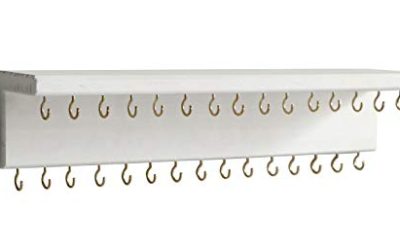
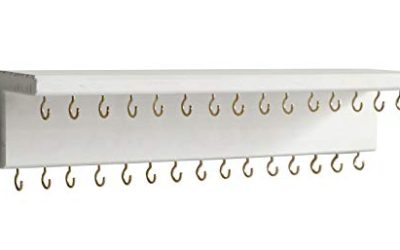
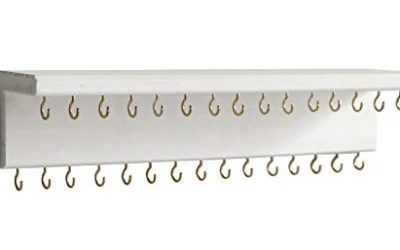
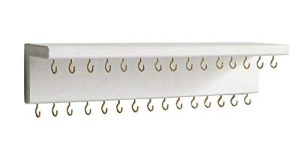
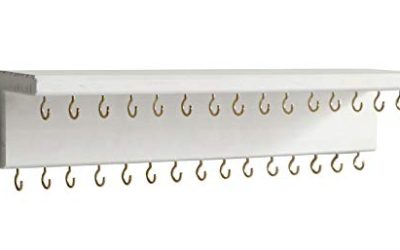
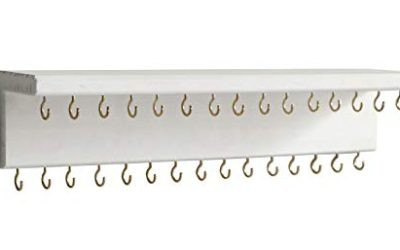
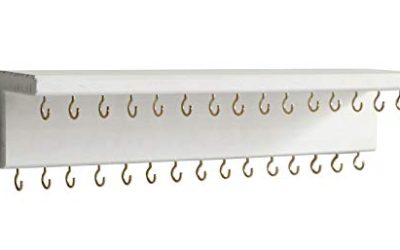
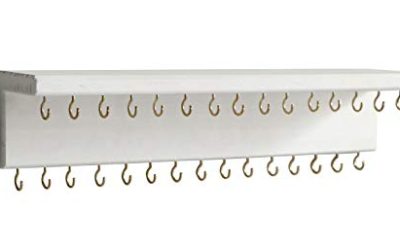
SANY DAYO Jewelry Organizer With 30 Hooks

To be plain about what this is: the SANY DAYO organizer is a jewelry organizer, designed for necklaces and similar light items. In a desk corner it earns a second job as a light-duty rail. Each labeled spare lead gets its own hook, hung in a loose loop with the tag facing outward, so the label stays flat and readable instead of being crushed at the bottom of a drawer. When a spare charger or monitor lead is needed, the right one can be found by reading tags rather than by untangling a pile.
The limits matter. Thirty hooks invite overloading, and this rail is light-duty only. It must never hold power strips or charging bricks, and heavy adapters belong in a drawer or bin, not on a hook meant for jewelry. Hung with light leads only, though, it turns the spare-cable problem into a quick visual scan, which is exactly what a labeling system needs to stay useful.
Specs
- 30 individual hooks on a single rail
- Designed for necklaces and lightweight jewelry
- Wall-mounted format that keeps spare leads off the desk surface
- Light-duty load only; not intended for power strips or charging bricks
- Works as a parking rail for labeled spare cables
HEKEE Dusk to Dawn Bulbs, A19

The HEKEE bulbs are plain automatic sensor bulbs for the room’s existing lamp or ceiling fixture. A built-in light sensor switches each bulb on at dusk and off at dawn, so the corner is lit in the evening without a daily switch routine. That general light makes small cable tags easier to read than they would be in a dim corner, and it keeps the room usable while cables are being sorted after dark.
Two clarifications keep expectations honest. These are explicitly not smart bulbs: there is no app, no hub, no voice control, and no scheduling beyond the light sensor itself. They are also not task lighting — reading tiny print on a tag under a desk still calls for a real work light aimed at the job. In a windowless room the sensor may keep the bulbs on far longer than expected, because the room never gets bright. And before fitting one in a covered fixture, check the listing for the enclosed-fixture caveat, since not every bulb is rated for enclosed use.
Specs
- A19 bulb shape with a standard screw base
- Built-in dusk-to-dawn light sensor
- Automatic on at dusk and off at dawn, with no switch routine
- Not a smart bulb: no app, hub, or voice control
- Check the listing for the enclosed-fixture rating before use in covered fixtures
ULANZI Super Clamp

The ULANZI super clamp is a mount only. It includes no light, no phone, and no camera of its own, and it should be bought with that understanding. Its role in a labeling session is practical: clamped to a desk edge or shelf, it can hold a small light or a phone — fitted with the appropriate holder — aimed under the desk while tags are being written and wrapped. Both hands stay free for the fiddly work, and the light stays where it was pointed.
Because it is a grip and nothing more, the details that matter are mechanical. The jaw opening has to suit the thickness of the desk edge or shelf it will bite, and the accessory being held needs a compatible mounting point. Used within those limits, a clamp quietly solves the oldest problem in cable work, which is that the dark tangle is always exactly where no free hand can hold a light.
Specs
- Clamp-style mount for desk edges, shelves, and similar supports
- Mount only; the light, phone, or camera being held is supplied separately
- Threaded mounting points accept standard small accessories and holders
- Jaw opening should be checked against the thickness of the mounting surface
- Suited to small lights and phones used as work aids
tomtoc Laptop Case

The tomtoc case is a padded soft case, and its connection to labeling is simple: the travel leads inside it get their own labels too. A laptop kit that travels — charger lead, adapter cable, spare cord — reads exactly like the desk at home when every lead is tagged, so nothing is borrowed, guessed at, or left behind in a hotel room. The padding handles the everyday bumps and scratches of a commute and keeps the kit in one place.
The limits are the usual ones for a soft case, and they are worth respecting. It is not a hard shell, so it will not protect a laptop against a serious crush or drop. It is not waterproof, so a soaked bag in heavy rain is still a risk to what is inside. And fit is not automatic: check the internal dimensions against the laptop before ordering, because a case from the wrong size class helps nobody. Within those limits, it is an honest, tidy home for a labeled travel kit.
Specs
- Padded soft-case construction for everyday bumps and scratches
- Sized by laptop class; internal dimensions should be checked before ordering
- Keeps a laptop and a small kit of labeled leads together in one place
- Not a hard shell; limited protection against drops or crushing
- Not waterproof
Hi-Lyte Electrolyte Drops

A full labeling session — every cable pulled, tagged at both ends, and routed back — can take longer than expected, and this is the point in the guide where claims stay deliberately modest. Hi-Lyte drops are added to a glass or bottle of water following the directions on the product’s own label. That label is, fittingly, the one label in this entire guide whose instructions should be followed exactly as written.
Beyond that, restraint is the honest position. These drops are not a medicine, not an energy product, and not a treatment for any condition. Plain water is fine for most people most of the time, and nothing in a bottle of drops changes that. Anyone with a medical condition, or a diet that restricts sodium, potassium, or other minerals, should check with a clinician before using a product like this rather than relying on a buying guide.
Specs
- Liquid drops added to a glass or bottle of water
- Serving directions are printed on the product label and should be followed
- Not a medicine, energy product, or treatment for any condition
- Plain water remains a suitable choice for most people
- Medical conditions or restricted diets warrant a clinician’s advice first
How to Choose
Start with the labeling system itself, because the products above only support it. The first rule is the both-ends rule: every cable gets a label at the device end and at the plug or hub end. A tag at only one end still leaves a guessing game at the other, and the under-desk end is usually the one that gets grabbed during a fault. The second rule is plain device names. Write “Monitor,” “Desk Lamp,” “Drive,” or “Laptop Charger” — a name that means something six months later — rather than “black cable” or a number that needs a key stored somewhere else.
Timing is the third rule. Label a cable when it is first plugged in, while its job is known for certain, instead of during a crisis when three identical leads are already mixed together. The fourth rule concerns materials. A label lives in dust, warmth, and constant small bending, so wrap-around flag labels, write-on tags with a clear protective wrap, or printed strips made for cables outlast plain paper stickers, which peel and fade. Whatever the material, write large enough to read without pulling the cable out. Finally, redo labels when gear changes: a tag that lies is worse than no tag at all.
The support picks then fall into place by job. The SANY DAYO rail parks labeled spare leads where their tags stay visible. The HEKEE bulbs keep the room lit into the evening, with a real work light still needed for close reading. The ULANZI clamp holds that light or a phone steady during the session. The tomtoc case extends the same labeled order to the travel kit. And the Hi-Lyte drops are simply a modest staple for the person doing the work, with no claims beyond the label directions.
FAQ
Why label both ends of a cable instead of just one?
Because the two ends are used in different moments. The plug end is what gets pulled when something is disconnected at the strip, and the device end is what gets traced when a monitor or drive is swapped. A label at only one end answers half the question and leaves the other half to guesswork, usually in the dark, behind furniture.
What should never be written on a cable label?
Anything private. Passwords, PINs, Wi-Fi codes, and similar secrets do not belong on a tag that anyone in the room can read, photograph, or find while cleaning. A cable label should carry the device name and nothing more sensitive than that. Security information belongs in a proper password manager or a locked note, not on a piece of tape.
Do labels replace cable clips or a tray?
No. Identification and routing are two different jobs. Labels say what a cable is; clips, sleeves, and trays decide where it goes and keep it off the floor. A corner with only labels is still a tangle, just a well-documented one. Most tidy corners use both systems together, and each makes the other easier to maintain.
Which label materials survive a dusty desk corner?
Wrap-around flag labels and write-on cable tags with a clear protective layer hold up best, because the writing is shielded and the label grips the cable instead of relying on a flat adhesive patch. Plain paper stickers tend to peel at the edges, collect dust, and fade. Whatever style is chosen, it should flex with the cable without cracking and stay legible after months near warm equipment.
Final Verdict
Labeling both ends of every cable is the cheapest order a desk corner will ever get, and it keeps paying off every time gear is moved, cleaned around, or replaced. The discipline is simple: tag at first plug-in, use plain device names, choose materials that survive dust and bending, and never put a secret on a tag. Of the support picks, the SANY DAYO rail is the most directly useful, because labeled spares stay labeled only when they are parked somewhere visible. The HEKEE bulbs, ULANZI clamp, and tomtoc case each support the system in a narrower way, and the Hi-Lyte drops are an optional staple with modest claims. Build the habit first; the hardware is just there to make it stick.
Product and ASIN Reference
| Product | ASIN |
|---|---|
| SANY DAYO jewelry organizer 30 hooks | B07QFZSVQW |
| HEKEE dusk to dawn bulbs A19 | B07HGZMYZ4 |
| ULANZI super clamp | B09C882D4M |
| tomtoc laptop case | B073TVX735 |
| Hi-Lyte electrolyte drops | B01MXDAHIB |
FAQ
Why label both ends of a cable instead of just one?
What should never be written on a cable label?
Do labels replace cable clips or a tray?
Which label materials survive a dusty desk corner?
More from Amazon
Programs that pair well with the guide above. Offers and eligibility are set by Amazon and may change.
Free shipping on eligible items, Prime Video and more. Eligible new members can start with a free trial.
Start a Prime free trialAudiobooks and podcasts to listen to on the go. Eligible new members can start with a free trial.
Try Audible freeAd-free music streaming. Eligible new subscribers can start with a free trial.
Try Music Unlimited freeA free business account with business pricing and bulk-buying tools for work, shop or home office.
Create a business accountAs an Amazon Associate we earn from qualifying purchases.
Write Your Review
No reviews yet. Be the first to share your experience!