
Key takeaways
- Choose a spiral cable wrap for a corner desk run with sizing, branching, and heat safety tips, plus five tidy desk picks for a cleaner setup.
A corner desk run looks simple and turns messy quickly. Power leads, monitor cables, charger cords, and data lines all travel the same narrow path from the wall outlet to the desk. A spiral cable wrap can turn that loose bundle into one tidy line that follows the corner, stays out of sight, and lifts easily when you clean or rearrange the room. Choosing the right size, planning the route honestly, and respecting a few safety limits keeps the finished run cool, flexible, and easy to change later.
None of the five picks in this guide is itself a cable wrap, and that matters before you read further. This article pairs practical guidance on choosing and fitting a spiral wrap with five supporting desk items that help a corner setup stay organized around that run. Read the How to Choose section first for the wrap itself, then use the picks to finish the corner properly.
As an Amazon Associate, we earn from qualifying purchases.
How to Choose a Cable Wrap for a Corner Desk
Start by planning the run before you buy anything. Trace the real route from the outlets to the desk, and note every turn, every drop down a desk leg, and every place where a cable needs to leave the bundle. Measure the full route and add a little slack for gentle bends, because a wrap pulled tight around a sharp corner will kink and strain the connectors at each end.
Next, measure the bundle itself. Gather only the cables that truly share the whole route, hold them together loosely, and estimate the diameter of that relaxed bundle. Choose a wrap size that contains the bundle without forcing it. An overfilled wrap bulges between the spirals, splits open at bends, and squeezes the cables inside.
Heat is the safety point that decides where the wrap starts and stops. A wrap bundles cables into one tidy run, but it must never squeeze cables tightly or seal in heat around power bricks, chargers, or transformers. Those bricks get warm in normal use and need open air on all sides to cool. Keep every brick outside the wrap, resting on a hard surface with space around it, and let only the thinner lead on either side enter the bundle.
The main reason to choose a spiral wrap over a fixed sleeve is branching. A spiral design lets a cable enter or leave the bundle anywhere along the run, easing out between the coils. A fixed sleeve usually forces every cable to travel the full length and exit at the ends, creating loops of spare cable at the desk.
Finally, remember what a wrap cannot do. A wrap hides and organizes cables, it does not repair them. If a cable is frayed, cracked, chewed, or showing bare conductor, replace it instead of wrapping it. Inspect every lead before it enters the run, keep the bundle away from chair casters and pet teeth, and leave the route accessible so you can check it again later. A tidy corner is only a good corner when every cable inside it is sound.
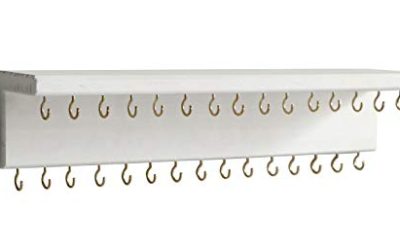
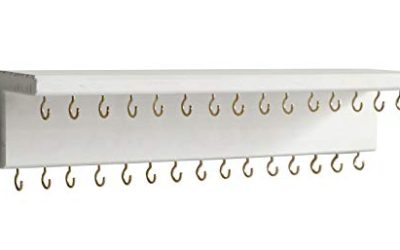
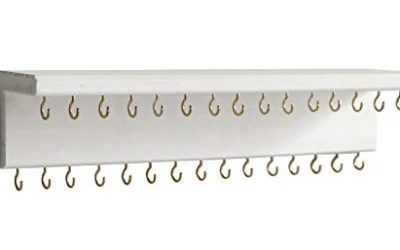
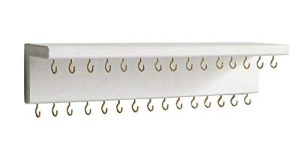
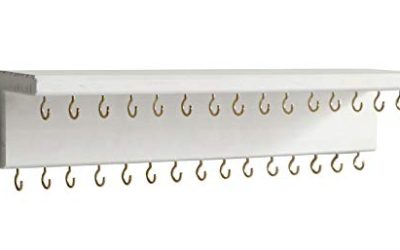
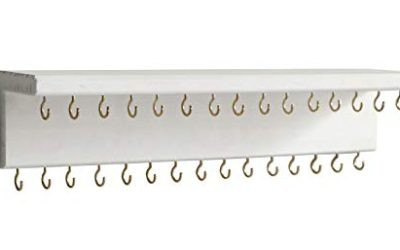
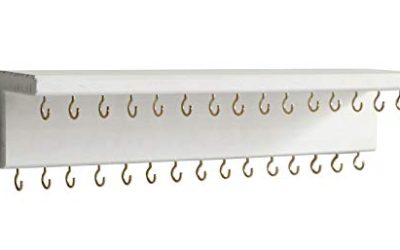
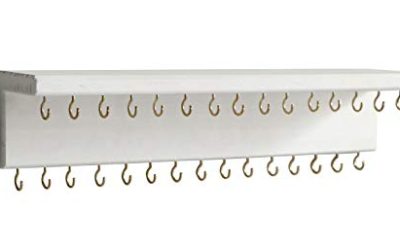
SANY DAYO Jewelry Organizer 30 Hooks

Near the start of the run, this organizer gives light leads a defined parking spot instead of a tangle on the floor. It is, plainly, a jewelry organizer with thirty hooks, used here only as a light-duty rail for light leads and a small card. Hang short charging leads, earbud cords, or a simple routing card from the hooks so they stay sorted and visible while the main wrapped bundle passes behind the desk.
Respect the limits of that light-duty role. The hooks are not a support system for heavy desk hardware, and this organizer should never hold consoles, drives, power strips, charging bricks, or heavy tools. Used within its honest purpose, the rail keeps everyday small cords off the floor, away from casters, and easy to find.
Specs
- Product type: jewelry organizer with 30 hooks
- Intended use here: light-duty rail for light leads and a small card
- Placement: wall, door back, or desk side near the run
- Load guidance: light items only, nothing heavy or warm
- Care: wipe clean and check hooks stay secure
HEKEE Dusk to Dawn Bulbs A19

Good light makes a corner run easier to install and easier to inspect. These are plain automatic sensor bulbs in a standard A19 shape: they respond to ambient darkness and switch on at dusk and off at dawn, with no app, hub, or schedule to manage. Fitted in a nearby lamp or fitting, they provide simple background light in the evening so the corner is never completely dark when you reach behind the desk.
These bulbs are explicitly not smart bulbs and not task lighting. They cannot be dimmed through an app, grouped into scenes, or aimed at a page the way a desk lamp can, and they should not replace the focused light you work by. Check the enclosed-fixture rating before fitting one inside a closed shade, and follow the fitting maker guidance for safe use in that fitting. In a windowless room they may stay on for long periods, because the sensor reads constant darkness as night, so consider the room before fitting them.
Specs
- Product type: dusk to dawn sensor bulbs, A19 shape
- Operation: automatic on at dusk, off at dawn
- Controls: no app, hub, or smart features
- Best role: simple background and evening light
- Check first: enclosed-fixture rating of the fitting
ULANZI Super Clamp

A clamp earns its place in a corner setup by holding a small accessory exactly where a stand would waste scarce surface. This super clamp is a mount only. It has no light, phone, or camera of its own, and its value is the firm grip it gives to a compatible accessory you already own, such as a small light panel or a phone holder with a suitable fitting.
Fit the clamp with care. Never clamp a screen, monitor, or any display, because the pressure can crack the panel or damage the bezel. Choose a solid edge that can take the force without flexing, pad the jaws with a soft layer to protect the finish, and tighten only until the mount is firm rather than forcing it further.
Specs
- Product type: super clamp mount
- Included light, phone, or camera: none, mount only
- Mounting surface: sturdy shelf or desk edge
- Protection: pad the jaws to guard the finish
- Safety rule: never clamp a screen or monitor
tomtoc Laptop Case

A corner desk often doubles as a parking spot for a laptop that moves between rooms, and a padded case keeps that machine protected without adding another loose item to the cable corner. This tomtoc case is a padded soft case designed to cushion a laptop against everyday knocks, scrapes, and bag bumps while it is carried or stored.
Be clear about the protection on offer. A padded soft case is not a hard shell, so it will not guard a laptop against a serious drop or a heavy weight placed on top. It is also not waterproof, so rain and spills remain a risk that a sheltered route should handle. Before ordering, check the internal dimensions against your exact laptop, including length, width, and thickness with any sleeve already fitted.
Specs
- Product type: padded laptop soft case
- Protection: cushioning against everyday knocks and scrapes
- Limits: not a hard shell and not waterproof
- Fit check: compare internal dimensions before ordering
- Use: carrying and storing a laptop off the desk
Hi-Lyte Electrolyte Drops

Long sessions at a corner desk often come with a simple problem: a water bottle that sits untouched for hours. These electrolyte drops are a modest addition to that routine, intended to be added to water following the label directions for people who want that option during long workdays, exercise, or hot weather.
Keep the claims for this product deliberately modest. These drops are not a medicine, an energy product, or a treatment for any condition, and they are not a substitute for medical care, a balanced diet, or plain rest. Plain water is fine for most people most of the time, and many readers will never need an electrolyte addition at all. Follow the label directions for serving and storage, and talk with a clinician first if you have a medical condition, take regular medication, or follow a restricted diet with limits on sodium or potassium.
Specs
- Product type: electrolyte drops for adding to water
- Directions: follow the label for serving and storage
- Claims: not a medicine, energy, or treatment product
- Everyday note: plain water is fine for most people
- Caution: clinician note for medical conditions or restricted diets
FAQ
How do I choose the right wrap size for my bundle?
Gather only the cables that share the full route, hold them together loosely, and estimate the diameter of the relaxed bundle. Choose a wrap that contains that bundle without forcing it, and step up a size if the fit feels close.
Can a power brick go inside the cable wrap?
No. Power bricks, chargers, and transformers get warm in normal use and need open air on every side to cool safely. Keep each brick outside the wrap on a hard surface with space around it, and let only the thinner leads enter the bundle.
Why pick a spiral wrap instead of a fixed sleeve?
A spiral wrap lets a cable branch out anywhere along the run, easing out between the coils exactly where it needs to reach a monitor, lamp, or speaker. For a corner run with several exit points, the spiral design is usually the more flexible fit, because each branch can leave at its natural point with a gentle curve instead of extra cable piling up at either end of the run.
What should I do with a frayed cable in the run?
Replace it. A wrap hides and organizes cables, but it does not repair damage, and covering a frayed or cracked lead hides the warning signs while trapping a weak spot inside the bundle.
Final Verdict
A cleaner corner desk run comes from planning first and tidying second. Measure the real route from outlet to desk, size the spiral wrap to a relaxed bundle rather than a forced one, let cables branch out where they naturally need to, and keep every power brick outside the wrap with air around it. Replace damaged leads instead of hiding them, and the finished run will stay cool, flexible, and easy to change. Around that run, the five picks each do one honest job, from holding small leads and adding background light to mounting an accessory, protecting a laptop, and supporting a simple drink routine during long desk days.
Product and ASIN Reference
| Product | ASIN |
|---|---|
| SANY DAYO jewelry organizer 30 hooks | B07QFZSVQW |
| HEKEE dusk to dawn bulbs A19 | B07HGZMYZ4 |
| ULANZI super clamp | B09C882D4M |
| tomtoc laptop case | B073TVX735 |
| Hi-Lyte electrolyte drops | B01MXDAHIB |
FAQ
How do I choose the right wrap size for my bundle?
Can a power brick go inside the cable wrap?
Why pick a spiral wrap instead of a fixed sleeve?
What should I do with a frayed cable in the run?
More from Amazon
Programs that pair well with the guide above. Offers and eligibility are set by Amazon and may change.
Free shipping on eligible items, Prime Video and more. Eligible new members can start with a free trial.
Start a Prime free trialAudiobooks and podcasts to listen to on the go. Eligible new members can start with a free trial.
Try Audible freeAd-free music streaming. Eligible new subscribers can start with a free trial.
Try Music Unlimited freeA free business account with business pricing and bulk-buying tools for work, shop or home office.
Create a business accountAs an Amazon Associate we earn from qualifying purchases.
Write Your Review
No reviews yet. Be the first to share your experience!