
Key takeaways
- Five honest companion picks that work around reusable cable ties at a late night gaming desk, with simple bundle habits for a calmer, tidier setup.
A desk used for late night game sessions collects cables faster than almost any other workspace: the monitor lead, the console power cable, a headset wire, a controller charging cable, a phone charger that migrates in from the hallway, and one mystery cord nobody claims. Reusable cable ties are the quiet heroes of that tangle — simple hook-and-loop straps that bundle a run of cables, open again when something changes, and close without tools, tape, or waste. A handful can turn the back of a desk from a nest into calm, readable lines.
This guide is about the companions that work around those ties, not the ties themselves. To be plain about it: none of the five picks below is itself a cable tie. Each supports the same desk differently — a light-duty rail that keeps small daily items off the cable runs, bulbs that light the room on their own, a clamp that holds a small accessory in place, a padded case that keeps a laptop and its charger out of the bundle entirely, and simple electrolyte drops for the player who forgets water during a long session. Together they make the ties easier to use, easier to change, and easier to live with after midnight.
As an Amazon Associate, we earn from qualifying purchases.
How to Choose
Good cable management at a gaming desk is mostly habit, not hardware. The ties do one simple job — they hold a bundle together — and everything else is about layout and how kindly the bundles are treated. Four ideas cover the choices that matter most.
Keep Each Bundle Loose Enough to Breathe
A reusable tie pulled drum-tight is a small problem waiting to happen. Crushed cables flex at one stressed point every time the desk moves, and a tight bundle is miserable to open when one cable needs to come out. Leave each bundle loose enough that a finger slips under the strap, and let cables curve in gentle arcs rather than sharp bends. The bundle should look gathered, not squeezed. Loose bundles also forgive the small tugs that happen when a chair rolls back or a foot finds a cord in the dark.
Use One Tie Per Bundle So Changes Stay Kind
Late night desks change often — a controller moves to the couch, a headset gets swapped, a charger goes home. If three different runs share one giant bundle, every small change means opening the whole thing. The monitor run gets its own tie, the charging cables get theirs, and the console power lead travels alone. When something changes, one strap opens, one cable moves, and the rest of the desk stays exactly as it was. Slower to set up, much faster to live with.
Keep Spare Ties in One Drawer
Reusable ties have a habit of vanishing into couch cushions, coat pockets, and the bottom of backpacks. The fix is boring and total: spares live in one drawer, always the same one, nearest the cable runs. A small handful of spares in one known place means a new cable gets bundled the day it arrives instead of joining the floor tangle for six months. One home for spares is the difference between a system and a suggestion.
Remember That Ties Bundle, While the Layout Organizes
Stated plainly: ties bundle the cables, while the layout does the organizing. A strap cannot decide that power should run left and signal cables right, or where the charging station belongs. Those decisions come first, made once, with the room honestly assessed. Only then do the ties arrive to hold the plan in place. Start with the layout and the desk stays tidy; start with a bag of ties and no plan, and the result is very neat bundles in exactly the wrong places.
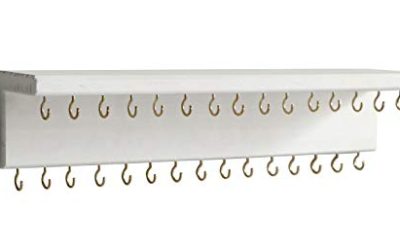
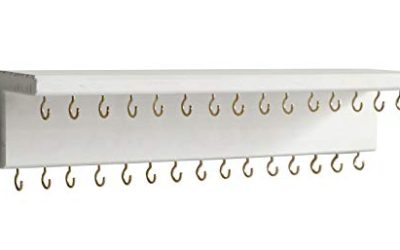
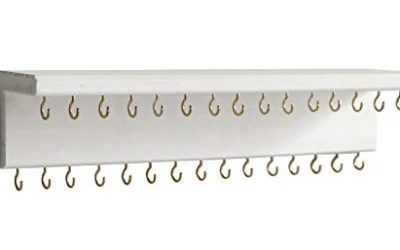
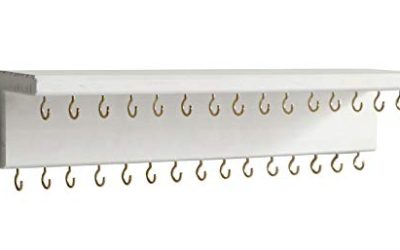
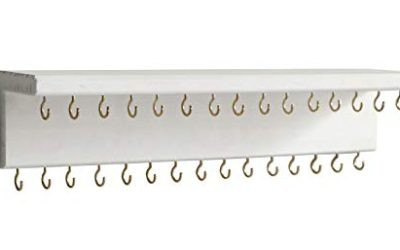
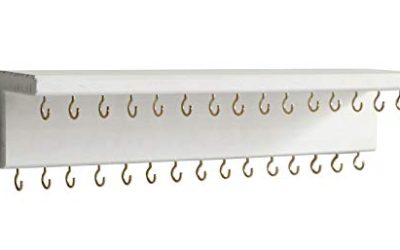
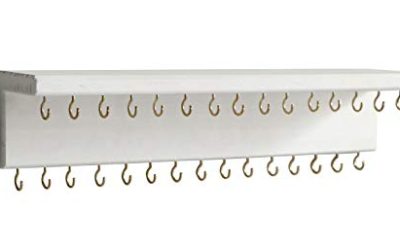
SANY DAYO Jewelry Organizer With 30 Hooks
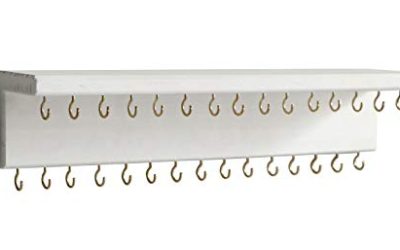
The first companion is honest about what it is: a jewelry organizer with thirty hooks, sold for necklaces and bracelets, repurposed here only as a light-duty wall rail. Mounted on the wall beside or above the desk, its hooks hold the small, light things that otherwise wander into the cable zone: keys, lanyards, a wrist strap, a coiled headset lead. With those items on hooks instead, the bundles behind the monitor stay purely cables, with nothing draped across them.
The limits matter as much as the uses, so they are stated plainly: this rail must never hold consoles, drives, power bricks, heavy tools, or cartridges. It is a light organizer, not shelving. Within its honest weight class, it earns its place: thirty hooks is generous, the layout reads at a glance in dim light, and everything stays in one known place, with nothing heavy pretending to be light.
Specs
- Product type: jewelry organizer with 30 hooks
- Intended original use: necklaces, bracelets, and small accessories
- Role in this guide: light-duty wall rail for keys, lanyards, and light items only
- Explicit limits: never for consoles, drives, power bricks, heavy tools, or cartridges
HEKEE Dusk-to-Dawn A19 LED Bulbs
Late night sessions live or die by lighting, and honestly, nobody wants to get up and manage lamps mid-game. These A19 bulbs carry a simple dusk-to-dawn sensor: they come on when the room darkens and switch off when daylight returns. They are plain automatic sensor bulbs — explicitly not smart bulbs, and not task lighting either. They will not take color commands or focus a beam on a keyboard. What they do is keep a hallway lamp or the room’s ambient light quietly handled, so the glow stays steady from evening to the small hours.
Two honest notes belong with them. First, in a windowless room the sensor may read permanent dusk and the bulbs may simply stay on; that is the sensor doing its job, and it is worth expecting rather than discovering. Second, check the enclosed-fixture rating before screwing one into a covered lamp or sealed ceiling fitting, because not every bulb is rated for enclosed use. Within those plain limits, they are the rare lighting product that asks for nothing: no schedule, no settings, no attention at all.
Specs
- Product type: A19 LED bulbs with dusk-to-dawn sensor
- Behavior: on at dusk, off at dawn, fully automatic
- Explicit limits: not smart bulbs, not task lighting, no app or color control
- Notes: may stay on in windowless rooms; check enclosed-fixture rating before use
ULANZI Super Clamp
Every cable-managed desk has one small thing that refuses to stay where it is put: a webcam that slides, a light panel that tips, a phone that migrates into the cable run. The ULANZI super clamp is the companion that holds that thing still. It is a mount only — it has no light, no phone, and no camera of its own. The clamp grips a desk edge, a shelf lip, or a pole, and whatever mounts to it stays put through a long night of bumps and chair rolls.
Used kindly, it keeps accessories out of the bundles entirely: a clamped item has a fixed home, so its cable takes one predictable path, tied once and forgotten. Two cautions come with it. Never clamp a monitor screen — a clamp’s pressure belongs on furniture, not displays. And pad the jaws on finished wood or anything that marks easily; a scrap of cloth keeps the grip firm and the surface honest.
Specs
- Product type: super clamp mount
- Role in this guide: holds a small accessory in one fixed place
- Explicit limits: mount only — no light, phone, or camera included
- Cautions: never clamp a monitor screen; pad the jaws on finished surfaces
tomtoc Laptop Case
Some cables should never join the desk bundle at all, and the laptop charger is the chief of them. A laptop that travels between desk, couch, and bag drags its power brick through every bundle it meets. The tomtoc case gives that machine a home of its own: a padded soft case that holds the laptop and keeps its charger corralled alongside, off the desk and out of the ties. On desks where the laptop is a second screen, the case also serves as its parking place when the session ends — lid closed, cable coiled, desk clear.
The honest framing: this is a padded soft case, not a hard shell, and it is not waterproof. It shrugs off bumps and the daily slide in and out of a backpack; it will not survive being stood on or keep a downpour out. Fit matters more than anything, so check the internal dimensions against the laptop before ordering — a case that is nearly right is simply wrong with padding. Sized correctly, it removes a whole machine’s worth of cable from the desk’s ecosystem.
Specs
- Product type: padded laptop case
- Role in this guide: homes the laptop and its charger away from desk bundles
- Explicit limits: soft case, not a hard shell; not waterproof
- Fit note: check internal dimensions against the laptop before ordering
Hi-Lyte Electrolyte Drops
The last companion is for the player, not the desk. Long sessions have a quiet pattern: the water glass empties once, never gets refilled, and the night ends with a headache blamed on the screen. Hi-Lyte electrolyte drops are concentrated drops added to water, and the claims made for them here are deliberately modest. They are not a medicine, not an energy product, and not a treatment for anything. They will not improve anyone’s aim, focus, or reaction time.
What they can honestly be is a small prompt toward drinking water during a long session, with a light mineral taste some people prefer to plain water. Plain water is fine for most people, most of the time, and nothing in this section argues otherwise. Follow the label directions, and anyone unsure whether electrolyte products suit their situation — a medical condition, medication, or anything else — should check with a clinician first. Kept beside the desk, the little bottle stays clear of the cable drawer and close to the water glass, where a modest habit helper belongs.
Specs
- Product type: electrolyte drops for water
- Role in this guide: a modest prompt to drink water during long sessions
- Explicit limits: not a medicine, energy, or treatment product; no performance claims
- Guidance: follow label directions; check with a clinician when unsure
FAQ
Are any of these picks actually cable ties?
No, and that is by design. None of the five picks is itself a cable tie. The ties themselves are simple, generic, unbranded hook-and-loop straps available anywhere; this guide covers the companions that work around them and make a tied desk easier to live with at night.
How many reusable ties does a gaming desk actually need?
Fewer than most people buy. One tie per bundle is the working rule, and most desks have four to six real bundles: monitor, power, charging, audio, and one or two strays. A small handful in use, plus a few spares in one drawer, covers nearly every late night desk.
Can the wall rail hold a console or a power brick?
No. The SANY DAYO organizer is a jewelry organizer repurposed only as a light-duty rail for keys, lanyards, and light accessories. It must never hold consoles, drives, power bricks, heavy tools, or cartridges. Heavy gear belongs on the desk or a real shelf.
Will the sensor bulbs work in a basement gaming room?
They will switch on, and in a windowless room they may stay on, because the sensor reads the room as permanent dusk — expected behavior, not a fault. Check the enclosed-fixture rating before using one in a covered fitting, and remember these are plain automatic bulbs, not smart bulbs and not task lighting.
Final Verdict
A tidy late night desk is built in the right order: layout first, bundles second, companions third. Keep each bundle loose, give each run its own tie, park spares in one drawer, and remember: ties bundle, the layout organizes. The five companions each do one honest job — the rail keeps light clutter off the cables, the bulbs handle ambient light without being asked, the clamp pins one accessory in place, the case removes a whole laptop from the tangle, and the drops nudge the player toward a glass of water. None of them is a cable tie, and that is why they belong here: the ties hold the cables, and everything else holds the routine.
Product and ASIN Reference
| # | Product | ASIN |
|---|---|---|
| 1 | SANY DAYO jewelry organizer with 30 hooks | B07QFZSVQW |
| 2 | HEKEE dusk-to-dawn A19 LED bulbs | B07HGZMYZ4 |
| 3 | ULANZI super clamp | B09C882D4M |
| 4 | tomtoc laptop case | B073TVX735 |
| 5 | Hi-Lyte electrolyte drops | B01MXDAHIB |
FAQ
Are any of these picks actually cable ties?
How many reusable ties does a gaming desk actually need?
Can the wall rail hold a console or a power brick?
Will the sensor bulbs work in a basement gaming room?
More from Amazon
Programs that pair well with the guide above. Offers and eligibility are set by Amazon and may change.
Free shipping on eligible items, Prime Video and more. Eligible new members can start with a free trial.
Start a Prime free trialAudiobooks and podcasts to listen to on the go. Eligible new members can start with a free trial.
Try Audible freeAd-free music streaming. Eligible new subscribers can start with a free trial.
Try Music Unlimited freeA free business account with business pricing and bulk-buying tools for work, shop or home office.
Create a business accountAs an Amazon Associate we earn from qualifying purchases.
Write Your Review
No reviews yet. Be the first to share your experience!