
Key takeaways
- Compare the best computer speakers for home office desks, from compact USB pairs to powered bookshelf models with Bluetooth and subwoofer options.
- Top Pick: Creative Pebble V3
- Runner-up: Logitech Z207
- Also consider: Edifier R1280T
A home office desk usually has limited spare room, yet the built-in speakers on most laptops and monitors sound thin during calls, training videos and music. A dedicated pair of computer speakers fixes that without taking over the desk, and the right model depends on how much space you can give up, which inputs your computer offers, and whether you want deep bass or simply clear voices.
This guide compares five powered speaker systems that suit desk work, from a tiny USB-powered pair to full bookshelf cabinets. Each pick is described from its published specifications, covering connection types, driver sizes, output ratings and dimensions.
As an Amazon Associate, we earn from qualifying purchases.
Quick answer
For most home office desks, the Edifier R1280T is the balanced pick, with a 4-inch bass driver, dual RCA inputs and tone controls in a wooden cabinet. Short on space, the Creative Pebble V3 runs on a single USB-C cable. For stronger bass during music and video, the Logitech Z407 adds a separate subwoofer and a wireless control dial.
Creative Pebble V3
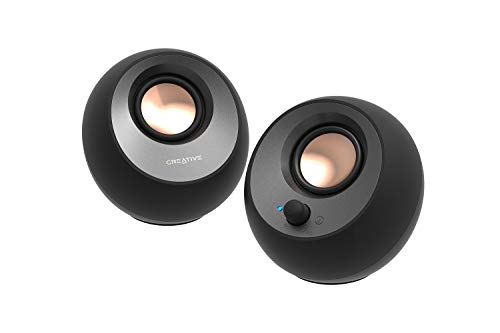
The Pebble V3 is the smallest option in this roundup, built for desks where the speakers tuck beside a monitor stand or under a raised screen. Each rounded cabinet holds a 2.25-inch full-range driver angled upward at 45 degrees, pointing the sound toward your ears. A single USB-C cable carries both audio and power, and Creative includes a USB-C to USB-A converter for older computers.
Beyond the wired link, the Pebble V3 adds Bluetooth 5.0 for a phone or tablet and a 3.5 mm AUX input for anything else. A Clear Dialog mode lifts the vocal range, which helps with recorded meetings and online courses. Output is rated at 8 watts RMS with 16 watts peak, so this is a near-field set for one listener at the desk, not for filling a room. There is no subwoofer output and no bass control. Choose it when cable count and footprint matter more than volume headroom.
Specs
- Configuration: 2.0 stereo pair
- Drivers: 2.25-inch full-range drivers, angled upward at 45 degrees
- Power output: 8 W RMS total, 16 W peak
- Inputs: USB-C for audio and power, Bluetooth 5.0, 3.5 mm AUX
- Extras: Clear Dialog mode, USB-C to USB-A converter included
- Size: about 4.8 x 4.7 x 4.6 inches per speaker
Logitech Z207

The Z207 takes the opposite approach to shape: two tall, narrow towers that stand about 9.5 inches high but only 3.5 inches wide, so they slide into the gap between a monitor and a desk lamp or notebook stack. Each tower pairs an active driver with a passive radiator, a layout that gives a 2.0 system a little more low-end body without a separate subwoofer box on the floor.
Logitech rates the pair at 10 watts peak and 5 watts RMS, which suits calls, podcasts and background music rather than loud playback. The headline feature is Easy-Switch: the speakers hold a Bluetooth link with two devices at once, so you can pause audio on your computer and play from your phone to swap sources. A 3.5 mm cable covers wired connections, and the right speaker carries the volume knob, power button and a headphone jack. There is no USB audio input and no remote. For a slim footprint with simple device swapping, it remains a tidy budget-tier choice.
Specs
- Configuration: 2.0 stereo pair
- Drivers: one active driver and one passive radiator per speaker
- Power output: 10 W peak, 5 W RMS
- Inputs: Bluetooth with Easy-Switch for two devices, 3.5 mm
- Controls: volume and power on the right speaker, headphone jack
- Size: about 9.5 x 3.5 x 4.9 inches per speaker
Edifier R1280T
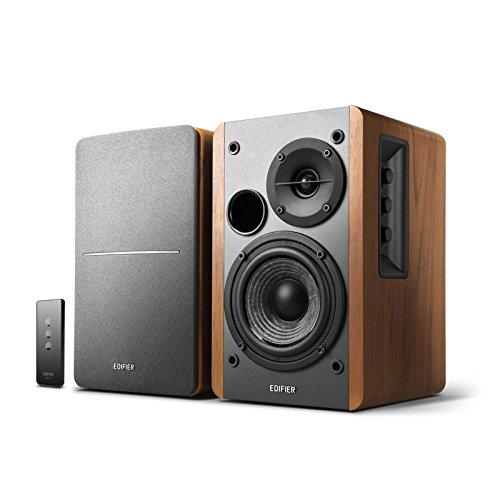
The R1280T is a powered bookshelf pair, and it behaves like a small hi-fi system rather than a computer accessory. Each wooden cabinet holds a 4-inch bass driver and a 13 mm silk dome tweeter, driven by an amplifier rated at 42 watts RMS in total. That output, plus the larger cabinet volume, gives it the fullest sound of the 2.0 sets here, with enough headroom for music at the end of the workday.
Connectivity is analog only: two RCA line inputs let you keep a computer and a second source plugged in at the same time. Bass, treble and volume knobs sit on the side of the active speaker, and the included remote handles volume and mute from your chair. There is no Bluetooth and no USB input, so a laptop with only USB-C ports needs an adapter cable to feed the RCA inputs. The cabinets are also the deepest in this guide at about 7.7 inches, so measure your desk depth first. For buyers who value tone control and dual inputs over wireless links, this is the mid-range benchmark.
Specs
- Configuration: 2.0 powered bookshelf pair
- Drivers: 4-inch bass driver and 13 mm silk dome tweeter per speaker
- Power output: 42 W RMS total
- Inputs: dual RCA line inputs for two sources
- Controls: bass, treble and volume knobs on the active speaker, remote for volume and mute
- Enclosure: wood finish cabinet
- Size: about 5.7 x 9.2 x 7.7 inches per speaker
Logitech Z407
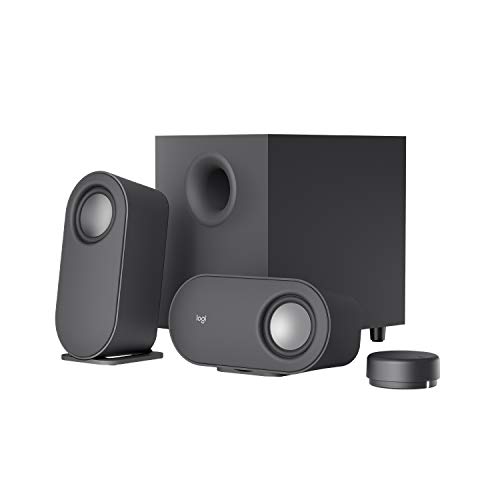
The Z407 is the only 2.1 system in this guide: two compact satellites plus a separate subwoofer that handles the low frequencies the small desk speakers cannot reach. Logitech rates the system at 80 watts peak and 40 watts RMS in total, with a published frequency response of 40 Hz to 20 kHz. The satellites can stand upright or lie flat, which helps if your monitor sits low or your desk has a hutch shelf.
Three input paths cover most office setups: Bluetooth for wireless playback, a micro USB connection for computer audio, and a 3.5 mm input for everything else. Instead of reaching behind a speaker, you use the wireless control dial on the desk; it turns for volume and handles play, pause and bass level. The trade-offs are under-desk space for the subwoofer and one more power outlet in use. There is no RCA input and no headphone jack. If your desk time mixes video calls with films and games after hours, the subwoofer makes this the most flexible mid-range system here.
Specs
- Configuration: 2.1 system with two satellites and a separate subwoofer
- Power output: 80 W peak, 40 W RMS total
- Frequency response: 40 Hz to 20 kHz
- Inputs: Bluetooth, micro USB, 3.5 mm
- Controls: wireless desk dial for volume, play, pause and bass level
- Layout: satellites can stand upright or lie flat
Audioengine A2+

The A2+ is the premium pick, a compact powered pair built around a built-in USB DAC. Feeding audio over USB lets the speakers convert the digital signal themselves instead of relying on a laptop headphone output, and the analog amplifier is rated at 60 watts peak in total. Each cabinet, just 6 inches tall, carries a 2.75-inch aramid fiber woofer and a 0.75-inch silk dome tweeter, a driver pairing aimed at clear midrange for voices and acoustic music.
Alongside USB, the A2+ offers RCA and 3.5 mm inputs, plus an RCA variable line output, so you can add a powered subwoofer later. The published frequency response runs from 65 Hz to 22 kHz, honest figures for a cabinet this small. There is no Bluetooth on this version and no remote control; volume is set by the rear knob or your computer. Buyers pay premium-tier money for the DAC, the build quality and the upgrade path rather than for extra features. For a long-term desk where sound quality comes first, it earns its place.
Specs
- Configuration: 2.0 powered pair
- Drivers: 2.75-inch aramid fiber woofer and 0.75-inch silk dome tweeter per speaker
- Power output: 60 W peak total, 30 W peak per channel
- Inputs: USB with built-in DAC, RCA, 3.5 mm
- Outputs: RCA variable line out for an external subwoofer
- Frequency response: 65 Hz to 22 kHz
- Size: 6 x 4 x 5.25 inches per speaker
How to choose
Begin with space. Measure the free width beside your monitor and the depth of your desk, then compare those figures with the cabinet sizes above. Compact sets like the Pebble V3 fit almost anywhere, while bookshelf cabinets such as the R1280T need real depth.
Next, match the inputs to your computer. A USB connection, offered by the Pebble V3 and the A2+, keeps audio digital until it reaches the speaker and avoids a noisy headphone output. Bluetooth suits a laptop that moves around, while dual RCA inputs help a fixed desk with two sources. Decide whether bass matters: a 2.1 system like the Z407 gives films and music a weight that small 2.0 pairs cannot match, at the cost of floor space and extra cabling. Finally, think about controls. A desk dial or remote is worth having if the speakers will sit behind a monitor, out of easy reach.
Who should skip
Skip this whole category if you take calls all day on a headset, since a good USB headset will serve you better in a shared room. Also skip compact 2.0 sets if you expect cinema-style bass in a large living room; none of the small pairs here can do that job, and even the Z407 is tuned for a desk. If other people sleep nearby during your work hours, speakers of any size are the wrong purchase. And if your desk has no spare power outlet and no free USB port, solve that first, because every system here needs one or the other.
FAQ
Do computer speakers need a separate amplifier?
No. Every system in this guide is powered, which means the amplifier is built into one of the cabinets or the subwoofer. You connect them to a power outlet and to your computer, and they are ready to use without extra audio gear.
Is USB or 3.5 mm the better connection for a desk setup?
USB keeps the signal digital until the speaker converts it, which can avoid hiss from a low-quality headphone output. A 3.5 mm cable is simpler and works with nearly any device. For calls and everyday listening, either connection is fine when the source is decent.
Can I add a subwoofer to a 2.0 speaker pair later?
Only if the pair has a line output for one. The Audioengine A2+ includes an RCA variable line out made for that purpose. The Pebble V3, Z207 and R1280T have no subwoofer output, so with those models a 2.1 system is the better first purchase.
Where should desk speakers sit for the clearest sound?
Place them at ear level where possible, angled slightly toward your chair, with the tweeters roughly in line with your ears. Keep some distance from the wall behind them if the bass sounds boomy.
Final verdict
For a typical home office, the Edifier R1280T offers the strongest all-round mix of output, tone control and dual inputs. The Creative Pebble V3 wins on tight desks, the Logitech Z207 on slim towers with easy device swapping, the Logitech Z407 on bass and flexible controls, and the Audioengine A2+ on build quality and its built-in DAC. Measure your desk, check your ports, and pick the system that fits.
FAQ
Do computer speakers need a separate amplifier?
Is USB or 3.5 mm the better connection for a desk setup?
Can I add a subwoofer to a 2.0 speaker pair later?
Where should desk speakers sit for the clearest sound?
More from Amazon
Programs that pair well with the guide above. Offers and eligibility are set by Amazon and may change.
Free shipping on eligible items, Prime Video and more. Eligible new members can start with a free trial.
Start a Prime free trialAudiobooks and podcasts to listen to on the go. Eligible new members can start with a free trial.
Try Audible freeAd-free music streaming. Eligible new subscribers can start with a free trial.
Try Music Unlimited freeA free business account with business pricing and bulk-buying tools for work, shop or home office.
Create a business accountAs an Amazon Associate we earn from qualifying purchases.




Write Your Review
No reviews yet. Be the first to share your experience!