
Key takeaways
- Compare the best USB foot switches for PC, from the driverless Kinesis Savant Elite2 to quiet iKKEGOL pedals for transcription, gaming, CAD and macros.
Your feet sit idle under the desk while your hands do every click, shortcut and keystroke. A USB foot switch fixes that imbalance. It plugs into your PC and sends a key press, mouse click, shortcut or playback command at a tap of your foot. Transcriptionists have used them for decades to run audio without leaving the keyboard. The same idea helps CAD users who want Enter and Escape underfoot, video editors scrubbing a timeline, streamers who need push-to-talk, and anyone whose wrists ache from repeated clicks.
Disclosure: As an Amazon Associate, I earn from qualifying purchases.
The market splits into two camps. Programmable pedals, mostly sold by iKKEGOL and Kinesis, can send almost any keyboard or mouse action. Fixed-function transcription pedals, led by the Infinity IN-USB-2, send playback controls and little else. This guide compares five pedals that cover the main buying cases, from a silent single pedal for calls to a driverless triple unit for locked-down work computers.
How to Choose a USB Foot Switch
Decide how many pedals you need. A single pedal handles one repeated action: push-to-talk, mute, a screenshot key, or a mouse click. Two or three pedals suit paired or grouped commands, such as rewind, play and fast-forward, or copy, paste and Enter. Count the actions you repeat every hour before buying. Extra pedals you never assign are just extra width under the desk.
Understand the two programming models. Budget pedals are configured with a small vendor app, usually on Windows. You assign each pedal a key, combo, mouse action or short text string, and the setting is stored on the pedal. Premium pedals like the Kinesis program without installed software, which matters on office machines where you cannot add programs. Fixed transcription pedals skip programming entirely and work as playback controllers only.
Pick a switch feel. Mechanical pedals give a clear click that helps timing but can annoy people nearby. Optical pedals trigger on a light beam, so they are nearly silent and have no contact to wear out, but the missing click takes getting used to. If you share a room or record audio, optical is the safer choice.
Check the base, not just the pedal. A foot switch lives on the floor and gets nudged by chair casters and shoes. Heavy steel bases stay where you put them. Light plastic units are fine on carpet but can skate across hard floors without rubber feet. Cable length matters too: two metres covers most desks, but a longer cable helps when the tower sits far away.
Confirm operating system support honestly. Almost every pedal here is a standard USB input device, so basic actions work on Windows, macOS and Linux. The catch is setup software, which is often Windows-only: Mac and Linux users either configure once on a Windows machine or choose a driverless model with onboard settings.
Kinesis Savant Elite2 Triple Pedal (FP30A)

The Savant Elite2 is the professional end of this category. Three front-hinged pedals sit on a heavy steel base, and each one can send a keystroke, a shortcut, a mouse click or a recorded macro. It ships set up for left, double and right mouse clicks, a sensible default for offloading click strain. Programming is the headline feature: no driver, no required install. You use the SmartSet app stored on the pedal itself or edit simple text files on its built-in memory, so it works on a locked-down office PC and keeps its settings between computers. Activation force is adjustable, so a resting foot does not fire it by accident.
Specs
- Pedals: 3, front-hinged, with adjustable spacing and activation force
- Programming: Driverless, via onboard SmartSet app or plain text files
- Memory: 4 MB onboard flash; settings travel with the pedal
- Base: Heavy steel, low profile
- Size and cable: 10.75 x 7 x 1.25 in, 2.5 lb; USB cable about 9 ft
- Compatibility: Windows, macOS, Linux, Android and Chrome OS
Pros:
– Programs without installing software, ideal for work computers
– Adjustable activation force prevents accidental presses
– Steel base stays planted under the desk
– Works across every major operating system
Cons:
– Costs several times more than the budget pedals here
– A pedal sends a complete action; it cannot act as a held modifier key
– Plain industrial styling, and text-file setup has a learning curve
Who it suits: CAD operators, editors and programmers who want three dependable macro pedals, and anyone whose employer will not let them install vendor software.
iKKEGOL Upgraded USB Triple Foot Pedal

This is the value route to three pedals. The iKKEGOL triple puts three wide pedals on a single plastic base, each driven by an optical switch, so presses are quiet and nothing wears out. The free configuration software lets each pedal send a key, a combo, a mouse action, a media command or a short text string, covering most gaming, editing and office shortcuts. You can also run more than one unit on the same PC. For streamers who want push-to-talk, scene switching and a mute on separate pedals, it does the job at a fraction of the Kinesis price.
Specs
- Pedals: 3 wide pedals on one shared base
- Switch type: Optical, quiet with a long rated service life
- Programming: Vendor software for keys, combos, mouse, media and text strings
- Connection: USB wired, standard HID device
- Model: 10717
- Compatibility: Windows, macOS and Linux; configuration done in Windows
Pros:
– Three programmable pedals for far less than pro-grade gear
– Optical switches are quiet enough for shared rooms
– Stores shortcuts and short text strings, not just single keys
– Multiple units can run on one computer
Cons:
– Setup software is Windows-only and feels dated
– All-plastic base can creep on smooth hard floors
– Pedals sit close together, which big feet may find cramped
Who it suits: Streamers, gamers and home editors who want three foot actions without paying professional prices.
Infinity USB Foot Pedal (IN-USB-2)

The Infinity is not a general-purpose macro pedal, and that is exactly why transcriptionists keep buying it. Its three pedals are arranged for audio work: the large centre pedal plays, and the side pedals rewind and fast-forward. It plugs in by USB and is recognised straight away by transcription software such as Express Scribe, on Windows and Mac. The housing is heavy and wide, so it stays put through a full day of tapping, and the centre pedal is easy to find by feel. If your day is spent turning recordings into documents, this is the tool built for that single job.
Specs
- Layout: 3 pedals; large centre play pedal, side pedals for rewind and fast-forward
- Connection: USB, plug and play
- Compatibility: Windows and Mac transcription software, including Express Scribe
- Build: Heavy-duty housing on a wide, low-profile base
- Programming: Fixed transcription controls; remapping needs extra software
- Maker: Executive Communication Systems
Pros:
– The long-running standard pedal for transcription work
– Big centre pedal is easy to locate by feel
– Heavy base does not slide during long sessions
– Recognised instantly by popular transcription programs
Cons:
– Not a general macro pedal out of the box
– Bulky under a small desk
– No onboard programming or shortcut storage
Who it suits: Transcriptionists, court and medical typists, students and researchers who control recorded audio all day.
iKKEGOL Optical Full Quiet USB Foot Pedal

Most foot pedals announce themselves with a click. This single iKKEGOL pedal uses an optical switch with no tactile snap at all, so a press is close to silent. That makes it the pick for push-to-talk during calls, muting a microphone mid-meeting, or any job where the pedal shares a room with other people. It still programs like its siblings, sending a key, mouse action or shortcut through the vendor software, and the tiny body takes up almost no floor space. The trade-off is feel: with no click to confirm a press, new users sometimes tap twice at first.
Specs
- Pedals: 1
- Switch type: Optical, silent, with no tactile click
- Rated life: 10,000,000 presses, per the maker
- Size and weight: 3.9 x 2.5 x 1.5 in; about 3.9 oz
- Cable: USB, 1.9 m
- Programming: Vendor software; keyboard, mouse and push-to-talk actions
Pros:
– Near-silent operation suits shared offices and live microphones
– Optical switch has no contact to wear out
– Very small footprint and easy to travel with
Cons:
– No tactile feedback, so double presses happen while learning
– Very light body can shift on slick floors
– One action only, like every single pedal
Who it suits: Remote workers and streamers who need a quiet mute or push-to-talk pedal that nobody else can hear.
iKKEGOL Upgraded USB Single Foot Pedal
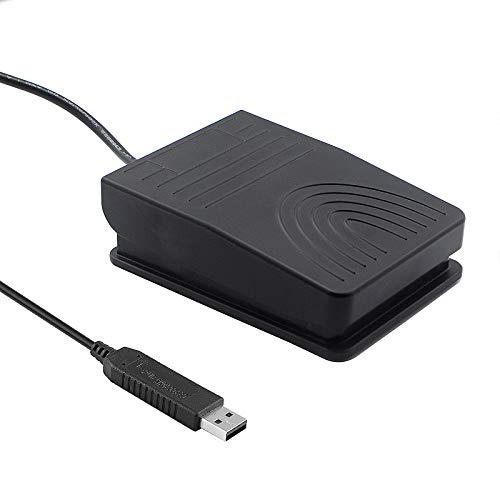
If you have never owned a foot switch, start here. This single wide pedal sends one programmed key, mouse click or shortcut when you step on it. The two-metre cable reaches the floor from most desks, four rubber pads keep it from wandering, and the pedal is rated to take a full standing load. It is a sensible way to try foot control before spending more on a triple unit. The mechanical switch gives a clear, audible click, which some people like as confirmation and others will find wearing in a quiet room.
Specs
- Pedals: 1 wide pedal
- Switch type: Mechanical, with an audible click
- Cable: USB, 2 m
- Programming: Vendor software; one key, click or combo per press
- Feet: 4 TPU rubber pads
- Load rating: Pedal built to bear over 100 kg, per the maker
Pros:
– Simple and inexpensive way to try foot control
– Long cable suits tower PCs and standing desks
– Wide pedal is easy to hit without looking
– Rubber pads grip hard floors well
Cons:
– Audible click can annoy coworkers
– One action only
– Setup requires the vendor software on Windows
Who it suits: First-time buyers, gamers who want push-to-talk, and office workers offloading one repeated keystroke.
Comparison Table
| Product | Pedals | Switch type | Programming | Cable | Best for |
|---|---|---|---|---|---|
| Kinesis Savant Elite2 Triple (FP30A) | 3 | Mechanical, adjustable force | Driverless, onboard | About 9 ft | Pro macros on any computer |
| iKKEGOL Upgraded Triple | 3 | Optical | Vendor software | USB wired | Three actions on a budget |
| Infinity IN-USB-2 | 3 | Mechanical | Fixed playback controls | USB wired | Transcription and dictation |
| iKKEGOL Optical Full Quiet | 1 | Optical, silent | Vendor software | 1.9 m | Silent push-to-talk and mute |
| iKKEGOL Upgraded Single | 1 | Mechanical, clicky | Vendor software | 2 m | A first pedal for one shortcut |
FAQ
Will a USB foot switch work with my programs?
Programmable pedals behave like a keyboard or mouse, so any program that accepts a keystroke or click will accept the pedal: CAD tools, editors, games, office apps. The exception is a fixed transcription pedal like the Infinity, whose playback controls only transcription and dictation software understands.
Can a foot pedal hold a key down, like Shift or Ctrl?
Usually not in the way a finger does. Most pedals send one complete action per press; the Kinesis explicitly cannot act as a held modifier. Some vendor software offers toggle or repeat modes that imitate holding, but if you truly need a held modifier, keep that key on the keyboard and give the pedal a full shortcut instead.
Do these pedals work on Mac or Linux?
Yes for basic use, because they appear as standard USB input devices. The limitation is setup: most budget brands only provide a Windows configuration app, so you set the pedal up once on a Windows PC, then use it anywhere. The Kinesis avoids this by storing its tools and settings on the pedal itself.
Should I buy a single pedal or a triple pedal?
List the actions you repeat most in an hour. If it is one action, such as mute or push-to-talk, a single pedal is cheaper, smaller and easier to learn. If you have a natural group of three, such as rewind, play and forward, or copy, paste and Enter, a triple pedal keeps them together and saves you buying twice.
Conclusion
A foot switch earns its floor space by removing one repeated action from your hands, and the right model depends on the job. Choose the Kinesis Savant Elite2 if you want three macro pedals that program without software and work on any machine. Choose the iKKEGOL triple for the same three-pedal layout at a budget price, or the Infinity if your work is transcription and nothing else. For a single quiet action, the optical iKKEGOL keeps calls and recordings free of clicks, while the upgraded single is the low-cost way to learn whether foot control fits how you work.
More from Amazon
Programs that pair well with the guide above. Offers and eligibility are set by Amazon and may change.
Free shipping on eligible items, Prime Video and more. Eligible new members can start with a free trial.
Start a Prime free trialAudiobooks and podcasts to listen to on the go. Eligible new members can start with a free trial.
Try Audible freeAd-free music streaming. Eligible new subscribers can start with a free trial.
Try Music Unlimited freeA free business account with business pricing and bulk-buying tools for work, shop or home office.
Create a business accountAs an Amazon Associate we earn from qualifying purchases.



Write Your Review
No reviews yet. Be the first to share your experience!