Key takeaways
- Pros: Affordable way to get two fully-adjustable arms; works with most standard 24-27 inch monitors; clamp or grommet mounting options.
- Cons: 30-inch/22 lb ceiling means it won’t handle larger ultrawide or 4K panels; gas-spring tension sometimes needs manual adjustment after setup.
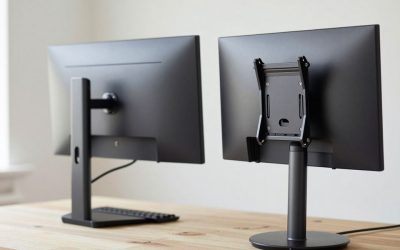
A dual monitor arm mount holds two separate screens on independent (or sometimes stacked) arms attached to a single desk clamp or grommet base, instead of using two separate single-monitor stands. This frees up desk space underneath both monitors, lets you position each screen independently for an ergonomic viewing angle, and keeps your desktop clear for keyboard, mouse, and notes. The main spec to check before buying is per-arm weight capacity against your actual monitor weight (not just screen size), plus the VESA mounting pattern (75x75mm or 100x100mm) your monitors use.
VIVO Dual Monitor Desk Mount (STAND-V002)
A widely available entry point into dual-arm mounting, this gas-spring-assisted mount fits screens from 13 to 30 inches with a 22 lb capacity per arm, using the standard 75x75mm/100x100mm VESA pattern. Each arm offers full tilt, swivel, and rotation, and it mounts via desk clamp or grommet hole.
- Pros: Affordable way to get two fully-adjustable arms; works with most standard 24-27 inch monitors; clamp or grommet mounting options.
- Cons: 30-inch/22 lb ceiling means it won’t handle larger ultrawide or 4K panels; gas-spring tension sometimes needs manual adjustment after setup.
Ergotron LX Dual Desk Mount
Ergotron’s LX line is one of the most established names in monitor arms, and the dual version offers side-by-side or stacking configurations with a 7-20 lb capacity per arm and 75x75mm/100x100mm VESA compatibility. Build quality and smoothness of motion are generally considered a step above budget arms.
- Pros: Very smooth, precise height and angle adjustment; can be configured side-by-side or stacked for vertical dual-monitor setups; strong reputation for long-term durability.
- Cons: Noticeably pricier than budget dual arms; officially rated for up to roughly 25-inch monitors, so check weight/size before mounting larger screens.
Mount-It! MI-1772 Dual Monitor Mount
This mount uses two independent gas-spring arms rated at 19.8 lbs each, fitting 13-32 inch monitors with 13 inches of vertical travel, 45° tilt, 180° swivel, and 360° rotation per arm. The wider size range makes it a reasonable middle ground between small-screen budget mounts and heavy-duty arms.
- Pros: Supports larger 27-32 inch monitors that smaller dual arms can’t; generous vertical travel range; independent arm movement.
- Cons: At the top of its 32-inch/19.8 lb range, some heavier panels may feel less stable; desk clamp needs a reasonably thin desktop edge to grip properly.
HUANUO Dual Monitor Stand (HNDS7)
Built specifically for larger panels, this heavy-duty dual arm is rated for 34-inch or even 40-inch curved monitors with a 26.4 lb capacity per arm and 100x100mm VESA mounting. It’s the pick for anyone running two large curved or ultrawide displays rather than standard 24-27 inch screens.
- Pros: Rated for large curved/ultrawide monitors most dual arms can’t handle; higher per-arm weight capacity gives a safety margin; still fully adjustable for height, tilt, and swivel.
- Cons: Larger footprint and clamp base needed to support the extra leverage of big screens; overkill (and more expensive) if you’re just running two standard 24-inch monitors.
How to Choose
Weigh your actual monitors (check the spec sheet or box, not just the screen size) before picking a mount — a 27-inch monitor can weigh anywhere from 8 to 15 lbs, and a 32-inch ultrawide can hit 18-20 lbs, so “27-inch compatible” claims from different brands don’t always mean the same thing. Confirm your monitors have a VESA mounting pattern on the back (almost all modern monitors do) and that it matches 75x75mm or 100x100mm, which covers the vast majority of dual arms. If your desk is thick, glass, or has a raised lip, double-check the clamp’s maximum desktop thickness before buying, or look for a grommet-mount option instead.
FAQ
Can I mix two different monitor sizes on one dual arm?
Yes, as long as both fall within the arm’s rated size and weight range and both have compatible VESA mounts — the two arms move independently, so size mismatches aren’t a mechanical problem, just a visual one.
Do dual monitor arms work with curved or ultrawide monitors?
Only if the arm is specifically rated for the weight and VESA pattern of that monitor — curved and ultrawide panels are typically heavier than flat 16:9 screens of similar diagonal size, which is why heavy-duty arms like the HUANUO HNDS7 exist.
Clamp mount or grommet mount — which is better?
Clamp mounts are easier to install and remove without drilling anything, while grommet mounts (through a hole in the desk) are more stable for heavier dual setups and don’t take up clamp space at the back edge of the desk.
Another Option Worth a Look: NB North Bayou G65 Heavy Duty Dual Arm
The G65 steps up from North Bayou’s standard dual arms with a heavy-duty rating of 11 to 35.2 lbs per arm, built specifically for pairs of 27 to 34-inch monitors that exceed what the VIVO or Mount-It! mounts above can safely carry. It’s a more affordable heavy-duty option than the HUANUO HNDS7, trading a bit of brand polish for a noticeably lower price at a similar weight capacity.
- Pros: High per-arm capacity for large 27-34″ monitors; more affordable than other heavy-duty dual arms; full tilt, swivel, and height adjustment.
- Cons: Larger clamp footprint needed to support the extra leverage; overkill for two standard 24-inch monitors.
One More Thing to Weigh
Cable routing is easy to forget until after installation. Dual arms that move independently need enough slack in each monitor’s cables to follow the arm through its full range of motion without pulling taut at the extremes — route cables loosely along the arm’s built-in channels (most dual arms include these) rather than taping them directly to the desk, which restricts movement and can strain the cable over time.
Do I need identical monitors to use a dual monitor arm?
No — each arm moves independently, so mismatched monitor sizes or brands work fine mechanically, as long as both fall within the arm’s rated weight and VESA compatibility range.
More from Amazon
Programs that pair well with the guide above. Offers and eligibility are set by Amazon and may change.
Free shipping on eligible items, Prime Video and more. Eligible new members can start with a free trial.
Start a Prime free trialAudiobooks and podcasts to listen to on the go. Eligible new members can start with a free trial.
Try Audible freeAd-free music streaming. Eligible new subscribers can start with a free trial.
Try Music Unlimited freeA free business account with business pricing and bulk-buying tools for work, shop or home office.
Create a business accountAs an Amazon Associate we earn from qualifying purchases.

Write Your Review
No reviews yet. Be the first to share your experience!