
Key takeaways
- Honest companion picks that work around a simple cord keeper on a spare room desk, from a light-duty hook rail to plain sensor bulbs and a soft case.
A spare room desk usually collects cords the way a kitchen drawer collects loose string. There is a lamp cord, a laptop charger, a phone cable, maybe a spare monitor lead, and all of them drift toward the floor in a slow tangle. A plain cord keeper is one of the simplest answers: a small guide, clip, or channel that holds the cords along one kind path, usually down the back leg of the desk or along the underside of the top, so they travel together instead of wandering. The honest ones are all unbranded little helpers that do one quiet job well.
Here is the plain truth about this guide: none of the five picks below is itself a cord keeper. Each one is a companion that works around the cord keeper on a spare room desk. A keeper guides the cords, but the room around it still needs somewhere for keys to land, light that behaves itself, a way to mount a small accessory, a safe place for the laptop when guests arrive, and a simple drink habit for the person working there. Those supporting jobs are what the five picks cover, each described honestly, including what it cannot do.
As an Amazon Associate, we earn from qualifying purchases.
How to Choose
A cord keeper does its best work when the habits around it are simple. Before looking at the companion picks, it helps to settle four plain ideas that make any keeper setup in a spare room easier to live with day after day.
One Keeper Per Cord Run
Give each run of cords its own keeper instead of forcing every cable through a single crowded path. The charger run can travel down one desk leg while the lamp and monitor leads follow another. When one device leaves the desk, its cord lifts out of its own run without disturbing the rest, and no single keeper is stuffed so full that cords pinch or pop free. Separate runs also make it obvious which cord belongs to which device, which matters when guests borrow chargers.
Lift Cords Before Cleaning
Dust gathers exactly where cords rest. Before vacuuming or sweeping around the desk, lift the cords out of their keepers and rest them on the desktop for a few minutes. That habit keeps a vacuum head from snagging a cable or pulling a keeper off its mount. It also gives a clear look at the keepers, so a cracked clip or loose pad can be spotted early and replaced before it drops a cord behind the desk.
Keep Spare Keepers in One Drawer
Keepers are small, cheap-feeling, and easy to lose. A clip that falls behind the desk tends to vanish into the same mystery space as missing socks. Keeping spare keepers, spare adhesive pads, and a few twist ties together in one drawer solves that. When a keeper breaks or a new device joins the desk, the replacement is already in the room, and the setup stays tidy instead of slowly unraveling one dropped cord at a time. One drawer, one small box, everything in it.
Keepers Guide, Layout Organizes
It is worth saying plainly: keepers only guide the cords. The layout of the desk does the real organizing. A keeper cannot fix a power strip on the wrong side of the room, a charger that barely reaches, or a desk pushed so far from the outlet that every cord runs at full stretch. Decide first where things sit, keep runs short, and let the keepers hold that good layout in place. With that settled, the five companions below each support the arrangement in a small, honest way.
SANY DAYO Jewelry Organizer, 30 Hooks
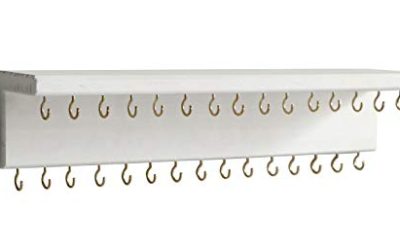
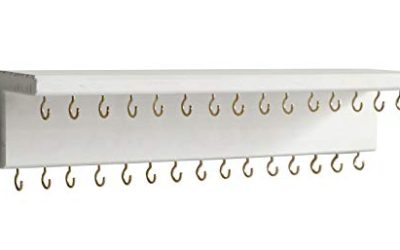
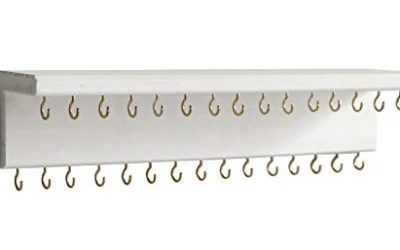
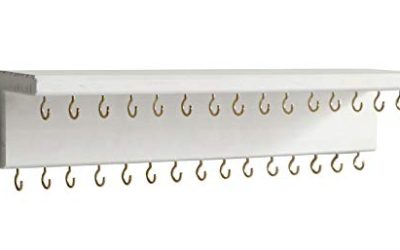
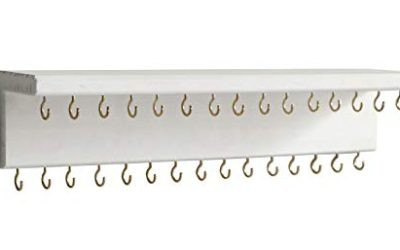
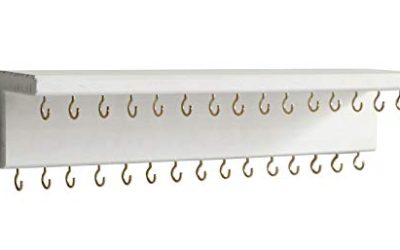
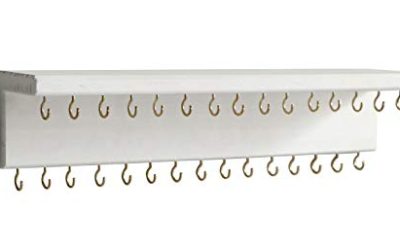
This first pick needs an honest introduction: the SANY DAYO organizer is a jewelry organizer, built for necklaces and bracelets. On a spare room desk wall, though, its thirty hooks make a useful light-duty rail for the small things that orbit a desk. Keys, lanyards, a spare charging cable looped loosely, a pair of earbuds in a soft pouch, and similar light accessories can hang in one visible row instead of scattering across the desktop or mixing into the cord runs below.
The limit matters just as much as the use. This rail is for light items only. It must not hold consoles, drives, power bricks, heavy tools, or cartridges. Those belong on shelves or in drawers with real support under them. A jewelry organizer’s hooks are shaped for delicate chains, and treating them like a hardware rack will bend them and drop whatever they hold. Kept within its honest job — a tidy landing strip for keys and lanyards — it keeps small clutter off the desk so the cord keepers below can work in a clear space.
Specs
- Thirty individual hooks in a single wall-mounted row
- Designed as a jewelry organizer for necklaces and similar light items
- Suited here to keys, lanyards, and light accessories only
- Not rated for consoles, drives, power bricks, heavy tools, or cartridges
HEKEE Dusk to Dawn Light Bulbs, A19
The HEKEE bulbs are plain automatic sensor bulbs, and that plainness is the point. A built-in dusk-to-dawn sensor turns the bulb on when the room darkens and off when daylight returns, with no app, no hub, and no switch routine to remember. In a spare room that doubles as an occasional office, that means the corner lamp or ceiling fitting quietly takes care of itself, and nobody fumbles for a switch behind the desk where the cord keepers run.
Two honest caveats belong here. First, these are explicitly not smart bulbs: no color control, no dimming schedule, no voice assistant. Second, they are not task lighting, so a focused desk lamp is still the right tool for reading or detailed work. Also note that in a windowless room the sensor sees little daylight, so the bulb may stay on far longer than expected, since it believes it is always dusk. Before screwing one into an enclosed fixture, check the enclosed-fixture rating, because sensor bulbs and sealed shades do not always agree. Within those limits, the bulbs keep ambient light simple and predictable.
Specs
- A19 bulb shape with a built-in dusk-to-dawn light sensor
- Turns on at dusk and off at dawn automatically
- Not a smart bulb: no app, color, or dimming control
- Not intended as task lighting
- Windowless rooms may keep the bulb on; check enclosed-fixture rating before use
ULANZI Super Clamp
The ULANZI super clamp is a mount, and only a mount. It has no light, no phone, and no camera of its own. What it offers is a strong jaw and a mounting point, so a small accessory that the owner already has — a lightweight lamp head, a small camera, a phone holder — can be fixed to a desk edge or shelf lip near the cord keepers instead of competing for flat desktop space.
Used carefully, a clamp keeps the desk surface clear. Two cautions keep it honest. Never clamp a monitor screen: the jaw pressure that holds an accessory firmly will damage a display panel. And pad the jaws with a scrap of cloth or rubber when clamping finished wood, so the grip does not leave marks on the desk edge. With the jaws padded and the clamp set on a sturdy edge, it holds a small accessory steady and lets its cord drop straight into the keeper run behind the desk.
Specs
- Clamp-style mount with adjustable jaw opening
- Provides a mounting point only; no light, phone, or camera included
- Fits desk edges and shelf lips within its jaw range
- Pad the jaws to protect finished surfaces
- Never clamp onto a monitor screen
tomtoc Laptop Case
A spare room desk has to give up its workspace whenever a guest stays over, and the laptop needs somewhere safe to go. The tomtoc case answers that with padding and structure for carrying and storing the machine. It is, honestly, a padded soft case. It is not a hard shell, so it should not be treated like armor against drops or heavy stacking, and it is not waterproof, so a spill or a rainy walk will still reach the laptop if the case is caught in it.
The fit deserves a moment of attention. Cases are sold by screen size, but internal dimensions decide whether a machine slides in comfortably. Checking them against the laptop, especially its thickness with any shell fitted, avoids the familiar disappointment of a case that almost closes. With the right size chosen, the case lets the spare room change roles in a minute: laptop tucked away, desk clear for a guest.
Specs
- Padded soft case for carrying and storing a laptop
- Not a hard shell; not waterproof
- Check internal dimensions against the laptop before choosing a size
- Room for the machine and small flat accessories, depending on size
Hi-Lyte Electrolyte Drops
The last pick is for the person rather than the desk. Long stretches at a spare room desk often mean plain water is forgotten until a headache arrives. Hi-Lyte drops are a simple way to add electrolytes to a glass or bottle of water at the desk. The claims here stay deliberately modest: these drops are not a medicine, not an energy product, and not a treatment for anything. Plain water is fine for most people, most of the time, and nothing in a small bottle changes that.
Used sensibly, the drops are just a habit aid for someone who works in a warm room or simply prefers the taste and drinks more water because of it. Follow the label directions for how much to add, and do not treat more as better. Anyone unsure whether electrolyte products suit them — because of a medical condition, medication, or a clinician’s advice about salt or potassium — should check with a clinician first. Kept honest like that, a bottle by the desk is a small, reasonable companion to a tidy workspace.
Specs
- Liquid electrolyte drops added to water
- Follow label directions for serving amounts
- Not a medicine, energy product, or treatment
- Plain water is fine for most people; check with a clinician if unsure
Frequently Asked Questions
What does a cord keeper actually do on a desk?
A cord keeper guides cords along one fixed path, usually down a desk leg or under the desktop, so they travel together instead of dangling and tangling. It does not shorten cords, hide a bad layout, or power anything. Its whole job is to hold a sensible route in place so the floor and desktop stay clear.
How many cord keepers does a spare room desk need?
Most desks do well with one keeper per cord run rather than a strict number. A charging run down one leg and a lamp-and-monitor run down the other usually covers a typical setup. Adding a new device may mean adding one more keeper to its run, which is why spares kept in one drawer are handy.
Can these companion picks replace a cord keeper?
No. Each pick in this guide supports the desk around the keeper — hanging light items, automating plain light, mounting a small accessory, storing the laptop, or supporting a water habit. None of them guides a cord. A plain keeper, chosen to suit the desk edge or leg, is still the tool that manages the cords themselves.
How should cords be handled when cleaning the room?
Lift the cords out of their keepers and rest them on the desktop before sweeping or vacuuming. That prevents snags that can pull keepers loose or drag charger bricks across the floor. While the cords are up, check each keeper for cracks or loose pads and replace any that are failing.
Final Verdict
A tidy spare room desk is mostly a layout decision, and a plain cord keeper is the small hardware that holds it in place. Run one keeper per cord path, lift the cords before cleaning, keep spares in one drawer, and let the layout do the organizing. The five companions here support that system honestly: a jewelry organizer repurposed as a light-duty rail for keys and lanyards, plain sensor bulbs that handle ambient light, a clamp that mounts a small accessory and nothing more, a soft padded case for the laptop, and modest electrolyte drops for the person at the desk. None of them pretends to be a cord keeper, and that honesty is why they sit well beside one.
Product and ASIN Reference
| # | Product | ASIN |
|---|---|---|
| 1 | SANY DAYO jewelry organizer, 30 hooks | B07QFZSVQW |
| 2 | HEKEE dusk to dawn light bulbs, A19 | B07HGZMYZ4 |
| 3 | ULANZI super clamp | B09C882D4M |
| 4 | tomtoc laptop case | B073TVX735 |
| 5 | Hi-Lyte electrolyte drops | B01MXDAHIB |
FAQ
What does a cord keeper actually do on a desk?
How many cord keepers does a spare room desk need?
Can these companion picks replace a cord keeper?
How should cords be handled when cleaning the room?
More from Amazon
Programs that pair well with the guide above. Offers and eligibility are set by Amazon and may change.
Free shipping on eligible items, Prime Video and more. Eligible new members can start with a free trial.
Start a Prime free trialAudiobooks and podcasts to listen to on the go. Eligible new members can start with a free trial.
Try Audible freeAd-free music streaming. Eligible new subscribers can start with a free trial.
Try Music Unlimited freeA free business account with business pricing and bulk-buying tools for work, shop or home office.
Create a business accountAs an Amazon Associate we earn from qualifying purchases.
Write Your Review
No reviews yet. Be the first to share your experience!