
Key takeaways
- Printer station cable picks for a home desk: labeled, parked leads that let the printer slide out for jams and cartridge swaps without unplugging a thing.
A printer station collects cables fast: a power lead, a data lead if the printer is wired, the laptop charger that migrates over whenever the battery runs low, and usually one mystery cable nobody claims. The tangle is annoying on an ordinary day, but it becomes a real problem when the printer jams or a cartridge runs dry, because both jobs mean pulling the machine forward and reaching around the back. If every lead is stretched tight or knotted into one bundle, that simple job turns into unplugging half the desk and guessing which cable went where.
The fix does not require a single specialized cable product. The idea behind every pick below is the same: give each lead a labeled parking spot, leave enough slack for the printer to slide out for service, and keep heat-producing parts like a power brick somewhere ventilated instead of buried in a coil. One honest note first. Tidy cables help access; they make the printer easier to reach, service, and reconnect correctly. They do not fix printer faults. A printer that jams daily or prints streaks has a mechanical or driver problem, and no cable arrangement will change that. Cable management simply removes the desk from the list of obstacles.
As an Amazon Associate, we earn from qualifying purchases.
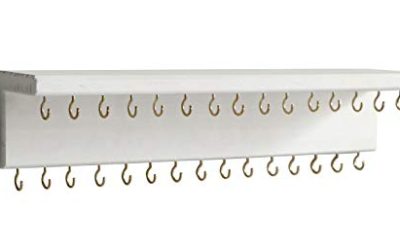
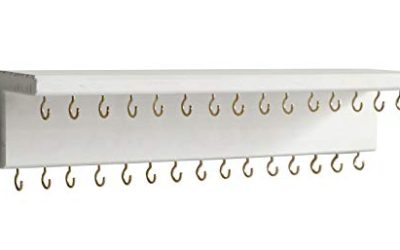
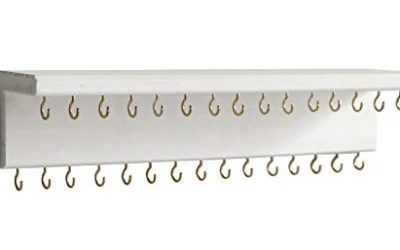
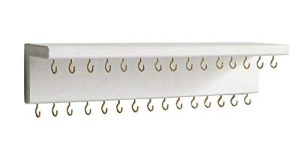
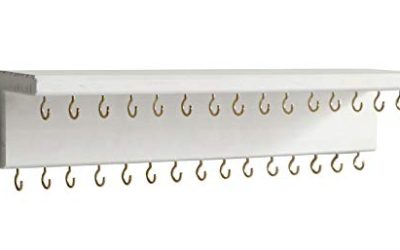
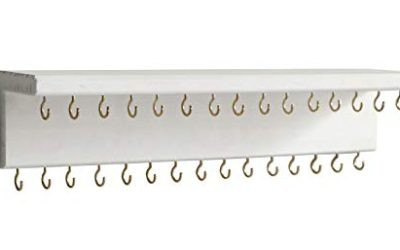
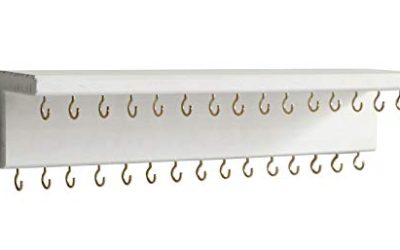
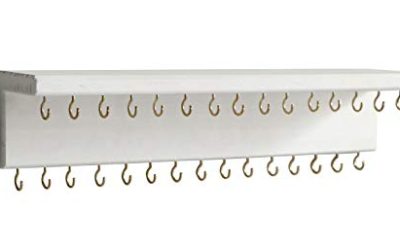
SANY DAYO Jewelry Organizer With 30 Hooks

This pick needs an honest introduction: it is a wall-mounted jewelry organizer, a general accessory rather than a cable product. It earns its place here because its row of thirty small hooks works well as a parking rail for the station’s leads. Mounted on the wall or side panel just behind the printer, the rail gives every cable a fixed hook in device order: printer power first, printer data next, then the laptop charger, then the spare lead. When a lead is unplugged, it goes back on its hook instead of dropping behind the desk to be forgotten.
The parking order matters more than the hardware. Coil each lead gently, hang the coil, and leave the last stretch free, so the printer can slide forward for a jam or cartridge swap while its leads stay connected, the slack hanging in a loose loop rather than stretched straight. A small label tag on each lead completes the system: reconnection after a deep clean takes seconds instead of guesswork.
The limits deserve plain language. These hooks are light-duty, sized for necklaces and keys. They suit individual cables and slim chargers, but not a chunky power brick, which is heavier than the hooks want and warms up in use. A brick belongs in a vented tray or on an open shelf with air around it, never wrapped inside a cable coil and never hung by its own cord.
Specs
- Wall-mounted organizer with 30 small hooks in a row
- Intended use: jewelry storage; repurposed as a cable parking rail
- Best for: power and data leads, slim chargers, spare cables
- Load note: light-duty hooks only; power bricks belong in a vented tray
- Placement: wall or desk side panel behind the printer
HEKEE Dusk to Dawn Bulbs A19

The second pick is also a general accessory rather than anything cable-related: A19 bulbs with a built-in light sensor that switches them on at dusk and off at dawn. Their role at a printer station is background light. A home desk that doubles as the household printing spot gets used at odd hours, often for one quick page in the evening, and a bulb that handles the room’s baseline light automatically removes the friction of walking into a dark room.
Honesty matters here. These are plain sensor bulbs, not smart bulbs: no app, no scheduling, no dimming, no voice control. The sensor responds to light in the room, so a bulb in a shaded lamp or enclosed fixture may behave unexpectedly, switching on during a dark afternoon or staying off near a bright window. An open fixture gives the most predictable results.
They are also not task lighting. Reading a faint cartridge label or finding the sheet wedged inside a jam needs focused light aimed at the machine, which is the next pick’s job. The sensor bulbs provide the ambient layer: a room that is never fully dark when someone walks in to print.
Specs
- A19 bulbs with a built-in dusk-to-dawn light sensor
- Automatic on at dusk and off at dawn; no app or hub required
- Not smart bulbs: no dimming, scheduling, or voice control
- Best results in open fixtures where the sensor can read room light
- Role at the station: ambient evening light, not task lighting
ULANZI Super Clamp

The super clamp is a mount, and only a mount. It includes no light and no cable of its own. It grips a desk edge, shelf, or printer stand and holds a small item exactly where it is pointed. At a printer station, the natural job is holding a compact light over the paper tray and rear panel, aimed into the machine for when a jam needs clearing or output needs a close look.
That is the honest division of labor here: the sensor bulbs light the room, the clamp positions the working light. A clamp beats a loose desk lamp in this crowded corner, where paper stacks and spare cartridges compete for the same flat surface and a lamp base is one more thing to knock over. The clamp takes no desk surface at all.
Two cautions keep it in its lane. Clamp it to furniture, never to the printer itself; printer panels are not built to carry a clamped load, and vibration can walk a clamp loose. And route the mounted light’s cable back to the parking rail, so it does not become one more loose lead.
Specs
- Clamp-style mount for desk edges, shelves, and stands
- Mount only: includes no light, camera, or cable
- Typical station job: holding a small light over the paper tray
- Grip note: clamp to furniture, never to the printer body
- Cable note: route the mounted light’s lead back to the parking rail
tomtoc Laptop Case

A laptop case sounds like a travel product in the wrong guide, so its role should be stated plainly: it is the parking spot for the laptop in a corner where paper dust and open printer panels are part of daily life. When the printer needs a service session, the laptop slides into the case and off the desk, protected from the dust a cartridge swap stirs up and from the casual elbow knock during a jam clearance. Paired with the rail, it gives the setup a simple territory rule: printer leads live on the hooks, the laptop lives in its case.
The limits are the usual ones for a padded soft case. It offers bump and scratch protection, not a hard shell; it will not save a laptop from a drop onto a hard floor, and it is not waterproof. Fit decides whether a case works at all: measure the laptop and compare against the case’s internal dimensions rather than the headline size.
Specs
- Padded soft laptop case with zip closure
- Protection: bumps and scratches; not a hard shell, not waterproof
- Fit check: compare laptop measurements to internal dimensions
- Station role: protected parking for the laptop during printer service
- Pairs with the rail: charger on its hook, laptop in the case
Hi-Lyte Electrolyte Drops

The last pick is the smallest and needs the most careful framing. Electrolyte drops are a drink additive, meant to be used according to their label directions, and that is the whole of the claim made for them here. A long print-and-sort session can leave a person reaching for water, and keeping the drops near the water glass is a reasonable habit for people who use them.
The drops are not a medicine, not an energy product, and not a treatment for anything. Plain water is fine for most people, most of the time. Anyone with a medical condition, or on a restricted diet including sodium or potassium restrictions, should talk to a clinician before using electrolyte products; the label directions govern amount and frequency.
Placement gets one practical note: drinks belong away from the station itself, on a side surface where a spill cannot reach paper, cartridges, or parked cables.
Specs
- Liquid electrolyte drops for adding to water
- Use: follow label directions for amount and frequency
- Not a medicine, energy product, or treatment
- Plain water is sufficient for most people
- Clinician note: medical conditions or restricted diets need advice first
How to Choose
Start with the parking system, because everything else hangs off it. Decide where each lead lives when unplugged, place the rail there, and assign the leads in device order, printer first. Label each lead at the device end: anyone can then unplug the printer for service and reconnect it correctly without a diagram.
Second, plan the slack before the tidiness. A printer that cannot move cannot be serviced, so measure the slide-out distance needed for rear panel and cartridge access, and leave that much loose cable in a gentle loop. Cables pulled drum-tight look neat in a photo and cause exactly the mid-service unplugging this setup exists to prevent. Tidy means parked and labeled, not taut.
Third, separate heat from storage. The power brick goes in a vented tray or on an open shelf, alone, with air around it. Spare cable coils go on hooks, never bundled around a warm brick.
Fourth, layer the light honestly. Ambient light, like the sensor bulbs, is for walking in and working generally. Aimed light, positioned by the clamp, is for jams and labels. Neither replaces the other.
Finally, keep expectations in proportion. This setup makes a station calmer and service visits shorter; it does not extend the printer’s life or prevent jams. A machine that faults regularly needs the manufacturer’s maintenance guidance, not more cable gear.
FAQ
How much slack should a printer’s cables have?
Enough for the printer to slide fully out to its service position, plus a little extra so no lead pulls taut at the furthest point. In practice that means a loose loop hanging from the parking rail rather than a cable trimmed to the exact desk distance.
Can the hook rail hold the printer’s power brick?
No, and it should not try. The hooks are light-duty, meant for individual cables and slim items. A power brick is heavier and warms up during use, so it belongs in a vented tray or on an open shelf with air around it. Hanging a brick by its cord, or burying it in a cable coil, shortens the life of both.
Do sensor bulbs work in a room that is dark all day?
They switch on whenever the light reaching the sensor falls low enough, so a basement office or a room with heavy curtains may keep them on most of the day. That is expected behavior rather than a fault, but the automatic routine suits rooms with a normal day-night cycle best. In an always-dark room, a switched lamp is usually simpler.
Will tidy cables stop my printer from jamming?
No. Jams come from the paper path: the loaded paper, worn rollers, dust, or the media itself. Cable management only decides how painful a jam is to deal with. Parked, labeled leads with proper slack mean the machine slides out, opens up, and goes back together in minutes. A printer that jams constantly needs its manual’s maintenance steps or a technician, not a better cable rail.
Final Verdict
A good printer station passes one test: when the printer jams at an inconvenient moment, can it be slid out, opened, cleared, and reconnected by whoever is standing there, without a single cable being guessed at? These picks are organized around that test. The hook rail gives every lead a labeled home in device order, with the caveat that it is a light-duty jewelry organizer doing cable duty and the power brick lives separately in a vented tray. The sensor bulbs handle the room’s evening light automatically, without pretending to be smart bulbs or task lighting. The clamp positions a working light over the machine while taking no desk surface, and the laptop case gives the computer a protected parking spot. The electrolyte drops sit at the edge of the setup as a modest, label-directed extra, with plain water acknowledged as fine for most people.
None of it claims to fix the printer itself, and that restraint is the point. Cable management done well is invisible infrastructure: leads parked, slack planned, heat separated, light layered.
Product and ASIN Reference
| Product | ASIN |
|---|---|
| SANY DAYO jewelry organizer 30 hooks | B07QFZSVQW |
| HEKEE dusk to dawn bulbs A19 | B07HGZMYZ4 |
| ULANZI super clamp | B09C882D4M |
| tomtoc laptop case | B073TVX735 |
| Hi-Lyte electrolyte drops | B01MXDAHIB |
FAQ
How much slack should a printer’s cables have?
Can the hook rail hold the printer’s power brick?
Do sensor bulbs work in a room that is dark all day?
Will tidy cables stop my printer from jamming?
More from Amazon
Programs that pair well with the guide above. Offers and eligibility are set by Amazon and may change.
Free shipping on eligible items, Prime Video and more. Eligible new members can start with a free trial.
Start a Prime free trialAudiobooks and podcasts to listen to on the go. Eligible new members can start with a free trial.
Try Audible freeAd-free music streaming. Eligible new subscribers can start with a free trial.
Try Music Unlimited freeA free business account with business pricing and bulk-buying tools for work, shop or home office.
Create a business accountAs an Amazon Associate we earn from qualifying purchases.
Write Your Review
No reviews yet. Be the first to share your experience!