
Key takeaways
- Tidy a corner desk with the right cord wrap, plus five support picks for loose leads, work light, laptop storage, and long rewiring sessions.
A corner desk collects cables the way a corner of a room collects dust. The monitor lead, the power brick cord, the display cable, and a charger or two all slide down behind the same narrow gap, and within a month they have braided themselves into a single dusty rope. A cord wrap — a spiral wrap you wind around the bundle, or a braided sleeve you feed the cables through — turns that tangle into one clean run that follows the desk edge and drops neatly to the outlet. It is a simple fix, but not a free one, and choosing the right wrap matters more than most people expect.
One thing should be said plainly before anything else: none of the five products in this guide is itself a cord wrap. The wrap choice is covered in the How to Choose section below. The five picks here are the support items that make a wrapped corner desk work well day to day — a rail for the leads the wrap leaves out, lighting for the space behind the desk, a mount for a work lamp, a case that keeps the laptop out of the cable runs, and a small comfort for the person doing the rewiring. Each one earns its place around the wrap rather than pretending to be it.
As an Amazon Associate, we earn from qualifying purchases.
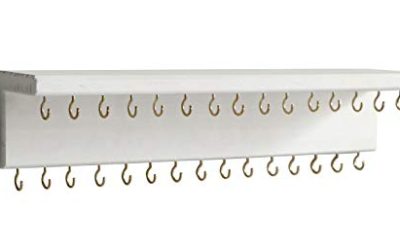
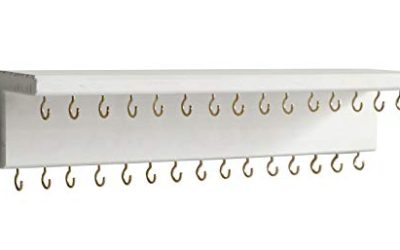
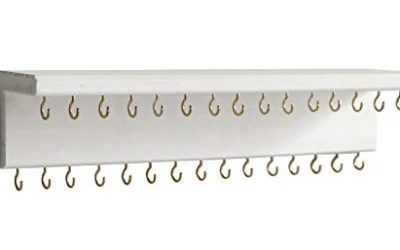
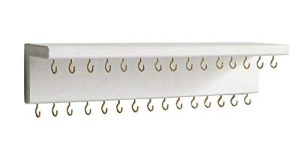
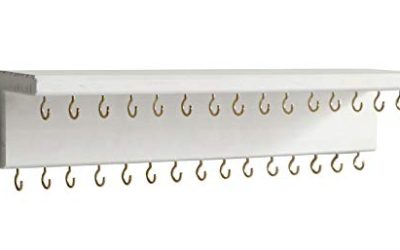
SANY DAYO Jewelry Organizer with 30 Hooks

Every good wrap plan deliberately leaves some cables out. The phone charger that moves between rooms, the lead for a tablet that visits the desk twice a week, the spare cable for a guest laptop — wrapping those into a fixed run would be a mistake, because they need to come and go. Those loose leads still need a home, though, or they end up coiled on the desk and defeating the whole exercise. A wall-mounted rail beside the desk gives them one: each lead hangs on its own hook, visible, untangled, and easy to grab.
This organizer is, plainly, a jewelry organizer — a rail with thirty hooks made for necklaces and bracelets — used here as a light-duty cable rail. The hooks are sized and spaced for light items, and that is what loose charging leads are. It also holds the run-map card: a small card noting which cables live inside the wrap and where each one goes, so a future change does not start with detective work. What it must never hold is a power strip or a charging brick. Those are heavy, they get warm, and they belong on a proper surface or tray.
Specs
- Wall-mounted rail with 30 individual hooks
- Suited to light items: charging leads, earbuds cords, lanyards, keys
- Keeps loose leads separated and visible instead of coiled
- Works as a parking spot for a written run-map card
- Light-duty only — not rated for power strips, bricks, or tools
HEKEE Dusk to Dawn Bulbs A19

Rewiring a corner desk means spending real time looking at the darkest part of the room. The space behind a desk, down at floor level in a corner, gets almost no light during the day and none by evening, which is when most people finally get around to cable projects. A room fixture fitted with dusk to dawn bulbs helps more than expected: the bulbs sense the falling light and switch themselves on, so the corner is lit when the work happens, and they turn off again when daylight returns.
These are plain automatic sensor bulbs, and it is worth being exact about what that means. They are not smart bulbs — there is no app, no voice control, no scheduling, and no color changing. They are also not task lighting. A sensor bulb in a ceiling fixture gives general room light, enough to see the cable runs and read a label, but close work like reading tiny connector markings still calls for a real lamp aimed at the job. In a windowless room, the sensor may keep the bulbs on much of the time, since the room rarely gets bright. Before fitting them in an enclosed fixture, check that the fixture and bulb are both rated for enclosed use.
Specs
- Standard A19 bulb shape with a built-in dusk to dawn sensor
- Switches on automatically as light fades, off again at daylight
- No app, hub, or smart-home setup required
- Provides general room light, not focused task lighting
- Check enclosed-fixture ratings before using in covered fittings
ULANZI Super Clamp

During a rewiring session, the lamp is the tool that gets improvised most badly — balanced on a stack of books or propped against the monitor. A super clamp ends that. It grips a desk edge, a shelf, or a rail and holds the work lamp exactly where the light is needed: down behind the desk, aimed along the cable run, while both hands stay free to feed cables through the wrap. When the session ends, the clamp comes off in seconds.
The clamp is a mount only. It includes no light, no phone, and no camera of its own — it holds gear the user already owns, and its value is entirely in the grip. Two limits deserve stating. Never clamp a screen: monitor panels are not built for clamping pressure, and a tightened clamp can crack a panel or mark it permanently. And never clamp a wrapped cable run. The wrap is a sleeve, not a structure; squeezing it crushes the cables inside and can damage insulation. Clamp the furniture, aim the lamp, and leave the cables alone.
Specs
- Heavy-duty clamp mount for attaching lights or accessories to edges and rails
- Mount only — no light, phone, or camera included
- Adjustable grip suited to desk edges and shelving
- Frees both hands during cable work
- Never clamp screens or cable runs — clamp solid furniture only
tomtoc Laptop Case

A laptop that lives on the desk usually has its lead woven into the desk’s cable runs, which quietly sabotages the idea of a fixed wrap. The machine gets carried to a couch or another room, the lead gets yanked out of the bundle, and the tidy run unravels one tug at a time. A padded case changes the habit: the laptop and its charger travel together in the case, and the desk’s wrapped runs stay exactly as they were built. When the laptop comes back, it docks to the same short lead every time.
Before ordering, check the case’s internal dimensions against the actual laptop, including its size with any shell or cover fitted — a case that almost fits is a case that gets left behind. The honest limits matter too. This is a padded soft case: it protects against bumps, scratches, and dust, but it is not a hard shell and will not save a laptop from a serious drop. It is also not waterproof, so a rainy commute calls for the case to ride inside a bag.
Specs
- Padded soft case sized for laptops — check internal dimensions before ordering
- Keeps the laptop and its charger together, out of the desk’s fixed cable runs
- Protects against everyday bumps, scratches, and dust
- Soft construction — not a hard shell, not drop-proof
- Not waterproof; carry inside a bag in wet weather
Hi-Lyte Electrolyte Drops

A full rewiring session behind a corner desk takes longer than anyone plans. There is kneeling, reaching, feeding a sleeve a few inches at a time, and usually one cable that has to come back out because it went in backwards. A water bottle within reach makes the session noticeably more comfortable, and a few electrolyte drops make plain water a little more palatable during a long, warm job under a desk.
The claims here should stay deliberately modest. These drops are not a medicine, not an energy product, and not a treatment for anything. For most people, plain water is perfectly fine. Anyone who uses them should follow the product’s own label directions, and anyone with a medical condition or a restricted diet should check with a clinician first. Think of them as a comfort for a long session, nothing more.
Specs
- Liquid electrolyte drops added to a bottle of water
- Unflavored style suited to mixing into plain water
- Follow the product label for serving directions
- A comfort item for long work sessions — not a medicine or treatment
- Check with a clinician first if managing a medical condition or restricted diet
How to Choose a Cord Wrap for a Corner Desk
Start with the honest trade-off, because it decides everything else: a wrap bundles and protects cables, but every wrapped run is slower to change. Adding or removing one cable means opening the wrap along its length, threading the change through, and closing it again. That is a fair price for runs that stay fixed for a year — the monitor’s power and display cables, the desk lamp lead, the run to the outlet. It is a bad price for anything swapped weekly. So the first step is sorting: wrap the permanent runs, and leave frequently swapped leads loose, clipped, or parked on a rail.
Second, never wrap a cable that has to move. The run up a monitor arm flexes every time the screen is adjusted, and the cables on a height-adjustable desk travel through the full sit-to-stand range daily. A tight wrap fights that movement, and the strain lands on the connectors — the most fragile part of any cable. Moving runs belong in a loose cable chain made for motion, or simply left with generous slack. The wrap is for the still parts of the desk only.
Third, leave slack at both ends of every wrapped run. A bundle pulled drum-tight tugs every plug sideways, and sideways strain loosens ports over time. A few spare inches at each end lets plugs sit straight and gives the run room to be serviced later. Fourth, choose the wrap style for the bundle: spiral wrap winds on without disconnecting anything, while a braided sleeve looks cleaner and protects better but requires feeding cables through from one end, so it suits a run built from scratch. Finally, remember what a wrap cannot do. It hides cables and keeps them together, but it does not organize the desk by itself. The run still needs a planned path — a tray under the desk, clips along the edge, a defined drop to the outlet — or the wrapped bundle becomes one big cable lying where the tangle used to be.
FAQ
Should every cable behind the desk go into the wrap?
No. Wrap only the runs that stay fixed, such as monitor power and display cables. Leads that get swapped often — chargers, guest devices, a traveling laptop cable — should stay loose or clipped so they can be removed without opening the whole wrap.
Can a cord wrap be used on a height-adjustable desk?
Only on parts that do not move. Cables that travel with the desktop as it rises and lowers need slack or a purpose-built cable spine. Wrapping them tightly strains the connectors every time the desk moves.
Is a spiral wrap or a braided sleeve better?
They suit different moments. Spiral wrap can be wound onto cables that are already connected, making it the easier retrofit. A braided sleeve gives a cleaner finish but needs cables fed through before they are plugged in, so it fits a fresh setup.
How much slack should be left at the ends of a wrapped run?
A few inches at each end is a good rule. Plugs should sit straight in their ports without being pulled sideways, and the spare length makes future changes possible without rebuilding the run.
Final Verdict
A cord wrap earns its place on a corner desk when it is used with a little discipline: wrap the fixed runs, keep moving cables and frequent swaps out of it, leave slack at the ends, and give the bundle a real path to follow. The five support picks cover the rest of the system — the SANY DAYO rail parks the loose leads and the run map, the HEKEE bulbs keep the corner lit without any smart-home fuss, the ULANZI clamp puts a work lamp where the session needs it, the tomtoc case keeps the laptop from unraveling the fixed runs, and the Hi-Lyte drops make a long session a bit more comfortable. Together they turn the back of a corner desk from a tangle into a run that can be understood, serviced, and left alone.
Product and ASIN Reference
| Product | ASIN |
|---|---|
| SANY DAYO jewelry organizer 30 hooks | B07QFZSVQW |
| HEKEE dusk to dawn bulbs A19 | B07HGZMYZ4 |
| ULANZI super clamp | B09C882D4M |
| tomtoc laptop case | B073TVX735 |
| Hi-Lyte electrolyte drops | B01MXDAHIB |
FAQ
Should every cable behind the desk go into the wrap?
Can a cord wrap be used on a height-adjustable desk?
Is a spiral wrap or a braided sleeve better?
How much slack should be left at the ends of a wrapped run?
More from Amazon
Programs that pair well with the guide above. Offers and eligibility are set by Amazon and may change.
Free shipping on eligible items, Prime Video and more. Eligible new members can start with a free trial.
Start a Prime free trialAudiobooks and podcasts to listen to on the go. Eligible new members can start with a free trial.
Try Audible freeAd-free music streaming. Eligible new subscribers can start with a free trial.
Try Music Unlimited freeA free business account with business pricing and bulk-buying tools for work, shop or home office.
Create a business accountAs an Amazon Associate we earn from qualifying purchases.
Write Your Review
No reviews yet. Be the first to share your experience!