
Key takeaways
- Compare cord clips and cable holders for a desk corner, with honest guidance on adhesive, clamp, and weighted styles plus five corner companion picks.
Every desk corner has the same small betrayal. You unplug your phone, set the charging lead down for one second, and it slides silently behind the desk, down into the dust and the cable tangle. By the end of the week you are on your knees with a flashlight, fishing for a cable end that was on the desk on Monday. A cord clip exists to stop exactly that slide. It is one of the smallest accessories in cable management, and one of the most satisfying, because the problem it solves happens every single day.
One thing should be plain before the picks: none of the five products below is itself a cord clip. They are corner companions — the small supporting cast that keeps a desk corner lit, mounted, carried, and comfortable while the cable work gets done. The clip decision itself is taught in the How to Choose section that follows, because the wrong clip style for your surface or your cable will fail quietly within a month. Read that section first, then use the product sections to round out the corner around your clips.
As an Amazon Associate, we earn from qualifying purchases.
How to Choose
Start with the honest scope of the job. Clips hold the last stretch of cable. They keep the charging lead parked at the edge of the desk instead of sliding behind it, and that small job is the whole job. A clip is not routing: the long run from the wall outlet to the desk still needs a tray or channel underneath. A clip is not storage either: it will not coil spare cables or hide a power strip. Buy clips for the final few inches of cable you touch daily, and let other tools handle the rest of the run.
Next, be honest about how the clip attaches, because adhesive clips are only as good as the surface prep. The pad needs a clean, dry surface and its full curing time before it holds any weight; stick one onto a dusty desk edge and load it immediately, and it will be on the floor by Friday. Adhesive also has a cost on the way out: pads can take paint off some walls when removed. Renters, and anyone with finished furniture they care about, should choose clamp clips that grip the desk edge or weighted clips that sit on the surface and hold the cable by gravity. Both come off cleanly and move when the desk moves.
Slot size follows the cable, and this is where most clip purchases quietly go wrong. A clip sized for a thin phone lead will not grip a thick laptop charging cable; the cable either refuses the slot or pops out under its own stiffness. The reverse is just as useless: a wide slot lets a thin lead slide straight through, and a loose clip is a decoration, not a tool. Measure the cable diameter, match the slot to it, and when a corner serves cables of different sizes, buy a mixed set rather than forcing one size to do everything.
Finally, place clips where the hand actually reaches. The natural parking spot is the desk edge beside the chair, where you already set the cable down without thinking. A clip mounted at the far back corner, behind the monitor, will hold cables nobody uses, while the lead you charge with every night keeps sliding off the front edge. Watch your own habit for a day before sticking anything down. The best clip position is the one your hand was already using; the clip simply makes that spot reliable.
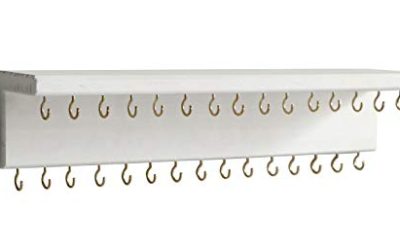
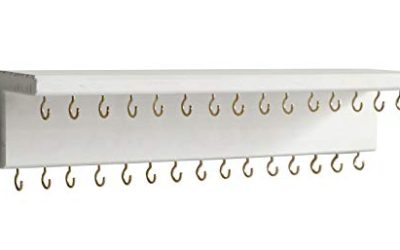
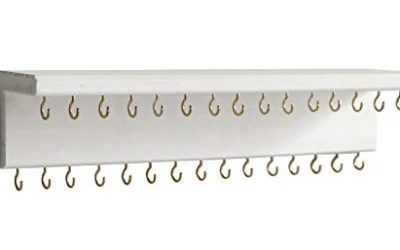
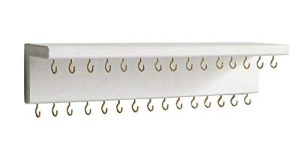
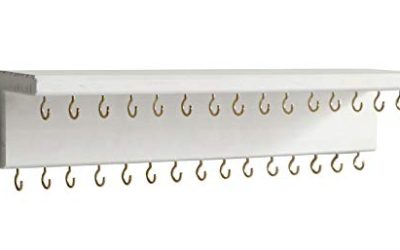
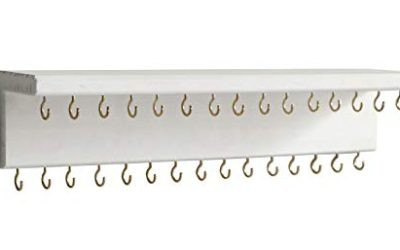
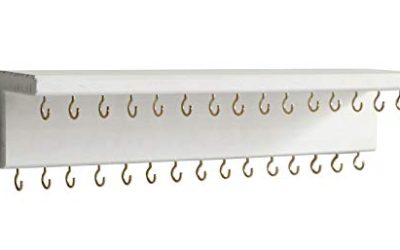
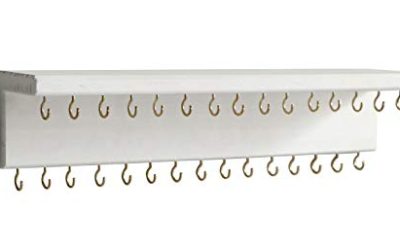
SANY DAYO Jewelry Organizer With 30 Hooks

The SANY DAYO organizer is, plainly, a jewelry organizer: a rail with thirty hooks made for necklaces and similar light items. In a desk corner it earns a place only in a light-duty role, as a rail for light leads and a small card — a spare phone cable looped loosely, a short earbud lead, a sticky note with the day’s call list. Hung beside the desk, it keeps those featherweight items off the work surface and visible.
The limits matter more than the uses. This rail never holds consoles, drives, power strips, charging bricks, or heavy tools. Its hooks are sized for jewelry-weight loads, and a power brick hanging from one will bend it or pull the rail off its mounting. Treat it as a parking rail for things that weigh almost nothing, mount it into a solid fixing rather than bare plaster, and keep heavy cables on the desk, in a tray, or in a proper clip. Within that honest boundary, it gives light leads a home that is not the floor.
Specs
- Format: wall-mounted rail with 30 hooks
- Intended use: jewelry storage, repurposed here as a light-duty rail
- Suitable loads: light charging leads, earbud cables, a small card
- Not suitable for: consoles, drives, power strips, charging bricks, heavy tools
- Mounting: wall fixing beside the desk, into a solid surface
HEKEE Dusk to Dawn Bulbs A19

The HEKEE bulbs are plain automatic sensor bulbs. Each carries a light sensor that switches the bulb on at dusk and off at dawn, with no app, no hub, and no programming. That is the entire feature set, described exactly: these are explicitly not smart bulbs, and they are not task lighting. You cannot dim them from a phone, change their color, or aim them at your paperwork. What they do well is keep a hallway, porch, or the lamp by the desk corner lit through the evening without anyone remembering a switch.
Two honest caveats belong in any buying decision. In a windowless room, the sensor may read the space as permanently dark, so the bulb may stay on around the clock rather than cycling — harmless, but not the behavior you bought it for. And before screwing one into an enclosed fixture, check the enclosed-fixture rating, because trapped heat shortens the life of any LED. In an open lamp or ventilated fitting, with daylight reaching the sensor, these are a set-and-forget way to handle the corner’s background light.
Specs
- Format: A19 screw-base bulbs with built-in light sensors
- Behavior: on at dusk, off at dawn, fully automatic
- Controls: none; no app, hub, dimming, or color adjustment
- Best placement: open or ventilated fixtures with daylight reaching the sensor
- Caveats: may stay on in windowless rooms; check enclosed-fixture rating before use
ULANZI Super Clamp

The ULANZI super clamp is a mount, and only a mount. It includes no light, no phone, and no camera of its own; what it provides is a strong gripping jaw and a mounting point, so a small accessory you already own — a lightweight light panel, a phone holder arm — can be held at the edge of the desk instead of occupying surface space. In a corner where every square inch is spoken for, that is a real gain, and the grip holds position through a working day.
Used carelessly, though, a strong clamp can damage the things around it. Never clamp a screen: monitor bezels and laptop lids are not built for jaw pressure, and a clamp bite can crack a panel or warp a lid. Clamp the desk edge, a shelf, or a sturdy rail instead. On finished furniture, pad the jaws — felt, leather, or thick cloth between jaw and wood — because bare metal leaves marks in a polished surface. Check the grip after the first hour and again the next day, since clamps can settle.
Specs
- Format: heavy-duty clamp with mounting stud
- Includes: clamp only; no light, phone, or camera included
- Suitable for: holding small accessories at a desk edge or shelf
- Never clamp: screens, monitor bezels, or laptop lids
- Furniture care: pad the jaws; recheck grip after fitting
tomtoc Laptop Case

The tomtoc case is a padded soft case for carrying a laptop between the desk and everywhere else, and its protection should be described in those terms. The padding guards against everyday commute knocks — a bump against a door frame, jostling in a bag. It is not a hard shell, so it will not stand up to a serious crush or a drop onto concrete, and it is not waterproof: in rain, the case goes inside a bag rather than serving as the outer layer. Judged as a padded sleeve rather than armor, it does its job well.
The one step buyers skip is the tape measure. Check the internal dimensions against your actual laptop before ordering, including thickness with any shell or skin fitted, because a case a fraction too small strains its zipper from day one, and a case too large lets the machine slide and bang inside. For a laptop that leaves the desk daily, a well-fitted soft case plus sensible handling beats a bulky hard case that gets left behind.
Specs
- Format: padded soft laptop case
- Protection: everyday bumps and scratches during carrying
- Limits: not a hard shell; not waterproof
- Fit: check internal dimensions against the laptop before ordering
- Best for: daily desk-to-home carrying
Hi-Lyte Electrolyte Drops

Hi-Lyte drops are a mineral concentrate added to water, and the claims made for them here are deliberately modest. This is not a medicine, not an energy product, and not a treatment for anything. Plain water is fine for most people, most of the time. What the drops offer is a way to add electrolytes and a light mineral taste to a bottle of water, which some people who work long hours at a desk, exercise in the heat, or dislike the taste of plain water find helps them keep drinking through the day.
Use them as directed: follow the label directions for the amount per bottle, and do not treat more drops as more benefit. Readers with medical conditions or restricted diets — including anyone watching sodium or potassium intake — should check with a clinician before using an electrolyte product regularly. Kept in that honest frame, a small bottle by the desk is a reasonable companion for long sessions in a warm corner.
Specs
- Format: liquid electrolyte concentrate drops for water
- Use: add to a bottle of water following label directions
- Claims: modest; not a medicine, energy product, or treatment
- Note: plain water is fine for most people
- Caution: readers with medical conditions or restricted diets should check with a clinician
FAQ
Will adhesive cord clips damage my desk or wall?
They can. Adhesive pads sometimes lift paint or finish when removed, especially from painted walls. On surfaces you care about, or in a rented home, choose clamp clips for the desk edge or weighted clips that sit on the surface, since both remove cleanly.
How many clips does a desk corner actually need?
Fewer than the multipack suggests. Most corners need two to four: one for the phone lead, one for the laptop charger, perhaps one each for a tablet or earbuds lead. Clip only cables you unplug daily; cables that stay connected for months belong in a tray or channel.
My cable keeps popping out of its clip. What is wrong?
The slot is the wrong size, or the cable is under tension. A thick, stiff laptop lead will lever itself out of a slot cut for a thin phone cable. Match the slot diameter to the cable, and leave slack in the run so the cable rests in the clip instead of pulling against it.
Where is the best place to mount a clip?
At the desk edge nearest your chair, exactly where your hand already sets the cable down. That spot, rather than the neatest-looking spot, is the one that gets used. Mount one clip there first, live with it a week, and add more only where a cable still escapes.
Final Verdict
A cord clip is a two-inch answer to a daily annoyance, and choosing well comes down to three honest checks: match the attachment to your surface, with clamp or weighted styles for renters and finished furniture; match the slot to the cable, because a loose clip is only a decoration; and mount the clip where your hand already parks the cable. Get those three right and the charging lead will be waiting at the desk edge every morning. The five companions above round out the corner around that fix — a light-duty rail for featherweight leads, automatic bulbs for evening light, a clamp to lift one accessory off the surface, a fitted case for the laptop’s daily travel, and a modest bottle of drops beside the water.
Product and ASIN Reference
| Product | ASIN |
|---|---|
| SANY DAYO jewelry organizer 30 hooks | B07QFZSVQW |
| HEKEE dusk to dawn bulbs A19 | B07HGZMYZ4 |
| ULANZI super clamp | B09C882D4M |
| tomtoc laptop case | B073TVX735 |
| Hi-Lyte electrolyte drops | B01MXDAHIB |
FAQ
Will adhesive cord clips damage my desk or wall?
How many clips does a desk corner actually need?
My cable keeps popping out of its clip. What is wrong?
Where is the best place to mount a clip?
More from Amazon
Programs that pair well with the guide above. Offers and eligibility are set by Amazon and may change.
Free shipping on eligible items, Prime Video and more. Eligible new members can start with a free trial.
Start a Prime free trialAudiobooks and podcasts to listen to on the go. Eligible new members can start with a free trial.
Try Audible freeAd-free music streaming. Eligible new subscribers can start with a free trial.
Try Music Unlimited freeA free business account with business pricing and bulk-buying tools for work, shop or home office.
Create a business accountAs an Amazon Associate we earn from qualifying purchases.
Write Your Review
No reviews yet. Be the first to share your experience!