
Key takeaways
- Honest cable ties desk picks: what hook-and-loop ties actually do, how tight is too tight, and the five desk companions worth pairing with them.
A cable tie does one simple thing: it bundles. It does not organize a system, it does not shorten a cable that is too long, and it does not hide a power strip or make a messy desk route itself. A bundle is only as tidy as the routing decision behind it, so the honest work happens first: decide where each cable should run and group the ones that travel together. Ties are the finishing step of that thinking, not a substitute for it. Used as a shortcut, they turn five separate mistakes into one thick, dusty rope that still goes nowhere sensible.
One more honesty note before the picks: none of the five products below is itself a cable tie. They are desk companions that sit around the cable problem — a light-duty rail, automatic bulbs, a clamp mount, a padded case, and electrolyte drops — each framed for what it actually is and is not — including where each one should never be asked to do a cable tie’s job.
As an Amazon Associate, we earn from qualifying purchases.
How to Choose Cable Ties for a Desk Run
Reusable Hook-and-Loop vs Single-Use Zip Ties
This is the honest fork, and neither side wins outright. Zip ties are stronger, slimmer, and effectively permanent until they are cut off. That permanence suits a run that will never change, and is a real liability everywhere else: cutting one off means sliding a blade in next to the cables being protected, and one slip nicks insulation. Hook-and-loop ties reopen a hundred times, forgive every change of mind, and let a bundle be opened to add one cable without rebuilding the whole run. Their weakness is grip: under real weight or constant tension, hook-and-loop slowly loosens and a heavy bundle sags. For most desks, where setups change a few times a year, reusability wins. For a fixed bundle that hangs and never moves, a zip tie’s stubbornness is the honest choice — just leave a finger of slack so the cut, when it comes, is safe.
Snug, Not Strangled
Cinching any tie hard feels tidy and is quietly destructive: a cable crushed at one point flexes there every time the desk moves, and conductors fatigue over months. Network and display cables are the least forgiving: their internal pairs and shielding are built to tolerances that kinks and pinches genuinely degrade, so a strangled Ethernet or HDMI run can cost signal quality in ways that look like a failing device. The rule is simple — the bundle should hold its shape when nudged, and no individual cable should be dented by the tie. If a tie leaves a visible crease in a jacket, it is too tight.
Spacing Beats One Heroic Tie
A single tie at the end of a run does almost nothing. The cables fan out along their length, cross each other, and arrive at the tie already tangled. The pattern that works is unglamorous: one tie per bundle point, spaced along the run — roughly a hand’s span apart on long drops, and always one near each end and one before any split where cables part toward different devices. Each tie is a small decision that the cables travel together between here and there. This also makes maintenance sane: open one section, change one cable, close it again, instead of undoing a whole lashed run for the smallest change.
Color Coding Is the Quiet Feature
At the front of a desk, ties are invisible; at the back, in the dark, they are the only labeling system most people ever maintain. Assigning one color per family — black for power, blue for network, red for display, say — turns a future troubleshooting session from tracing individual cables by hand into reading the bundles at a glance. It costs nothing extra, since multi-color packs are the norm, but it only pays off if the scheme is decided before the first tie closes and then actually kept. A half-finished color code is worse than none, because it teaches false confidence.
Dust, Hair, and the Case for a Tray
Fabric hook-and-loop is a dust magnet by construction. A bundle left lying on the floor under a desk becomes a dust rope within weeks, gathering hair and grit where hands must work later. Ties alone cannot fix this; they were never meant to. The honest pairing is ties plus elevation: bundles tied at intervals and then lifted into an under-desk tray or routed along the desk’s rear edge stay cleaner and reachable. If a run must touch the floor, expect to wipe the ties down whenever the area is cleaned, and expect pet hair to win some rounds regardless.
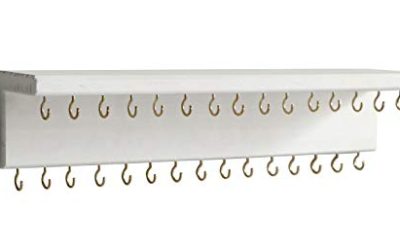
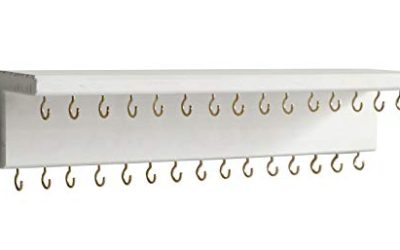
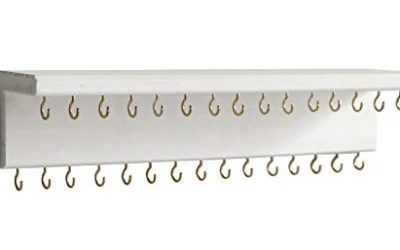
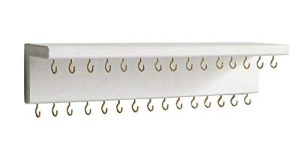
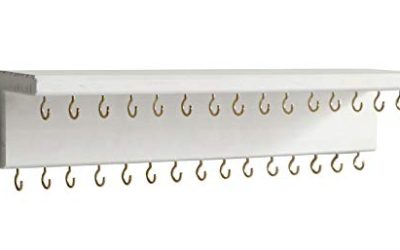
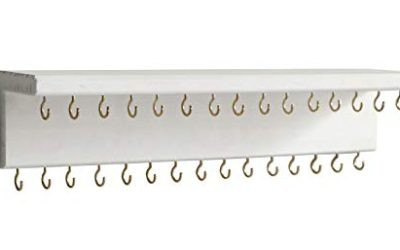
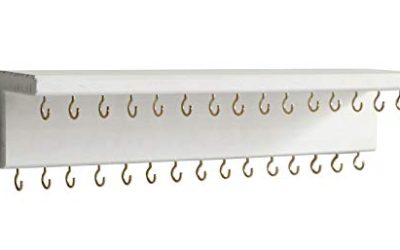
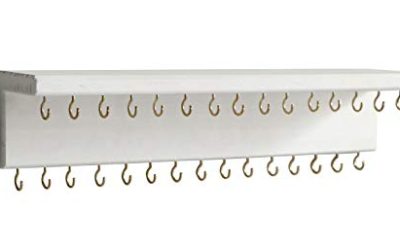
SANY DAYO Jewelry Organizer 30 Hooks

This is a jewelry organizer: a rail with thirty small hooks meant for necklaces and lightweight accessories. Presented plainly, its desk role is a light-duty rail for light leads and a small card — a short charging lead for earbuds, a lanyard, a badge card — hung where they can be seen and reached. That is the whole of its honest usefulness here.
What it must never be asked to do matters more. It is not a cable management system, and its hooks are not rated for power strips, charging bricks, consoles, external drives, or heavy tools — hanging real weight from a jewelry rail bends hooks and ends with gear on the floor. Kept inside its limits, it is a tidy home for featherweight things; pushed past them, it fails exactly the way physics says it will.
Specs
- Format: wall- or door-style rail with 30 small hooks
- Intended use: jewelry and lightweight accessories
- Honest desk role: light leads, lanyards, and small cards only
- Not suitable for: power strips, bricks, consoles, drives, heavy tools
HEKEE Dusk to Dawn Bulbs A19

These are plain automatic sensor bulbs: a photocell switches them on at dusk and off at dawn, with no app, no hub, and no schedule to program. They are explicitly not smart bulbs, and they are not task lighting. A sensor bulb cannot be dimmed from a phone or aimed at a page; it is ambient light that handles itself.
Their useful role is a room or hallway near the workspace that should never be dark when someone walks in after sunset. Two caveats decide whether they suit a given socket. In a windowless room, the sensor may never see enough daylight to switch off, so the bulb can stay on around the clock — sometimes acceptable, rarely intended. And like any bulb, the fixture matters: check the enclosed-fixture rating before installing one in a covered fitting.
Specs
- Format: A19 bulbs with a built-in dusk-to-dawn photocell sensor
- Control: fully automatic, no app or hub
- Explicitly not: smart bulbs, and not task lighting
- Check first: enclosed-fixture rating; behavior in windowless rooms
ULANZI Super Clamp

The ULANZI super clamp is a mount, and only a mount. It has no light, no phone, and no camera of its own; it grips an edge or a pole and presents a mounting point for an accessory the owner already has — a small light panel, a phone holder, a compact camera on a ball head. Around a desk, that makes it a way to hold a small light or camera above the rear edge while hands work on the runs below.
Two rules keep it honest. Never clamp a screen: the jaw pressure that makes it secure will crack or mark a monitor, and no mount is worth a display. And pad the jaws when gripping finished wood or painted edges, because bare metal teeth bite. Used as a temporary, removable extra hand — and removed when the job is done — it earns its place.
Specs
- Format: heavy-duty clamp with standard mounting points
- Provides: a grip and a mount only — no light, phone, or camera included
- Desk role: temporary hold for a small light or camera while working
- Rules: never clamp a screen; pad the jaws on finished surfaces
tomtoc Laptop Case

A laptop lives in motion between desks, and its cables travel with it. The tomtoc case is a padded soft case: it cushions a laptop against the knocks of a bag and a commute, and keeps a charging lead and small accessories corralled in the same place, so the travel cables stop living in three different drawers.
Its limits are equally plain. It is not a hard shell, so it will not protect against a serious crush or a drop onto concrete, and it is not waterproof, so rain means keeping it inside another bag. Fit decides everything: check the internal dimensions against the actual laptop, including any shell or skin already on the machine, because a case that must be forced shut protects nothing and stresses its own zipper.
Specs
- Format: padded soft laptop case
- Protection level: everyday knocks and scratches — not a hard shell
- Water resistance: not waterproof
- Fit rule: verify internal dimensions against the laptop before buying
Hi-Lyte Electrolyte Drops

Long desk sessions have a mundane failure mode: hours pass, water does not, and the afternoon slump arrives on schedule. Hi-Lyte electrolyte drops exist to make a glass of water a little more appealing and to replace the electrolytes lost in ordinary daily activity.
These drops are not a medicine, not an energy product, and not a treatment for anything. Plain water is fine for most people, most of the time, and no drop changes that. Anyone with a medical condition or a restricted diet — particularly around sodium or potassium — should follow a clinician’s guidance rather than a product label’s enthusiasm. Used as directed on the label, as a small nudge toward drinking enough during a long sit, they are a reasonable desk-drawer item.
Specs
- Format: concentrated electrolyte drops added to water
- Use: follow the label directions for dilution
- Claims kept modest: not a medicine, energy, or treatment product
- Note: plain water suits most people; clinician guidance for medical conditions or restricted diets
Frequently Asked Questions
Are hook-and-loop ties better than zip ties for a desk?
For most desks, yes, because desks change. Hook-and-loop ties reopen freely, forgive re-routing, and cannot be over-tightened as permanently as a zip tie can. Zip ties hold heavier, fixed bundles better, but removing one means cutting beside the cables. Many tidy setups use both: reusable ties for runs that evolve, zip ties only for bundles that will genuinely never change.
How tight should a cable tie be?
Snug enough that the bundle holds its shape, loose enough that no cable jacket is dented or creased. Over-tightening fatigues conductors at the pinch point and can degrade network and display cables, where internal tolerances matter. If a tie leaves a mark on a cable, reopen it and close it one notch gentler.
How many ties does one desk run need?
More than one, spaced along the run. A workable pattern is a tie near each end, one before any point where cables split toward different devices, and additional ties roughly a hand’s span apart on long drops. Bundles tied at intervals stay parallel and serviceable, while a run tied only at the ends tangles in the middle within weeks.
Do cable ties actually make a desk look tidy?
Only after the routing is right. Ties preserve a good decision; they cannot create one. A run that is routed sensibly — grouped by destination, kept off the floor, lifted into a tray where possible — looks tidy and stays that way once tied. The same ties applied to unplanned routing produce a neater-looking knot that is just as hard to service.
Final Verdict
Cable ties do exactly one thing — bundle — and they do it well only when the thinking happened first. Choose reusable hook-and-loop ties for any run that will change, reserve zip ties for fixed bundles, keep every tie snug rather than strangled, space them along the run instead of trusting one heroic tie, and let a simple color code do quiet work at the back of the desk. Lift the finished bundles into a tray so they stop collecting dust on the floor. The five companions above each support that work in a limited, plainly stated way: a rail for featherweight leads, automatic light that needs no managing, a clamp that lends a temporary hand, a case that keeps travel cables contained, and drops that modestly encourage hydration through long sessions. None of them replaces a tie, a tray, or a decision.
Product and ASIN Reference
| Product | ASIN |
|---|---|
| SANY DAYO jewelry organizer 30 hooks | B07QFZSVQW |
| HEKEE dusk to dawn bulbs A19 | B07HGZMYZ4 |
| ULANZI super clamp | B09C882D4M |
| tomtoc laptop case | B073TVX735 |
| Hi-Lyte electrolyte drops | B01MXDAHIB |
FAQ
Are hook-and-loop ties better than zip ties for a desk?
How tight should a cable tie be?
How many ties does one desk run need?
Do cable ties actually make a desk look tidy?
More from Amazon
Programs that pair well with the guide above. Offers and eligibility are set by Amazon and may change.
Free shipping on eligible items, Prime Video and more. Eligible new members can start with a free trial.
Start a Prime free trialAudiobooks and podcasts to listen to on the go. Eligible new members can start with a free trial.
Try Audible freeAd-free music streaming. Eligible new subscribers can start with a free trial.
Try Music Unlimited freeA free business account with business pricing and bulk-buying tools for work, shop or home office.
Create a business accountAs an Amazon Associate we earn from qualifying purchases.
Write Your Review
No reviews yet. Be the first to share your experience!