
Key takeaways
- Honest picks that work around simple cable ties in a spare room desk setup, with tidy bundling tips and companions that keep cords calm and neat.
A spare room desk tends to collect cables faster than anything else. A laptop charger lives behind the desk, a lamp cord curls around the leg, and a phone cable slides off the edge every time the chair rolls back. Plain cable ties are the simplest answer: small, unbranded straps that bundle a few cords together so the whole run sits calmly instead of wandering. The trick is not to gather every cable into one fat rope, but to make a few small bundles that stay loose enough to breathe.
One thing needs to be said plainly: none of the five picks in this guide is itself a cable tie. Cable ties are cheap, plain, and easy to find in almost any drawer, and they do not need a buying guide. What makes a spare room desk feel finished is the small set of companions that work around the cable ties — the things that hold the light accessories, light the room, mount the small extras, and carry the laptop away when the spare room needs to be a spare room again. Those companions are what this guide covers, honestly and without exaggeration.
As an Amazon Associate, we earn from qualifying purchases.
How to Choose
Each Bundle Loose Enough to Breathe
The most common mistake with cable ties is pulling them as tight as they will go. A bundle cinched hard can pinch insulation, kink a thin cord, and make the whole run stiff and awkward. A better rule is simple: the bundle should hold its shape when you lift it, but you should still be able to slide a fingertip under the tie without forcing it. Cables that can move a little last longer, and swapping one cord out stays a quick job instead of a small project.
One Tie per Bundle So Changes Stay Kind
Resist the urge to tie a long cable run at every few inches. One tie near each end of a bundle, and one in the middle on longer runs, is plenty. Fewer ties means fewer things to snip when a charger dies or a new device joins the desk, and the bundle can flex naturally around the desk leg instead of fighting it. When a change comes, cut the old tie carefully, blade facing away from the cords, and replace it with a fresh one.
Spare Ties Kept in One Drawer
Cable ties are only useful if you can find them when a new cable arrives. Keep the spare pack in one drawer — the same drawer every time — rather than scattering a few in the kitchen, a few in the garage, and the rest in a mystery box. A small pouch or plain envelope works fine. When the pack runs low, restock then, not when a new monitor lands on the desk.
Ties Bundle the Cables While the Layout Does the Organizing
It is worth being honest about what a cable tie can and cannot do. A tie gathers cables; it does not decide where they should run. The organizing happens in the layout: power on one side, data on the other, chargers low and out of sight, and only the cables that truly need to reach the desktop allowed up there. Decide the route first, with the cables loose, and only then add ties. A tidy desk is mostly a tidy plan; the ties just keep the plan honest.
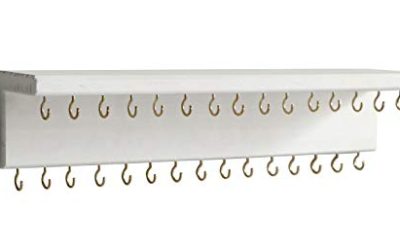
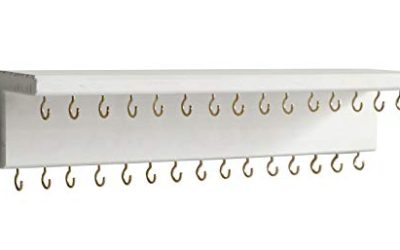
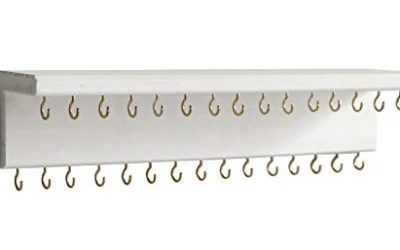
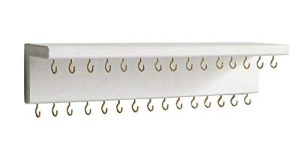
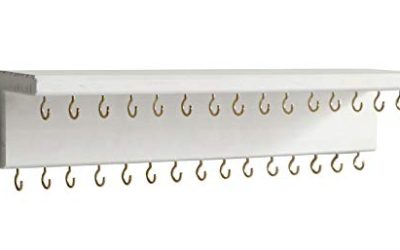
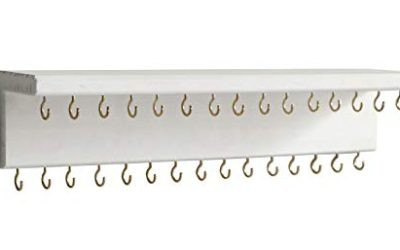
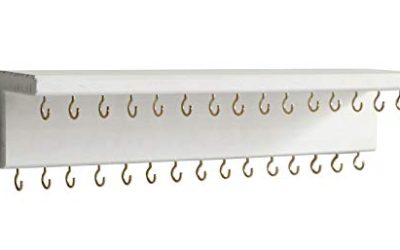
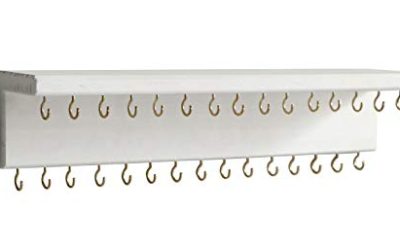
SANY DAYO Jewelry Organizer, 30 Hooks — A Light-Duty Rail Beside the Desk

The first companion is a wall-mounted organizer with thirty small hooks, and it helps to say exactly what it is: a jewelry organizer, made for necklaces and bracelets, not for hardware. Used honestly, though, it makes a fine light-duty rail on the wall beside a spare room desk. Short charging cables loop neatly over the hooks, a lanyard hangs where it can be found, and the light accessories that otherwise pile up on the desk — a spare earbud cord, a key ring, a badge on a strap — get a home off the work surface.
The limits matter as much as the uses. This rail is for light items only, full stop. It must not hold consoles, drives, power bricks, heavy tools, or cartridges, and it should never be asked to carry anything with real weight behind it. Mount it into a stud or use proper anchors, keep each hook to one light item, and it will quietly do its small job for years.
Specs
- Product type: wall-mounted jewelry organizer with 30 hooks
- Best role here: light-duty rail for short cables, lanyards, and light accessories
- Load guidance: light items only; not for consoles, drives, power bricks, heavy tools, or cartridges
- Mounting: wall mount; stud or suitable anchors recommended
HEKEE Dusk to Dawn Light Bulbs, A19 — Automatic Light for the Spare Room

Good cable management is hard to enjoy in a dim room, and spare rooms are often the dimmest in the house. These A19 bulbs carry a small light sensor in the base: when the room goes dark, the bulb comes on, and when daylight returns, it switches itself off. That suits a spare room that doubles as a desk space, where the overhead light tends to be forgotten in both directions — left off when someone works in the evening, and left on all day after they leave.
Honesty requires two clear statements about what these bulbs are not. They are plain automatic sensor bulbs: they are not smart bulbs, they cannot be dimmed or scheduled from a phone, and they are not task lighting for close desk work. A desk still deserves its own lamp for reading and detailed tasks. Also note: in a windowless room they may stay on, because they never see the daylight that tells them to stop. Check the enclosed-fixture rating on the packaging before use in a covered fitting.
Specs
- Product type: A19 light bulb with built-in dusk-to-dawn sensor
- Behavior: turns on in darkness, off in daylight, automatically
- Not suitable as: smart lighting, dimmable lighting, or primary task lighting
- Note: may stay on in windowless rooms; verify enclosed-fixture rating before use
ULANZI Super Clamp — A Mount for the Small Extras

Every desk accumulates one or two small things better held up than laid down: a small camera for calls, a phone at eye level, a tiny light panel. A super clamp is the honest way to hold them. It grips the edge of the desk or a shelf, and its mounting stud gives the accessory a fixed point instead of a wobbly stack of books. It also keeps those extras off the surface entirely, which means fewer cables draped across the desk in the first place.
The framing here needs to be exact: the clamp is a mount only. It has no light, no phone, and no camera of its own — it holds things that you supply. Two cautions keep it friendly. Never clamp a monitor screen; the pressure belongs on a desk edge or a sturdy shelf, never on a display. And pad the jaws on finished wood, so the grip leaves no mark. Tighten firmly, give the mounted item a gentle test wiggle, and check it again after the first day.
Specs
- Product type: super clamp mount for small accessories
- Includes: clamp and mounting point only; no light, phone, or camera included
- Mounting surface: desk edge or shelf; never clamp a monitor screen
- Surface care: pad the jaws on finished surfaces
tomtoc Laptop Case — The Desk Clears When the Laptop Leaves

A spare room has to change jobs without a fight. Guests arrive, the desk becomes a nightstand, and the laptop needs somewhere safe to go that is not the bed or the floor. A padded laptop case makes that swap painless: the machine slides in, the charger and its tidily bundled cable go with it, and the whole setup can wait in a closet until the room is an office again.
The honest description of this case is a padded soft case. It is not a hard shell, so it cushions against bumps and scratches rather than absorbing a serious drop, and it is not waterproof, so a rainy walk still calls for an umbrella or an inner bag. Fit matters most: check the internal dimensions against the laptop before ordering, because a case that is too small is useless and one that is far too large lets the machine slide around inside.
Specs
- Product type: padded soft laptop case
- Protection level: cushioning for everyday bumps and scratches; not a hard shell
- Water resistance: not waterproof
- Fit guidance: compare internal dimensions with the laptop before choosing a size
JoyJolt Faye Highball Glasses, 13 oz, 6 Pack — A Drink Kept Away From the Desk

A long session at a spare room desk usually involves a drink, and where that drink sits matters more than most people admit. A tall glass balanced beside a keyboard, on top of the very cables this guide just tidied, is an accident looking for a moment. These highball glasses are part of the setup for a simple reason: they belong on a side table, not on the desk. A drink a step away keeps spills away from the laptop, the cables, and the paperwork all at once.
These are real glasses, and they should be treated that way. Real glassware is breakable, so it lives on a stable side table or a tray, gets carried one or two at a time, and never gets parked on the edge of the desk. The tall, plain shape is easy to wash and store between uses. Six glasses mean the spare room can host a guest properly, too.
Specs
- Product type: highball drinking glasses, 6 pack
- Capacity: 13 oz per glass
- Material: real glass; breakable, handle and store with care
- Best placement: side table or tray, away from the desk and electronics
FAQ
Are any of these picks actually cable ties?
No, and that is deliberate. Plain cable ties are simple, generic straps that need no research to buy. This guide covers the companions that work around the ties: a light-duty hook rail, automatic room lighting, a clamp mount, a laptop case, and glassware that keeps drinks off the desk. Together they make the tied cables part of a room that actually works.
How tight should a cable tie be on a desk bundle?
Snug, not strangled. The tie should hold the bundle’s shape when lifted, but a fingertip should still slide underneath it. Overtight ties can pinch insulation and kink thin cords, and they make later changes miserable. Leave a little room, route the cables first, and let the tie hold the route you already chose.
Can the hook organizer hold a game console or a power brick?
No. The organizer is a jewelry organizer with small hooks, used here only as a light-duty rail for short cables, lanyards, keys, and similarly light accessories. Consoles, drives, power bricks, heavy tools, and cartridges are all too heavy for it and belong on a shelf or in a drawer. Keeping the load light is what makes the rail safe and useful.
What should I do with spare cable ties so they are easy to find?
Keep the whole spare pack in one place — ideally the desk drawer itself, in a small pouch or envelope — so a new cable never sends you hunting through the house. One tie per bundle means a single pack lasts a long time. Restock when the pouch feels light, not when a new device is already sitting on the desk.
Final Verdict
The best cable tie setup for a spare room desk is mostly not about ties at all. Plain ties, used loosely and sparingly, hold a sensible cable layout in place; the layout itself does the real organizing. Around them, five honest companions finish the job: the SANY DAYO organizer as a strictly light-duty rail, the HEKEE sensor bulbs for automatic room light never confused with task lighting, the ULANZI clamp as a mount only — padded jaws, desk edge, never a screen — the tomtoc case as soft, non-waterproof protection sized by its internal dimensions, and the JoyJolt glasses kept on a side table where real glassware belongs. None of it is fancy, and that is exactly the point: a desk that stays tidy because every piece is doing a job it can honestly do.
Product and ASIN Reference
| Product | ASIN |
|---|---|
| SANY DAYO jewelry organizer, 30 hooks | B07QFZSVQW |
| HEKEE dusk to dawn light bulbs, A19 | B07HGZMYZ4 |
| ULANZI super clamp | B09C882D4M |
| tomtoc laptop case | B073TVX735 |
| JoyJolt Faye highball glasses, 13 oz, 6 pack | B08BB62QWT |
FAQ
Are any of these picks actually cable ties?
How tight should a cable tie be on a desk bundle?
Can the hook organizer hold a game console or a power brick?
What should I do with spare cable ties so they are easy to find?
More from Amazon
Programs that pair well with the guide above. Offers and eligibility are set by Amazon and may change.
Free shipping on eligible items, Prime Video and more. Eligible new members can start with a free trial.
Start a Prime free trialAudiobooks and podcasts to listen to on the go. Eligible new members can start with a free trial.
Try Audible freeAd-free music streaming. Eligible new subscribers can start with a free trial.
Try Music Unlimited freeA free business account with business pricing and bulk-buying tools for work, shop or home office.
Create a business accountAs an Amazon Associate we earn from qualifying purchases.
Write Your Review
No reviews yet. Be the first to share your experience!