
Key takeaways
- Peaceful morning companions for a monitor light bar: a light-duty wall rail, sensor bulbs, a clamp mount, a soft case, and glassware for the side table.
A monitor light bar earns its place in the early hours because it does one narrow job well: it sits along the top edge of the screen and throws a calm pool of light down onto the desk, leaving the display itself free of reflections. When the bar is angled kindly down at the desk, no glare hits the eyes, and the keyboard, notebook, and mug all fall inside the same gentle circle of light. The screen in front of it stays blank or shows only a soft abstract glow before the workday begins, and the rest of the room can stay dim and quiet.
One point needs to be plain before anything else: none of the five picks below is itself a light bar. A light bar is described here only generically and unbranded, and each pick is a companion that lives around the bar and the desk it serves. One keeps small things off the desk surface, one handles the room’s background light, one offers a careful way to position small gear nearby, one protects a laptop on the move, and one keeps morning drinks safely off to the side. Together they support the calm setup the bar starts.
As an Amazon Associate, we earn from qualifying purchases.
How to Choose
Angle the Bar Kindly Down at the Desk
The first decision with any monitor light bar is the angle. The bar should tilt so its light lands on the desk surface and the keyboard, not outward toward the face. A bar angled kindly down keeps glare off the eyes and off the screen, which matters most in a dim room where any stray brightness feels harsh. Most bars pivot on their mount, so small adjustments are easy: nudge the bar, sit back, and check whether the desk is lit while the display stays clean. If the top of the screen catches a bright edge, the bar needs another small tilt downward.
Keep the Brightness Low in the Early Hours
A peaceful morning rarely needs full brightness. In the first hour of the day, eyes are still adjusting, and a low setting is usually enough to read notes, find keys, and type comfortably. Many bars offer a warm-to-cool color range as well, and the warmer end tends to suit early hours better than a stark white setting. The habit worth building is simple: start low, and raise the level only as daylight and tasks demand. A bar that remembers its last setting makes that habit effortless, because the desk wakes up exactly as it was left.
Route the Bar’s Cable Behind the Monitor
A light bar usually draws power from a USB connection, and its cable deserves the same care as the light itself. Routing the cable behind the monitor keeps the desk surface clear and keeps the cord away from mugs, elbows, and sliding keyboards. A gentle loop of slack behind the screen lets the bar pivot for angle adjustments without tugging at the port. A tidy cable run is a small thing, but it protects the calm the setup is meant to create.
The Bar Only Lights the Desk While the Eyes Do the Seeing
It is worth stating the limit plainly: the bar only lights the desk while the eyes do the seeing. A light bar cannot fix a poorly placed monitor, a chair at the wrong height, or a screen set too bright for the room. It also cannot light a whole room, and it should not be asked to. Its job is a focused pool of light on the work surface, and within that job it is excellent. Seating, screen position, and regular breaks still matter just as much as the glow on the desk.
SANY DAYO Jewelry Organizer With 30 Hooks
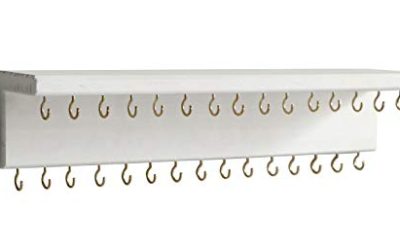
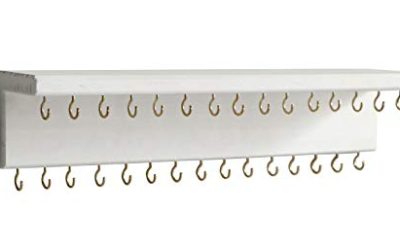
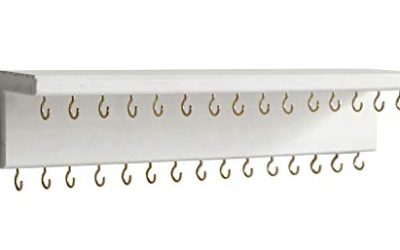
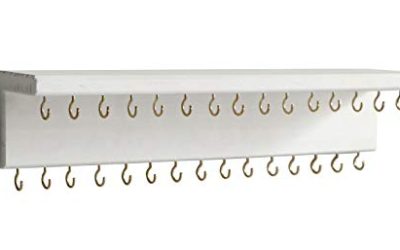
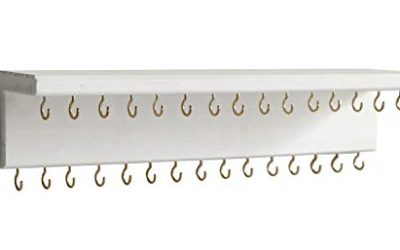
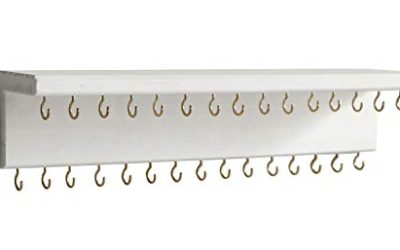
This first pick needs an honest introduction: it is a jewelry organizer, full stop. The SANY DAYO organizer is a wall-mounted rail fitted with thirty hooks that was designed to hold necklaces and similar light pieces. Around a morning desk, it earns a second life only as a light-duty wall rail for keys, lanyards, badge holders, and other small, light accessories that otherwise scatter across the desk surface. Hanging those items on a rail beside the desk keeps the light bar’s pool of light landing on a clear desk, which is exactly where it works best.
The limits matter as much as the use. This rail must never be described as holding consoles, drives, power bricks, heavy tools, or game cartridges, because it is not built for that weight or bulk. Each hook suits light items only, and the rail needs a firm wall fixing. Kept within those bounds, it is a tidy companion: the lanyard goes on the same hook every morning, and the desk stays clear for work.
Specs
- Product type: wall-mounted jewelry organizer rail
- Hook count: 30 hooks for necklaces and light items
- Intended use: jewelry storage; repurposed here only as a light-duty rail for keys, lanyards, and light accessories
- Mounting: wall rail, requires a secure fixing
HEKEE Dusk-to-Dawn Light Bulbs A19
While the light bar handles the desk, something still has to handle the room. The HEKEE A19 bulbs are plain automatic sensor bulbs with a built-in dusk-to-dawn sensor: they switch themselves on when the surrounding light falls and off when daylight returns. In a home office, that means the room’s background light quietly takes care of itself in the early hours, so the walk from the door to the desk is never done in the dark, and nobody has to fumble for a switch while carrying a mug.
Two clarifications keep expectations honest. These are explicitly not smart bulbs: there is no app, no voice control, and no scheduling beyond what the light sensor does on its own. They are also not task lighting, and they are no substitute for the light bar over the desk, because their glow is general room light rather than a focused pool on the work surface. Two practical notes complete the picture: in windowless rooms or garage spaces, the sensor may read the space as permanently dark, so the bulbs may stay on; and before fitting them in a covered fitting, check the enclosed-fixture rating.
Specs
- Product type: A19 light bulbs with dusk-to-dawn sensor
- Operation: automatic on at dusk, off at dawn, based on ambient light
- Controls: no app, no voice control; explicitly not smart bulbs
- Role: general room light, not task lighting
- Notes: may stay on in windowless or garage rooms; check the enclosed-fixture rating before use in covered fittings
ULANZI Super Clamp
The ULANZI super clamp is a sturdy mounting clamp, and its role near a light bar setup is positioning: it can grip a desk edge, a shelf lip, or a stand and hold a small accessory steady at a chosen angle. Around a peaceful-morning desk, that might mean holding a small phone stand off to the side or keeping a lightweight accessory arm in place, always clear of the screen itself.
The honest framing is essential here. The clamp is a mount only; it has no light, phone, or camera of its own, and it produces nothing but grip. Anything it holds has to be supplied separately. Two safety habits are non-negotiable: never clamp a monitor screen, because a screen’s bezel and panel are not built to take clamping pressure, and always pad the jaws when gripping furniture or finished surfaces so the bite does not mark the material. Used with that care, it is a flexible little problem-solver.
Specs
- Product type: super clamp mount
- Function: grips desk edges, shelves, and stands to hold small accessories
- Included gear: mount only; no light, phone, or camera included
- Use notes: never clamp a monitor screen; pad the jaws to protect surfaces
tomtoc Laptop Case
A peaceful morning desk often starts the night before, with a laptop put away safely and brought out without fuss. The tomtoc laptop case is a padded soft case designed to cushion a laptop against the knocks of a commute or a trip across the house. Its padding softens bumps, its interior is gentle on the machine’s finish, and it gives the laptop a defined home on a shelf or in a bag, which keeps the desk itself clear overnight.
Its limits are plain and worth repeating: it is a padded soft case, not a hard shell, so it will not stand up to crushing weight or a serious drop the way rigid armor might. It is also not waterproof, so rain and spills remain a real risk even with the laptop inside. Because laptop sizes vary, check the internal dimensions against the actual machine before ordering. Measured expectations make it a dependable everyday companion.
Specs
- Product type: padded laptop soft case
- Protection: cushioning against everyday bumps and knocks
- Limits: not a hard shell; not waterproof
- Fit note: check internal dimensions against the laptop before choosing a size
JoyJolt Faye Highball Glasses, 13 oz, Set of 6
The last companion belongs to the ritual side of the morning: a tall glass of water, juice, or iced tea waiting at the start of the day. The JoyJolt Faye highball glasses are 13 oz glasses sold as a set of six, with a clean, simple shape that suits everything from water to layered morning drinks. A full set means a fresh glass is always ready, and the tall profile keeps a generous drink within easy reach during the first work session.
The caution with this pick is physical, not digital: these are real glassware, and real glass can break. The sensible habit is to keep the glass on a side table away from electronics, cards, and collections, rather than on the desk beside the keyboard and monitor. A spill can reach a laptop in seconds, and broken glass near a workspace is a genuine hazard. Parked on a side table, the drink stays part of the calm morning without threatening the gear.
Specs
- Product type: highball drinking glasses
- Capacity: 13 oz per glass
- Set size: 6 glasses
- Material: real glass; breakable, handle with care
- Use note: keep on a side table away from electronics, cards, and collections
FAQ
Can a light bar replace a desk lamp entirely?
For the desk surface itself, often yes, because the bar’s light is aimed exactly where hands and eyes work. It will not light the whole room, though, so a general room light still has a role. Many morning setups pair the bar with soft background light and find that combination covers both needs comfortably.
Where should a light bar sit on the monitor?
It rests along the top edge of the screen, centered, so its light falls evenly across the desk. The bar should angle down toward the work surface, and its cable should route behind the monitor. If any part of the screen shows glare, a small tilt adjustment usually clears it.
Will a light bar bother anyone sharing the room?
Usually very little, because the light is directed down at the desk rather than outward. At low brightness in the early hours, the pool of light stays local to the workspace. That focused throw is one of the main reasons bars suit shared and quiet spaces.
How bright should the bar be in the morning?
Start at the low end and adjust by feel. The desk, keyboard, and notes should be easy to see without squinting, and the screen should not look dim by comparison. As daylight grows, the bar can be raised slightly or switched off until needed again.
Final Verdict
A monitor light bar is a small, focused tool: angled kindly down at the desk, kept low in the early hours, and cabled neatly behind the monitor, it gives a peaceful morning exactly the light it needs and no more. The five companions here support that calm from the edges. The SANY DAYO organizer serves honestly as a jewelry organizer repurposed only as a light-duty rail for keys and lanyards, the HEKEE bulbs quietly automate the room’s background light, the ULANZI clamp positions small gear with padded care, the tomtoc case cushions the laptop within its stated limits, and the JoyJolt glasses keep the morning drink safely on a side table. None of them is the bar itself, and that is the point: the bar only lights the desk while the eyes do the seeing.
Product and ASIN Reference
| # | Product | ASIN |
|---|---|---|
| 1 | SANY DAYO jewelry organizer with 30 hooks | B07QFZSVQW |
| 2 | HEKEE dusk-to-dawn light bulbs A19 | B07HGZMYZ4 |
| 3 | ULANZI super clamp | B09C882D4M |
| 4 | tomtoc laptop case | B073TVX735 |
| 5 | JoyJolt Faye highball glasses, 13 oz, set of 6 | B08BB62QWT |
FAQ
Can a light bar replace a desk lamp entirely?
Where should a light bar sit on the monitor?
Will a light bar bother anyone sharing the room?
How bright should the bar be in the morning?
More from Amazon
Programs that pair well with the guide above. Offers and eligibility are set by Amazon and may change.
Free shipping on eligible items, Prime Video and more. Eligible new members can start with a free trial.
Start a Prime free trialAudiobooks and podcasts to listen to on the go. Eligible new members can start with a free trial.
Try Audible freeAd-free music streaming. Eligible new subscribers can start with a free trial.
Try Music Unlimited freeA free business account with business pricing and bulk-buying tools for work, shop or home office.
Create a business accountAs an Amazon Associate we earn from qualifying purchases.
Write Your Review
No reviews yet. Be the first to share your experience!