
Key takeaways
- A ready-start desk begins with a plain light bar and five honest companion picks for rails, bulbs, mounts, laptop cases, and a side-table drink.
A desk that is ready at first light is mostly a desk that was left in order the night before. The center of that setup is a plain, generic, unbranded light bar: a simple strip of light that sits above or behind the work area, washes the desk surface evenly, and asks for nothing more than a clear patch of desk and a sensible angle. It has no app to open and no settings to memorize, and that plainness makes it easy to live with.
One point needs to be stated plainly before anything else: none of the five picks in this guide is itself a light bar. They are companion picks that sit around one. A small rail keeps the bar’s cable and little tools off the work surface, a sensor bulb handles the room’s general glow so the bar can stay focused on the desk, a clamp offers a mounting option, a padded case carries the laptop, and a set of glasses keeps a drink safely on the side table. Each earns its place by supporting the bar’s job rather than competing with it.
As an Amazon Associate, we earn from qualifying purchases.
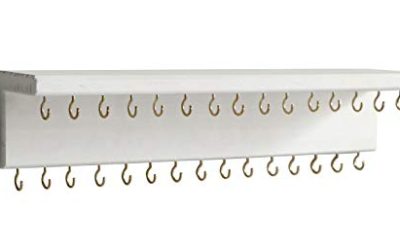
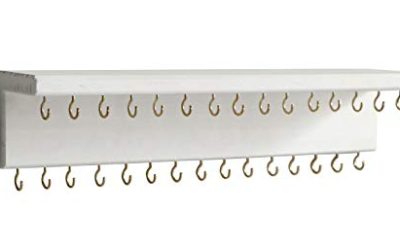
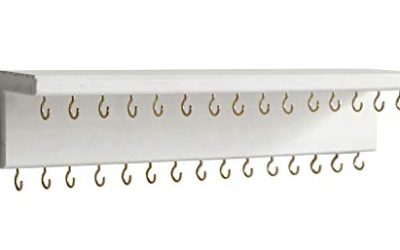
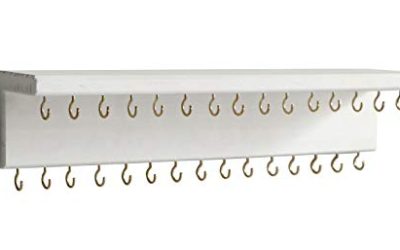
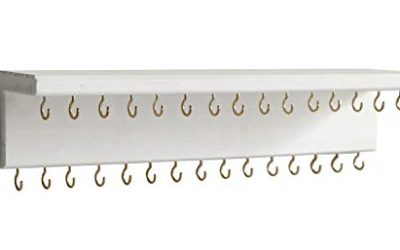
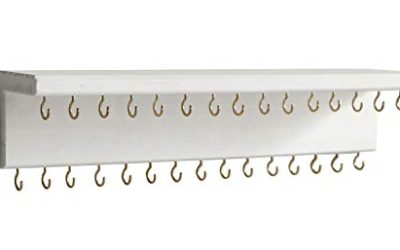
SANY DAYO Jewelry Organizer With 30 Hooks
The first companion is a wall or door rail sold as a jewelry organizer, and it works best here when treated honestly as what it is: a light-duty rail with thirty small hooks. Mounted on the wall beside the desk or on a bookcase side panel, it gives the light bar’s power cable a tidy route, holds a coiled spare cable, and keeps scissors, a tape measure, and other feather-light tools hanging in plain sight instead of scattered across the work surface.
Used within its limits, the rail quietly supports the whole ready-start idea: everything on it is visible at a glance, everything has a fixed home, and the desk stays clear for paper and keyboard. The limits matter as much as the uses. This is a jewelry rail, and it should only ever carry light items. It never holds consoles, drives, power bricks, heavy tools, or cartridges; a small shelf or drawer is the right home for those.
Specs
- Product type: wall-mounted jewelry organizer rail
- Hooks: 30 small hooks in a row
- Intended load: light items only, such as cables, lanyards, and small tools
- Best placement: wall beside the desk or inside a cabinet door
- Role in this setup: cable route and small-tool storage near the light bar
HEKEE Dusk to Dawn Bulbs A19
A light bar does its best work when it is not also responsible for lighting the whole room. These A19 bulbs carry the room’s general light instead. Each has a simple dusk-to-dawn sensor, so it switches itself on when the room darkens and off when daylight returns, with no timer to set. In the evening the bar lights the desk, the bulb lights the room, and neither has to do the other’s job.
These are plain automatic sensor bulbs, and it is worth being exact about what they are not. They are not smart bulbs: no app, no voice control, no color changing, no schedule to program. They are also not task lighting, and no substitute for the focused light the bar puts on the desk. In a windowless room or garage workspace, the sensor may read the space as permanently dark and the bulb may stay on, which is normal for this kind of sensor. Before fitting one in a covered fitting, check that the fixture is rated for enclosed use.
Specs
- Product type: A19 sensor bulb, sold for standard screw fittings
- Sensor: automatic dusk-to-dawn on and off
- Controls: none, no app or remote
- Best placement: ceiling or wall fixture for general room light
- Role in this setup: background room light so the bar can focus on the desk
ULANZI Super Clamp
The third pick is a sturdy clamp mount, and its role needs the same plain statement as the others: the clamp is a mount only. It has no light, no phone, and no camera of its own, and it adds nothing except a firm place to attach something else. Around a light bar desk, that firm place is useful: a clamp can grip a shelf edge above the desk and hold a small accessory arm, pin a cable run along a desk leg, or anchor a lightweight item that would otherwise need a stand.
The clamp’s jaws open wide enough for most desk edges and shelf boards, and its mounting points let an arm or holder sit at the angle the desk needs. Used this way, it keeps the bar’s surroundings flexible: a shelf above the monitor can carry a small item without drilling, and the arrangement can change in a minute. What it should never do is pretend to be the light source. The bar lights the desk; the clamp only holds things still.
Specs
- Product type: super clamp mount
- Function: grip and mounting point only, no light or device included
- Best placement: desk edge, shelf board, or monitor riser side
- Jaw fit: sized for common desk and shelf thicknesses
- Role in this setup: flexible mounting for small accessories near the bar
tomtoc Laptop Case
Most desks that earn a light bar also host a laptop, and a laptop that travels needs a case that treats it gently. This tomtoc case is a padded soft case: a cushioned sleeve that absorbs the small knocks of a commute or a walk between rooms. It keeps the machine separate from cables, notebooks, and the rail’s hooks, so the desk stays calm and the laptop stays protected when it leaves.
The honest limits of a soft case are simple. It is not a hard shell, and it will not protect a laptop from a serious drop or from weight stacked on top of it. It is also not waterproof, so on a rainy walk the case should ride inside a bag. The most important check happens before ordering: measure the laptop and compare it with the case’s internal dimensions, because a snug fit protects better than a loose one.
Specs
- Product type: padded soft laptop sleeve case
- Protection: cushioning against small knocks and scratches
- Limits: not a hard shell, not waterproof
- Fit check: compare laptop measurements with internal dimensions
- Role in this setup: safe storage and carrying for the desk’s laptop
JoyJolt Faye Highball Glasses 13 oz, 6 Pack
The last companion has nothing to do with light at all, and that is the point. A ready-start desk works better when drinks live somewhere else, and this set of six highball glasses gives morning water, juice, or iced tea a proper home on the side table. Each glass holds 13 ounces, enough for a full drink without constant refills, and the tall shape keeps the footprint small.
These are real glasses, made of real glass, and they should be treated that way. Glass breaks, so the glasses stay on the side table only, well away from electronics, cards, and collections, and never on the desk beside the keyboard where an elbow can find them. Kept in their place, they complete the arrangement the bar starts: light on the work, tools on the rail, drink safely off to the side.
Specs
- Product type: highball drinking glasses, pack of 6
- Capacity: 13 oz per glass
- Material: real glass, breakable
- Best placement: side table only, away from electronics and paper goods
- Role in this setup: keeps drinks off the desk and within easy reach
How to Choose
A light bar setup is easy to get right because every piece in it has one clear job. The four points below follow the order that matters most: aim the light, protect the screen, keep the bar clean, and remember what the bar can and cannot do.
Aim the Bar at the Desk Surface, Never at the Eyes
The bar should wash the desk, not the person sitting at it. Angle it down toward the work surface so the light spreads across paper, keyboard, and notebook, and keep it out of the direct line of sight. Light aimed at the eyes causes squinting and tiredness, while light aimed at the desk makes print easy to read. A small tilt is usually all it takes, and the change is obvious the moment the bar is switched on.
Keep the Screen Free of Glare
A monitor and a light bar share the same few feet of desk, so their angles have to agree. If the bar’s light reflects in the screen, the display washes out and the eyes work harder. The fix is placement rather than brightness: set the bar so its light falls in front of or beside the screen rather than onto it, and tilt the monitor slightly until the reflection disappears. A glare-free screen and a well-lit desk can exist together, but only when the bar is aimed with the screen in mind.
Dust the Bar on the Weekly Round
Light shows dust honestly. A bar wiped on the weekly round keeps its output even, and the job takes less than a minute with a dry or barely damp cloth. The same round can cover the rail’s hooks and the clamp’s jaws, since they gather the same fine layer. A bar that is never dusted slowly dims behind a film of grime, and the desk feels dull for reasons that are easy to miss.
Remember the Bar Only Lights the Desk
The bar’s whole job is to light the desk, and it does that job well. Everything else — the writing, the reading, the sorting, the deciding — belongs to the person in front of it. Keeping that division clear makes the setup easier to judge: if the desk is hard to work at, the answer is rarely a brighter bar and is usually a clearer surface or a drink moved to the side table. The bar only lights the desk; the person does the working.
Frequently Asked Questions
Is a plain light bar enough for a home office desk?
For most desk work, yes. A simple bar aimed at the surface gives even light for reading, writing, and keyboard work, and the room’s general light can come from an ordinary fixture or a sensor bulb. Desks used for detailed craft work may want an additional focused lamp, but for everyday office tasks a plain bar covers the need.
Why does the guide include picks that are not light bars?
Because a light bar never works alone. The bar needs its cable routed, the room needs background light, small items need a mount or a home, the laptop needs protection, and drinks need somewhere safe to sit. Each companion pick handles one of those supporting jobs, and the guide states plainly that none of them is a light bar, so there is no confusion about what is being bought.
Can the sensor bulbs replace the light bar?
No. The HEKEE bulbs provide general room light that switches on and off by itself, which is useful background light, but it is spread across the whole room rather than aimed at the desk. Task work needs light directed at the surface, and that is the bar’s role. The two work together: the bulb keeps the room comfortable, and the bar keeps the desk bright.
Where should drinks go if not on the desk?
On a side table, in a real glass, at a distance from anything that water can harm. The JoyJolt glasses in this guide are breakable glassware, so they belong away from electronics, cards, and collections, on a stable surface where they cannot be knocked into the work area. A drink within reach but off the desk keeps both the drink and the work safe.
Final Verdict
A ready-start desk does not need clever lighting. It needs a plain, generic, unbranded light bar aimed at the surface, a glare-free screen, and a short weekly dusting. Around that bar, five modest companions do the supporting work: the SANY DAYO rail carries light tools and the cable run, the HEKEE bulbs handle the room’s background glow, the ULANZI clamp offers a mount where one is needed, the tomtoc case protects the laptop, and the JoyJolt glasses keep drinks on the side table. None of them is a light bar, and the guide has said so from the start — together they make the bar’s one job easy to do well.
Product and ASIN Reference
| # | Product | ASIN |
|---|---|---|
| 1 | SANY DAYO jewelry organizer 30 hooks | B07QFZSVQW |
| 2 | HEKEE dusk to dawn bulbs A19 | B07HGZMYZ4 |
| 3 | ULANZI super clamp | B09C882D4M |
| 4 | tomtoc laptop case | B073TVX735 |
| 5 | JoyJolt Faye highball glasses 13 oz 6 pack | B08BB62QWT |
FAQ
Is a plain light bar enough for a home office desk?
Why does the guide include picks that are not light bars?
Can the sensor bulbs replace the light bar?
Where should drinks go if not on the desk?
More from Amazon
Programs that pair well with the guide above. Offers and eligibility are set by Amazon and may change.
Free shipping on eligible items, Prime Video and more. Eligible new members can start with a free trial.
Start a Prime free trialAudiobooks and podcasts to listen to on the go. Eligible new members can start with a free trial.
Try Audible freeAd-free music streaming. Eligible new subscribers can start with a free trial.
Try Music Unlimited freeA free business account with business pricing and bulk-buying tools for work, shop or home office.
Create a business accountAs an Amazon Associate we earn from qualifying purchases.
Write Your Review
No reviews yet. Be the first to share your experience!