
Key takeaways
- Five calm desk companions around a light bar for a clear start: a wall rail, sensor bulbs, a clamp, a soft case and real glassware for the side table.
A desk light bar is a simple idea done well: a plain, unbranded bar that sits on top of a monitor and throws an even wash of light across the desk surface instead of into the eyes. This guide is about the companions around that bar, because the honest starting point is that none of the five picks below is itself a light bar. The light bar in this setup is a generic, unbranded piece chosen separately, and any screen it lights is treated as a blank surface or a soft abstract glow, never a readable display. What these five picks do is support the calm start the bar makes possible: a wall rail for the small things that usually scatter, automatic bulbs that handle the room’s background light, a clamp that holds things steady, a soft case for the laptop that shares the desk, and real glassware that lives safely on a side table.
Each section below says why its pick earns a place, what the item cannot do, and where it belongs in a room built around a light bar. There are no prices, ratings or review counts here, and no testing claims are made. The goal is a calm, clear desk at the start of the day and the start of the evening alike: the bar lights the work surface, the companions keep everything else in its place, and the person does the reading, writing and thinking.
As an Amazon Associate, we earn from qualifying purchases.
SANY DAYO Jewelry Organizer: A Light-Duty Wall Rail Beside the Desk

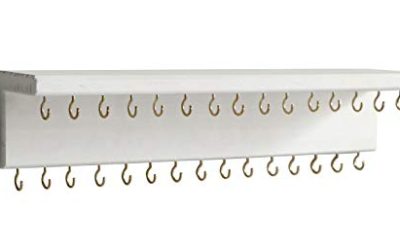
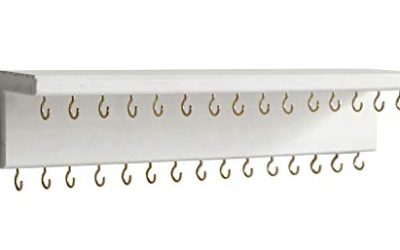
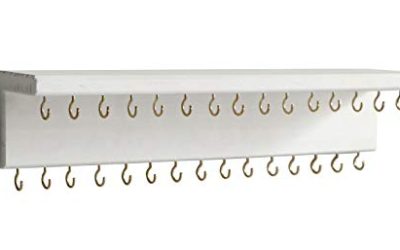
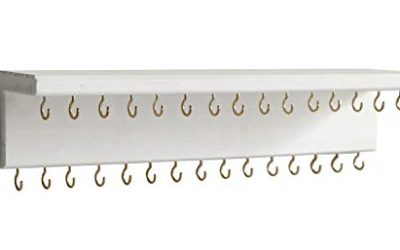
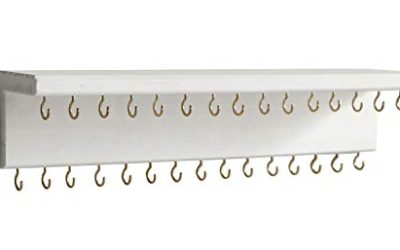
The first companion is the SANY DAYO jewelry organizer with 30 hooks, and it needs a plain statement up front: it is a jewelry organizer, and in this desk setup it is repurposed only as a light-duty wall rail. Mounted on the wall beside the desk, its hooks hold keys, lanyards, charging leads and other light accessories that otherwise end up in a pile under the light bar’s glow. That is the whole job, and it is a useful one, because a calm desk starts with the small clutter leaving the surface entirely.
The limits matter as much as the use. This rail is explicitly never for consoles, drives, power bricks, heavy tools or cartridges, The hooks are light-duty, and the desk equipment in this setup stays on shelves, in trays or in cases. Used within those limits, the rail gives the light bar a clear stage: the desk surface holds the keyboard, the notebook and the mug, while the wall holds the bits and pieces that used to wander.
Specs
- Product type: jewelry organizer with 30 hooks, repurposed as a light-duty wall rail
- Role in this setup: wall storage for keys, lanyards and light accessories beside the desk
- Explicit limits: never for consoles, drives, power bricks, heavy tools or cartridges
- Placement: wall-mounted beside the desk, clear of the light bar’s beam
HEKEE Dusk to Dawn Bulbs: Background Light That Handles Itself

The second companion is a set of HEKEE A19 bulbs with dusk-to-dawn sensors, and their framing needs to be exact: these are plain automatic sensor bulbs. They are explicitly not smart bulbs, with no app, no voice control and no scheduling, and they are not task lighting, so they never replace the light bar that lights the desk. What they do is handle the room’s background light on their own: when the room darkens, they come on; when daylight returns, they switch off. That automatic behavior keeps the room from going gloomy around a brightly lit desk, which is part of what makes an evening session feel calm instead of stark.
Two honest caveats belong with these bulbs. In a windowless room or a garage room, the sensor may read the space as permanent dusk, and the bulbs may stay on far longer than expected, so they suit rooms with some daylight best. And before any bulb goes into a covered fitting, check the enclosed-fixture rating for that fitting and the bulb. With those two checks done, the HEKEE bulbs quietly take one small decision off the evening routine: the room light simply looks after itself.
Specs
- Product type: A19 dusk-to-dawn sensor bulbs
- Role in this setup: automatic background room light around the desk
- Explicit limits: not smart bulbs, not task lighting, no app or voice control
- Notes: may stay on in windowless or garage rooms; check enclosed-fixture rating before use
ULANZI Super Clamp: A Steady Mount for the Small Extras

The third companion is the ULANZI super clamp, and its description starts with what it is not: it is a mount only, a clamp with a mounting point, and it has no light, phone or camera of its own. Anything it holds has to be supplied separately. In a desk built around a light bar, that makes it the steady hand for small extras: it can grip a shelf edge or a desk leg and hold a lightweight accessory in a fixed position, so the setup stays arranged the way it was left instead of sliding into disorder.
Two rules keep the clamp honest and safe. Never clamp a monitor screen: the jaws are made for edges, frames and poles, so the clamp belongs on the desk edge, a shelf or a stand, never on the display the light bar sits above. And pad the jaws before tightening, because padding protects the surface underneath from marks. Treated that way, the clamp is a quiet structural helper: it holds, the light bar lights, and neither one pretends to do the other’s job.
Specs
- Product type: super clamp mount
- Role in this setup: steady mounting point for small, lightweight accessories
- Explicit limits: a mount only, with no light, phone or camera of its own
- Notes: never clamp a monitor screen; pad the jaws before tightening
tomtoc Laptop Case: A Soft Landing for the Laptop That Shares the Desk

The fourth companion is the tomtoc laptop case, the soft landing place for the laptop that shares a desk with the light bar setup. Its description starts with limits: it is a padded soft case, not a hard shell, and it is not waterproof. It will soften everyday bumps and keep dust and scuffs off the machine in a bag or on a shelf, but it is not armor against drops or protection against rain or spills. Within those limits, it does a calm and useful job: when the laptop leaves the desk, the desk is fully clear for reading and writing under the bar, and when the laptop returns, it slides out of one known place instead of being hunted for.
The one check that matters before buying any soft case is fit. Check the internal dimensions against the laptop’s actual measurements, because a case that is nearly right is simply wrong: too tight strains the zipper, too loose lets the machine slide. With the size confirmed, the case becomes the place the laptop sleeps while the bar lights the evening’s paper work.
Specs
- Product type: padded laptop soft case
- Role in this setup: protected storage for the laptop when it leaves the desk
- Explicit limits: not a hard shell, not waterproof
- Notes: check internal dimensions against the laptop before choosing a size
JoyJolt Faye Highball Glasses: Real Glassware for the Side Table

The fifth companion is a set of six JoyJolt Faye highball glasses, and the honest description is short: these are real glassware, which means real glass that can break, and they belong on a side table away from electronics, cards and collections. A tall glass of water is a good desk habit during a long reading session under the light bar, but the glass itself should live one step removed from the keyboard, the monitor and anything vulnerable to a spill or a knock. The side table is close enough to reach and far enough to be safe, and that small distance is the entire point of this pick.
The glasses play a modest role: they mark the desk as a place where the evening settles rather than rushes. A drink poured, the bar lit, the room bulbs on by themselves, the small things on the wall rail, the laptop asleep in its case — the scene is calm because every item is in the right place and none is asked to do more than it honestly can.
Specs
- Product type: highball glasses, 13 oz, set of 6
- Role in this setup: drinks service for long desk sessions
- Explicit limits: real breakable glassware
- Placement: side table only, away from electronics, cards and collections
How to Choose
A light bar does its best work when four simple decisions are made once and then left alone. These four checks, in order, are the whole method.
Mount the Bar So No Glare Lands on the Screen
The bar should sit so its light falls on the desk and never reflects off the screen. A screen in this setup is a blank surface or a soft abstract glow, and glare is what turns that calm surface into a mirror. Angle the bar, check from the sitting position, and adjust until the display shows no bright reflection of the bar itself.
Aim the Bar at the Desk, Never at the Eyes
The beam belongs on the work surface: the notebook, the keyboard, the page. A bar aimed too high puts light into the eyes, which is tiring and defeats the purpose of the design. The test is simple: from the chair, the light source should be barely noticeable, while the desk below it is evenly lit.
Set the Brightness Once for the Evening
Pick a brightness that matches the room at the start of the session and then leave it alone. Constant adjusting is its own distraction, and a steady light is part of what makes the desk feel calm. If the room’s background bulbs come on as dusk falls, the desk light needs no change at all.
Remember the Bar Only Lights the Desk
The plain closing statement of every good setup: the bar only lights the desk, while the person does the reading. Light cannot do the work, it can only make the work visible and comfortable. The companions in this guide follow the same rule — the rail only holds, the clamp only grips, the case only cushions — and the person does everything that actually matters.
FAQ
Does a light bar replace a desk lamp entirely?
For lighting the desk surface, a bar does the job a lamp does, with the light spread evenly and aimed away from the eyes. It does not light the whole room, which is why background bulbs still have a role here.
Can the sensor bulbs and the light bar work in the same room?
Yes, because they do different jobs. The bar lights the desk as task light, and the sensor bulbs handle the room’s background automatically. Neither interferes with the other, and the room stays balanced as daylight fades.
Where should drinks sit during a session under the bar?
On a side table, within reach but off the desk. Real glassware near a keyboard and a monitor is a spill waiting to happen, so the glasses in this guide are placed one step away from every electronic item.
What should be checked before the first evening with a new setup?
Three quick checks: the bar’s angle, so no glare lands on the screen; the brightness, set once and left alone; and the clamp and rail placements, so nothing heavy hangs from the light-duty rail and nothing is clamped to the screen.
Final Verdict
A calm start at the desk is mostly a matter of honest placement. The light bar — plain, generic and unbranded — lights the surface and nothing more. Around it, the SANY DAYO organizer works strictly as a light-duty wall rail, the HEKEE bulbs handle background light automatically without pretending to be smart or task lighting, the ULANZI clamp holds small extras with padded jaws and stays off the screen, the tomtoc case gives the laptop a soft place to rest, and the JoyJolt glasses keep real glassware on the side table. None of the five is a light bar, and that is exactly why the setup works: each piece does one modest job well, and the person at the desk does the reading.
Product and ASIN Reference
| Product | ASIN |
|---|---|
| SANY DAYO jewelry organizer 30 hooks | B07QFZSVQW |
| HEKEE dusk to dawn bulbs A19 | B07HGZMYZ4 |
| ULANZI super clamp | B09C882D4M |
| tomtoc laptop case | B073TVX735 |
| JoyJolt Faye highball glasses 13 oz 6 pack | B08BB62QWT |
FAQ
Does a light bar replace a desk lamp entirely?
Can the sensor bulbs and the light bar work in the same room?
Where should drinks sit during a session under the bar?
What should be checked before the first evening with a new setup?
More from Amazon
Programs that pair well with the guide above. Offers and eligibility are set by Amazon and may change.
Free shipping on eligible items, Prime Video and more. Eligible new members can start with a free trial.
Start a Prime free trialAudiobooks and podcasts to listen to on the go. Eligible new members can start with a free trial.
Try Audible freeAd-free music streaming. Eligible new subscribers can start with a free trial.
Try Music Unlimited freeA free business account with business pricing and bulk-buying tools for work, shop or home office.
Create a business accountAs an Amazon Associate we earn from qualifying purchases.
Write Your Review
No reviews yet. Be the first to share your experience!