
Key takeaways
- Honest companion picks that work around a monitor light bar on long desk nights, from a light-duty wall rail to modest drops for late reading hours.
An honest night at the desk usually starts the same way: the room goes dim, the screen stays bright, and the space between the two starts to feel wider than it should. A monitor light bar answers that gap by resting on top of the screen and washing the desk in a soft, even glow, leaving the display itself a blank face or a soft abstract glow while the papers and keyboard below become easy to see. It works best when the rest of the desk supports it — clear surfaces, tidy cables, and a few quiet companions that keep the corner calm through the late hours.
This guide is about those companions, and it starts with a plain statement: none of the five picks below is itself a light bar. Each works around a light bar instead, handling the small jobs that make a lit desk feel settled. There is a light-duty wall rail for the little things that wander across the desk, plain automatic bulbs for the rest of the room, a sturdy clamp for mounting, a padded case for carrying the laptop away when the night ends, and a modest bottle of electrolyte drops for the person doing the sitting. Each is described honestly, limits included.
As an Amazon Associate, we earn from qualifying purchases.
How to Choose Companions for a Light Bar Desk
A light bar does one job well, and the choices around it should stay just as simple. Before adding anything, it helps to think about how the bar is set, how it is kept clean, where its cable runs, and what the light is actually for.
Set the bar so the light falls kindly on the desk
The bar should sit centered on top of the screen and angle its light down onto the desk surface, not into the eyes and not onto the display. When the light falls kindly, it pools on the keyboard and the page in front of the chair, and the screen keeps its own soft glow without a bright streak across it. A small tilt is usually all it takes: nudge the bar, sit back, and check that the desk is lit while the face is not. Companions that live under that light should sit where the pool reaches them, so nothing important waits in shadow at the corners.
Dust the bar on the regular cleaning round
A light bar gathers dust the same way a shelf does, and a dusty bar throws a duller, patchier light. The honest habit is simple: when the desk gets its regular cleaning round, the bar gets a pass with a dry, soft cloth along its length and around its mount. No sprays on the bar itself, no rough cloths, and no pressing on the screen while reaching across it. That round is also a good moment to wipe the desk surface it lights, since dust shows up quickly under a steady beam.
Route the cable kindly behind the screen
Every bar has a cable, and a cable left to wander will find the mouse path or the notebook sooner or later. Route it kindly: down the back of the screen, along the rear edge of the desk, out of the way of hands and chair wheels. Leave a little slack so the screen can tilt without tugging, and keep it clear of heat and sharp edges. A tidy run is the difference between a desk that feels settled and one that snags at every movement.
Remember that the bar lights the desk while the reader does the reading
It is worth stating plainly: a light bar lights the desk, and the reader does the reading. No bar, bulb, or accessory on this page will read the page or finish the chapter. What good companions do is remove friction — small things in reach, the room gently lit, gear protected, the person comfortable — so the reader can get on with the reading. Choose each piece for the small, real job it does, and be suspicious of anything that promises more.
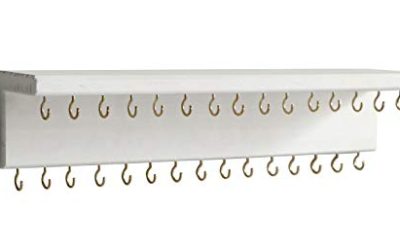
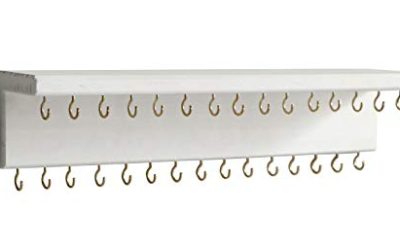
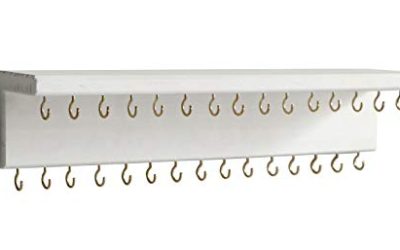
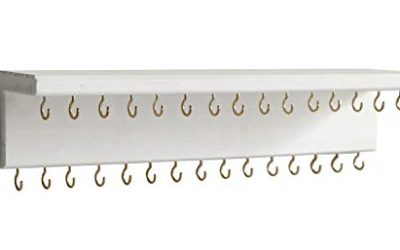
SANY DAYO Jewelry Organizer With 30 Hooks

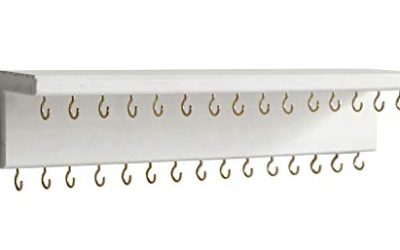
The first companion is a wall-mounted organizer with thirty hooks, sold as a jewelry organizer — and it is described here as exactly that. Repurposed honestly, it works as a light-duty wall rail beside the desk: a row of hooks for keys, lanyards, badge holders, idle charging leads, and other light accessories that otherwise drift across the lit surface. Under a light bar, a clear desk is half the benefit, and a rail on the wall is one of the easiest ways to keep it clear.
The limits matter as much as the uses. This is a jewelry organizer, not a hardware rack, and it must never hold consoles, drives, power bricks, heavy tools, or cartridges. Anything with real weight belongs on a shelf or in a drawer. Kept to light duties — keys, a lanyard for the morning, a spare lead looped neatly — it earns its place quietly.
Specs
- Product type: wall-mounted jewelry organizer with 30 hooks
- Honest role here: light-duty rail for keys, lanyards, and light accessories only
- Not for: consoles, drives, power bricks, heavy tools, or cartridges
- Mounting: wall rail; check the wall and fixings suit the spot before loading it
HEKEE Dusk to Dawn A19 LED Bulbs

A light bar handles the desk, but the rest of the room still matters on a long night. These bulbs are plain automatic sensor bulbs: they sense the light around them and switch on as the room darkens and off as it brightens. Stated plainly, they are not smart bulbs — no app, no voice control, no schedule to set — and they are not task lighting, so they are no substitute for the bar over the desk. What they do is keep a hallway or the room behind the chair from sitting in full darkness while the desk stays lit.
Two honest notes come with them. In a windowless room, where daylight never reaches the sensor, they may simply stay on, because the sensor never sees the bright moment that tells it to switch off. And before fitting any bulb into an enclosed fixture, check the enclosed-fixture rating, since enclosed spaces hold heat differently. Within those limits, they keep the edges of the evening gentle while the bar does the focused work.
Specs
- Product type: A19 LED bulbs with a dusk-to-dawn light sensor
- Behavior: switch on at dusk and off at dawn automatically
- Explicitly not: smart bulbs, and not task lighting
- Notes: may stay on in a windowless room; check the enclosed-fixture rating before use in enclosed fittings
ULANZI Super Clamp

The third companion is a super clamp, and its description starts with what it is not: it is a mount only. It has no light, no phone, and no camera of its own. What it offers is a strong, adjustable grip that can hold a small accessory arm or similar gear steady at a desk or shelf edge — useful for shaping a setup around a light bar without drilling holes.
Used kindly, it is a careful tool. Never clamp a monitor screen — the jaws belong on a desk edge, a shelf, or a sturdy rail, never on a display. Pad the jaws where they meet the surface so the grip does not mark the finish, and check the hold before trusting it with anything. Kept within those bounds, the clamp gives a small desk a flexible mounting point that can move when the setup changes.
Specs
- Product type: super clamp mount
- Honest role: mount only — no light, phone, or camera included
- Use: desk edges, shelves, and sturdy rails for small accessories
- Cautions: never clamp a monitor screen; pad the jaws to protect surfaces
tomtoc Laptop Case

When the honest night ends, the laptop usually has to travel — to another room, to an office, or just into a drawer until morning. This case is a padded soft case for that job. Stated plainly: it is not a hard shell, so it will not stand up to crushing weight or a hard drop the way a rigid case might, and it is not waterproof, so a wet commute calls for more protection than this alone. What it offers is soft, padded carrying that guards a laptop against scuffs, bumps, and desk-edge knocks.
The one check that matters before choosing it is fit: check the internal dimensions against the laptop that will actually live in it, since a case that is too snug strains its zip and one that is too loose lets the machine slide. Matched well, it turns the end of the night into a simple routine — screen closed, machine slipped into padding, case set by the door — and the desk is left clear for the morning.
Specs
- Product type: padded soft laptop case
- Honest limits: not a hard shell, and not waterproof
- Protection: padding against scuffs, bumps, and everyday knocks
- Fit note: check internal dimensions against your laptop before choosing
Hi-Lyte Electrolyte Drops

The last companion is for the person rather than the desk. These are electrolyte drops added to water, framed here with deliberately modest claims: this is not a medicine, not an energy product, and not a treatment for anything. For most people, plain water is fine, and a glass of it beside the keyboard is the honest first answer to a long night of reading. The drops simply add electrolytes to that water during long sits.
The sensible way to use them is the label’s way: follow the label directions for how much to add, do not treat more as better, and check with a clinician when unsure — particularly for anyone managing a health condition or taking regular medication. Kept in that modest place, the bottle is a small, honest addition to the night desk: water first, directions followed, no promises made that drops cannot keep.
Specs
- Product type: electrolyte drops added to drinking water
- Honest framing: not a medicine, energy, or treatment product
- Baseline note: plain water is fine for most people
- Use note: follow label directions; check with a clinician when unsure
FAQ
Is any pick in this guide actually a light bar?
No. Every pick here works around a light bar, not a replacement for one. The rail clears the desk the bar lights, the bulbs soften the room around it, the clamp mounts small accessories near it, the case carries the laptop away from it, and the drops look after the reader under it. The bar itself is chosen separately.
How should the light bar be positioned for reading?
Center it on top of the screen and angle it so the light falls on the desk surface — the keyboard, the notebook, the page — rather than into the eyes or across the display. The screen should keep its own soft glow without a bright streak, and the pool of light should land where the hands work. A small tilt and a sit-back check are usually enough.
How do I keep the light bar and its cable tidy?
Dust the bar with a dry, soft cloth on the regular cleaning round, without sprays on the bar or pressure on the screen. Route the cable down the back of the screen and along the rear edge of the desk, with a little slack for tilting, and keep it clear of the mouse path and chair wheels.
Can these companions replace good reading habits?
No, and they do not claim to. A bar lights the desk while the reader does the reading; breaks, posture, and a sensible stopping time do more for an honest night than any accessory. These picks simply remove small frictions — clutter, a dark room, loose gear, an unprotected laptop — so the habits have room to work.
Final Verdict
An honest night desk is not built from one bright purchase; it is built from a modest light and a few companions that each do one small job well. The bar washes the desk in a soft glow, the SANY DAYO rail keeps light things off that desk, the HEKEE bulbs keep the room gently lit, the ULANZI clamp offers a careful mounting point, the tomtoc case carries the laptop away in padding, and the Hi-Lyte drops sit beside a glass of water. None overpromises, and that is the point. Set the bar kindly, keep it clean, route its cable out of the way, and let the reader do the reading.
Product and ASIN Reference
| Product | ASIN |
|---|---|
| SANY DAYO jewelry organizer with 30 hooks | B07QFZSVQW |
| HEKEE dusk to dawn A19 LED bulbs | B07HGZMYZ4 |
| ULANZI super clamp | B09C882D4M |
| tomtoc laptop case | B073TVX735 |
| Hi-Lyte electrolyte drops | B01MXDAHIB |
FAQ
Is any pick in this guide actually a light bar?
How should the light bar be positioned for reading?
How do I keep the light bar and its cable tidy?
Can these companions replace good reading habits?
More from Amazon
Programs that pair well with the guide above. Offers and eligibility are set by Amazon and may change.
Free shipping on eligible items, Prime Video and more. Eligible new members can start with a free trial.
Start a Prime free trialAudiobooks and podcasts to listen to on the go. Eligible new members can start with a free trial.
Try Audible freeAd-free music streaming. Eligible new subscribers can start with a free trial.
Try Music Unlimited freeA free business account with business pricing and bulk-buying tools for work, shop or home office.
Create a business accountAs an Amazon Associate we earn from qualifying purchases.
Write Your Review
No reviews yet. Be the first to share your experience!