
Key takeaways
- Clear-morning companions for a monitor light bar setup, from wall rails and sensor bulbs to a clamp mount, a padded case, and sturdy glassware.
A clear morning at the desk starts with even light. A slim light bar resting on the top edge of the monitor throws a soft pool of light down across the keyboard and the notebook, while the screen itself stays blank or shows only a soft abstract glow, free of glare and reflections. The bar is a simple, unbranded fitting: it sits in place, points down at the work, and leaves the rest of the desk in calm shadow. Around that small pool of light, the whole morning setup works better when a few quiet companions keep the desk tidy, the room gently lit, and the tools of the day within easy reach.
None of the five picks below is itself a light bar. They are companions around the bar and the desk: a wall rail that clears small clutter off the surface, sensor bulbs that handle the room’s background light on their own, a clamp mount that holds a small accessory steady, a padded case that carries the laptop between rooms, and real glassware that keeps water on a side table instead of near the keyboard. Each one supports the clear-morning routine in a plain, practical way, and each earns its place without pretending to be the bar itself.
As an Amazon Associate, we earn from qualifying purchases.
How to Choose
Seat the Bar Kindly on the Screen’s Top Edge
The first job is placement. A light bar should sit centered on the top edge of the monitor, balanced by its counterweight, with the light aimed down at the desk rather than out at the room. When the bar is seated kindly and level, the beam falls across the work surface and stops short of the glass, so the screen shows no glare and no bright reflection. A bar pushed too far forward spills light into the eyes; a bar tilted back wastes the pool on the wall. Take a moment on the first morning to settle it once, and it will hold that position day after day.
Set the Brightness Once for the Morning
Morning light changes as the sun climbs, but the desk pool should stay steady. Set the brightness once at the start of the day, at the level where paper looks white and the keyboard legends are easy to read, then leave it there. A single calm setting avoids the fiddling that breaks concentration, and it keeps the contrast between the lit desk and the softer room gentle on the eyes. If the bar offers a warmer or cooler tone, pick the one that matches the room’s daylight and keep that choice for the whole morning.
Wipe the Bar on the Weekly Round
Dust settles on the top edge of a monitor faster than almost anywhere else on the desk, and a dusty bar scatters its light and dims the pool. Add the bar to the weekly round: one soft, dry cloth along the housing, a gentle pass over the lens strip, and the same cloth for the screen’s top bezel while you are there. The job takes less than a minute, needs no sprays or chemicals, and keeps the morning light as clear in month six as it was on the first day.
Remember the Bar Only Lights the Desk
A light bar does one job: it lights the desk. It does not fix a dark room, replace a ceiling light, or make a poor chair comfortable. The worker does the work; the bar simply keeps the work visible. Choosing companions with that plain truth in mind keeps the setup honest: background light for the room, a clear surface for the hands, safe storage for the machine, and water kept away from the electronics. When every piece does its own small job, the whole corner feels calm and clear.
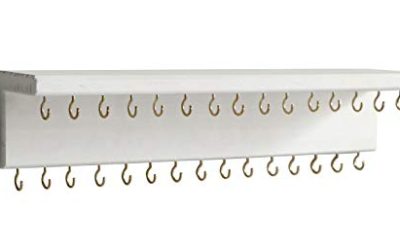
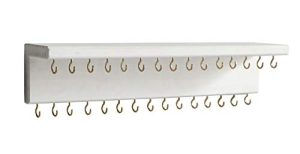
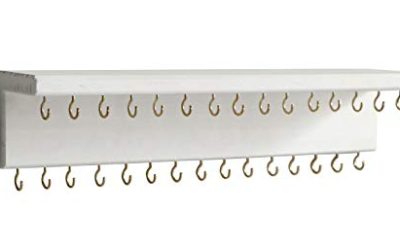
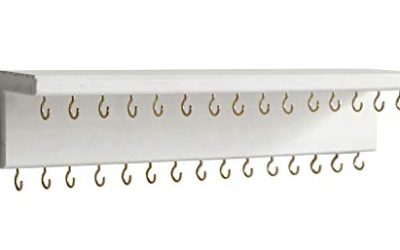
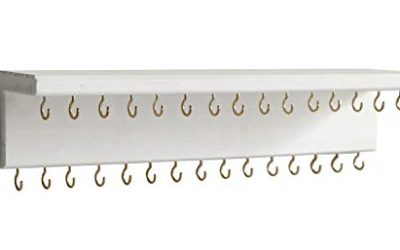
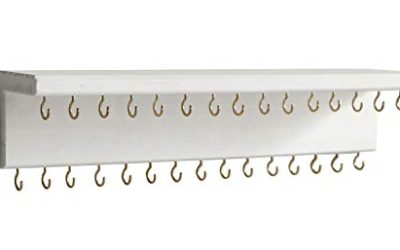
SANY DAYO Jewelry Organizer with 30 Hooks

The SANY DAYO organizer is, plainly and simply, a jewelry organizer: a wall-mounted rail with thirty small hooks made for necklaces, bracelets, and earrings. Repurposed beside a desk, it works well as a light-duty wall rail for keys, lanyards, ID badges, charging leads, and other light accessories that otherwise pool around the base of the monitor. Hanging those small items on the wall keeps the pool of light from the bar falling on a clear surface instead of a tangle, and it gives every small thing a fixed home to return to at the end of the day.
Its limits should be stated just as plainly. The hooks are small and light-duty, made for jewelry-weight items. This rail must never be described as holding consoles, drives, power bricks, heavy tools, or cartridges, and it should not be loaded with anything of that kind. Kept to keys, lanyards, and light accessories, it is a tidy and honest addition to the wall beside the desk.
Specs
- Product type: wall-mounted jewelry organizer rail
- Hook count: 30 hooks
- Intended use: necklaces, bracelets, earrings, and similar jewelry
- Desk use: light-duty rail for keys, lanyards, and light accessories only
- Mounting: wall mounted beside or above the desk
HEKEE Dusk-to-Dawn Light Bulbs A19

The HEKEE bulbs handle the room around the desk. Each A19 bulb carries a simple dusk-to-dawn sensor: it switches itself on when the room darkens and off again when daylight returns, with no app, no hub, and no schedule to set. These are plain automatic sensor bulbs. They are explicitly not smart bulbs, and they are not task lighting either; they will not replace the focused pool of the light bar on the desk. What they give the clear-morning corner is gentle background light that looks after itself, so the contrast between the bright desk and the rest of the room never turns harsh.
Two honest notes belong with these bulbs. In a windowless room or a garage workspace, the sensor may read the space as permanent dusk and the bulbs may stay on; that is the sensor doing its simple job, not a fault. And before fitting any bulb in a covered or enclosed fixture, check the enclosed-fixture rating on the fixture and the bulb so the pairing is a safe one.
Specs
- Product type: LED light bulb with dusk-to-dawn sensor
- Base and shape: A19 bulb shape
- Operation: automatic on at dusk, off at dawn, sensor controlled
- Connectivity: none; not a smart bulb
- Role: background room light, not task lighting
ULANZI Super Clamp

The ULANZI super clamp is a mount, and only a mount. It has no light, no phone, and no camera of its own; it is a strong spring clamp with a mounting point that grips a desk edge, a shelf, or a pole so a small accessory can be held in a fixed position. Beside a light bar setup, a clamp like this can hold a small flag to shape light, a lightweight accessory arm, or a cable run in place, keeping the desk surface itself clear. The jaws open wide, close firmly, and the whole fitting is small enough to live in a drawer when it is not needed.
Used with care, it is a safe tool. Pad the jaws with a scrap of cloth or the supplied padding so the grip does not mark wood or metal, and never clamp a monitor screen: the pressure that makes the clamp useful on a desk edge can damage a display panel. Clamp it to the desk, the shelf, or a stand, and it will hold steady without complaint.
Specs
- Product type: super clamp mount
- Function: mounting point only; includes no light, phone, or camera
- Grip: strong spring jaws for desk edges, shelves, and poles
- Care note: pad the jaws to protect surfaces
- Safety note: never clamp a monitor screen
tomtoc Laptop Case

The tomtoc case looks after the machine that the light bar serves. It is a padded soft case: a cushioned sleeve that absorbs the small knocks of daily carrying between the desk, a bag, and another room. That padding is real protection against bumps and scratches, but the case should be described honestly. It is not a hard shell, and it will not stand up to a crush or a drop the way a rigid case might. It is also not waterproof; a spill or a rainy walk calls for keeping the case inside a bag and out of the weather.
Fit matters more than anything with a soft case. Before choosing one, check the internal dimensions against the laptop’s own measurements, including its depth with the lid closed, so the machine slides in snugly without forcing the zip. A case that fits kindly will be used every day; one that fights the zip will be left in a drawer, and the laptop will travel unprotected.
Specs
- Product type: padded soft laptop case
- Protection: cushioning against bumps and scratches
- Limits: not a hard shell; not waterproof
- Fit: check internal dimensions against the laptop before choosing
- Carry: slim profile for use inside a bag or on its own
JoyJolt Faye Highball Glasses, 13 oz, Set of 6

Morning work goes better with water nearby, and the JoyJolt Faye glasses hold it in real glass. Each highball in the set of six holds 13 ounces, a comfortable size for water, juice, or iced tea at the start of the day. Real glass has a weight and clarity that plastic never quite matches, and a matched set keeps the kitchen shelf looking as calm as the desk.
The honest caution is simple: these are real, breakable glassware. Glass and electronics are poor neighbors, so keep the glass on a side table, a shelf, or a tray beside the desk rather than on the desk itself, well away from the keyboard, the monitor, and any cards or collections spread out for work. Set down on a side table, a full glass waits safely within reach, and the pool of light under the bar stays a dry, clear workspace.
Specs
- Product type: highball drinking glasses
- Capacity: 13 oz per glass
- Set size: 6 glasses
- Material: real glass; breakable, handle with care
- Placement: side table only, away from electronics, cards, and collections
FAQ
Does a light bar replace a desk lamp?
Not entirely. A light bar lights the area directly in front of the monitor very well and saves the desk space a lamp base would take. A lamp can throw light wider and from other angles. Many desks use the bar for the work pool and rely on room light for the rest, which is exactly the arrangement the picks above support.
Can the sensor bulbs and the light bar work in the same room?
Yes, and they suit each other. The bulbs give soft background light that switches itself on and off, while the bar gives the focused pool on the desk. Because the bulbs are plain sensor bulbs rather than smart bulbs, there is nothing to pair or configure; they simply respond to the room’s darkness.
Where should drinks sit during morning work?
On a side table or shelf beside the desk, never on the desk surface near the keyboard or monitor. Real glassware like the JoyJolt set is breakable, and a spill near electronics is costly. A side table keeps water within reach and the workspace dry.
How often should the light bar be cleaned?
Once a week is enough for most desks. A soft, dry cloth along the housing and lens strip during the weekly round keeps dust from scattering the light. Avoid sprays and wet cloths near the bar and the monitor; dry dusting is all the fitting needs.
Final Verdict
A clear morning at the desk is built from small, honest pieces. The light bar itself should be seated kindly on the screen’s top edge, set once for the morning, and wiped on the weekly round. Around it, the SANY DAYO organizer, used plainly as a light-duty rail for keys and lanyards, clears the surface; the HEKEE sensor bulbs look after the room’s background light without any fuss; the ULANZI clamp holds small accessories steady as a mount only; the tomtoc case carries the laptop with soft, honest protection; and the JoyJolt glasses keep water close on a side table, safely away from the work. None of them is the bar, and that is the point: each does its own job well, and together they keep the morning clear.
Product and ASIN Reference
| Product | ASIN |
|---|---|
| SANY DAYO jewelry organizer with 30 hooks | B07QFZSVQW |
| HEKEE dusk-to-dawn light bulbs A19 | B07HGZMYZ4 |
| ULANZI super clamp | B09C882D4M |
| tomtoc laptop case | B073TVX735 |
| JoyJolt Faye highball glasses, 13 oz, set of 6 | B08BB62QWT |
FAQ
Does a light bar replace a desk lamp?
Can the sensor bulbs and the light bar work in the same room?
Where should drinks sit during morning work?
How often should the light bar be cleaned?
More from Amazon
Programs that pair well with the guide above. Offers and eligibility are set by Amazon and may change.
Free shipping on eligible items, Prime Video and more. Eligible new members can start with a free trial.
Start a Prime free trialAudiobooks and podcasts to listen to on the go. Eligible new members can start with a free trial.
Try Audible freeAd-free music streaming. Eligible new subscribers can start with a free trial.
Try Music Unlimited freeA free business account with business pricing and bulk-buying tools for work, shop or home office.
Create a business accountAs an Amazon Associate we earn from qualifying purchases.
Write Your Review
No reviews yet. Be the first to share your experience!