
Key takeaways
- Companion picks that work alongside cable ties to bundle a calm home-office desk for a quiet start, with simple tips for tidy, traceable cables.
A quiet start to the day is easier when the desk is not quietly working against you. Loose cables behind a monitor slide down, tangle around a charger, and turn the first task of the morning into a small excavation. Plain cable ties, the simple unbranded straps found in any hardware drawer, solve most of that in minutes. A few bundles along the back edge of the desk, one loop for the monitor leads and another for the charging cables, and the whole setup settles into something calm and predictable.
To be plain about what follows: none of the five picks below is a cable tie. The ties themselves are generic straps described here only in general terms. These five products are companions that support the same tidy desk from different angles. One gives keys and light accessories a fixed home on the wall. One handles the room light automatically. One mounts a small accessory exactly where it belongs. One carries the laptop away cleanly at the end of the day. The last keeps a morning drink safely away from the cables entirely.
As an Amazon Associate, we earn from qualifying purchases.
How to Choose
Good cable management is mostly habit, and the ties are only as useful as the routine around them. Four simple ideas keep a bundled desk easy to live with day after day.
One Tie Per Bundle, So Cables Stay Easy to Trace
Group cables by where they go, not by where they happen to fall. The monitor power lead and its display cable form one bundle. The charger and the lamp lead form another. When each bundle carries a single purpose, tracing a cable later takes seconds: follow the bundle, and the right plug is at the end of it. Mixed bundles are where desk time disappears, because unplugging one device means loosening everything. Add a device, add a bundle. Remove one, and only its own tie is cut or unlooped.
Snug, Never Crushing
A tie should hold a bundle firmly enough that it keeps its shape, and no tighter. Cables that are cinched hard can kink, and a kinked cable is a weakened one. Pull the strap until the bundle stops sliding, then stop. Hook-and-loop straps are forgiving here because they can be loosened and redone without waste, while single-use nylon straps reward a gentler first attempt. Leave a little slack at the ends of each run, so plugs can be reached without straining the leads behind them.
Spare Ties Kept in One Drawer
Bundling only stays tidy if the supplies live in one known place. A small handful of spare ties in a single desk drawer, alongside the scissors used to trim them, means a new cable gets managed the day it arrives instead of joining a temporary pile that becomes permanent. Ten spares in a known spot beat a hundred scattered across the house. When the drawer runs low, that is the moment to restock.
The Tie Only Holds the Bundle
It is worth stating plainly: the tie does no clever work. It holds a bundle still, and that is all. The desk, the devices, and the person sitting down in the early light do the actual work of the day. That modesty is the point. A calm desk is not built from elaborate systems; it is built from small, unglamorous pieces each doing one simple job reliably. Keep expectations at that level and the ties will never disappoint, because holding a bundle together, quietly, for years, is exactly what they are for.
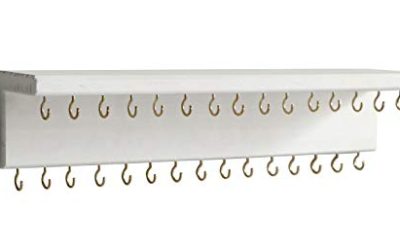
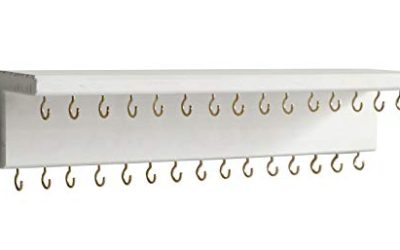
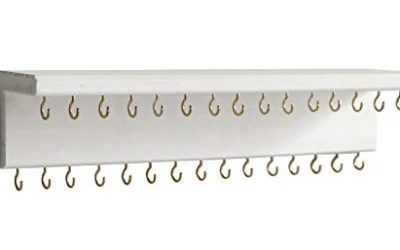
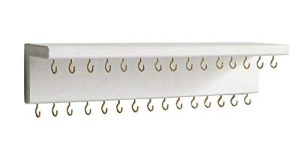
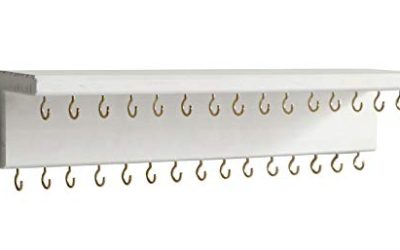
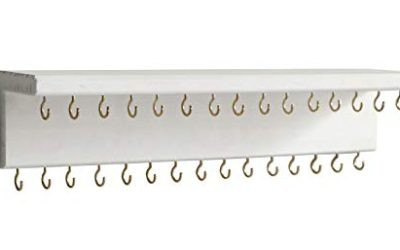
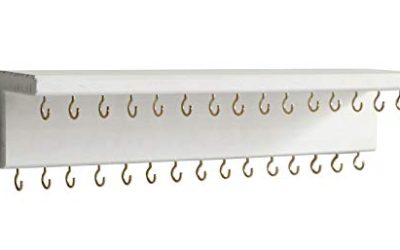
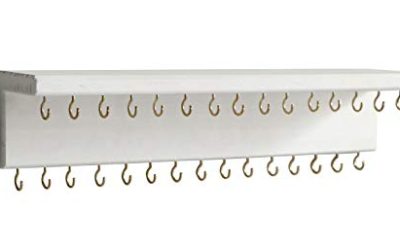
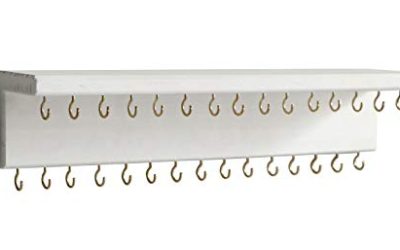
1. SANY DAYO Jewelry Organizer, 30 Hooks
This wall-mounted organizer is, plainly, a jewelry organizer: a rail with thirty hooks made for necklaces and similar light pieces. Repurposed with clear eyes, it serves a desk well as a light-duty wall rail. Keys, lanyards, a spare charging lead coiled loosely, and other light accessories each get a hook, which keeps them off the desk surface and out of the cable runs entirely. That separation is the real benefit. The small items that usually drift across a desk and tangle with the leads instead hang in a fixed row where they can be seen at a glance.
The limits deserve equal plainness. This rail is for light items only. It should never be asked to hold games consoles, hard drives, power bricks, heavy tools, or game cartridges, none of which belong on jewelry hooks. Treat it as a place for things that weigh very little and need to be found quickly, and it does that job neatly.
Specs
- Product type: Wall-mounted jewelry organizer rail
- Hook count: 30 hooks
- Best desk use: Light-duty rail for keys, lanyards, and light accessories
- Load guidance: Light items only; not for consoles, drives, power bricks, heavy tools, or cartridges
- Placement: Wall beside or above the desk, clear of cable runs
2. HEKEE Dusk-to-Dawn A19 Sensor Bulbs
These are plain automatic sensor bulbs with a standard A19 shape and a light sensor built in. They switch themselves on when the room darkens and off when daylight returns, which suits an early start: walk into the office at dawn and the room is already lit, no switch to hunt for with a mug in hand. Fitted in a ceiling fixture or a shaded lamp away from the desk, they provide the general room light that makes the whole space feel settled before the screen even wakes.
Two honest clarifications matter. First, these are not smart bulbs: there is no app, no voice control, and no color adjustment, just a sensor reacting to the light around it. Second, they are not task lighting, and a focused desk lamp is still the right tool for reading and close work. In windowless rooms and garages the sensor may read the space as permanently dark, so the bulbs may stay on; that is the sensor doing its simple job, not a fault. Before fitting them in any covered fixture, check the enclosed-fixture rating so the bulb and fixture are properly matched.
Specs
- Product type: Automatic dusk-to-dawn sensor bulbs
- Shape: A19, standard screw base
- Control: Built-in light sensor only; not smart bulbs, no app or voice control
- Role: General room light, not task lighting
- Note: May stay on in windowless or garage rooms; check enclosed-fixture rating before use
3. ULANZI Super Clamp
A super clamp earns its place on a tidy desk by holding one small thing in exactly the right spot: a lightweight accessory at the edge of the desk or on a nearby shelf, off the surface and out of the cable paths. The jaws open wide, grip firmly, and the whole arrangement can be moved in seconds when the layout changes. On a desk built around neat bundles, a clamp keeps the odd extra item from dragging cables out of line.
Be clear about what it is: a mount only. It includes no light, no phone, and no camera of its own; whatever it holds must be supplied separately and kept light. Two cautions keep it trouble-free. Never clamp it onto a monitor screen, which is not built to take that pressure. And pad the jaws, or choose a padded contact point, when gripping finished wood or painted edges, so the grip stays firm without leaving a mark on the furniture it serves.
Specs
- Product type: Super clamp mount
- Includes: Clamp only; no light, phone, or camera included
- Best desk use: Holding one small, light accessory at the desk edge or shelf
- Cautions: Never clamp a monitor screen; pad the jaws on finished surfaces
- Adjustment: Repositionable by hand without tools
4. tomtoc Laptop Case
At the end of the day, the neatest desk is often an empty one, and this padded case is how the laptop leaves the surface without fuss. It is a soft case: cushioned walls, a smooth lining, and enough structure to guard against the everyday knocks of a commute or a trip between rooms. Slipping the laptop away also frees the desk for a genuine reset, so the morning starts from clear space rather than from yesterday’s arrangement of devices and leads.
The honest boundaries are simple. A soft padded case is not a hard shell, and it will not protect a laptop the way rigid armor does against a serious drop or a heavy crush. It is also not waterproof, so rain calls for an umbrella or an outer bag rather than trust in the fabric. Fit deserves one careful moment before ordering: check the internal dimensions against the laptop’s actual measurements, because a case that is nearly right is still wrong every single day.
Specs
- Product type: Padded soft laptop case
- Protection: Cushioned against everyday knocks; not a hard shell
- Water resistance: Not waterproof
- Fit guidance: Check internal dimensions against the laptop before ordering
- Best desk use: Clearing the laptop from the desk for a clean daily reset
5. JoyJolt Faye Highball Glasses, 13 oz, 6 Pack
A quiet start often includes a glass of water or juice at the desk, and that is exactly where this set earns its place in a cable management roundup: by staying off the desk. These are real glasses, made of actual glass, in a tall highball shape that suits water, juice, and iced drinks. A set of six means a fresh glass is always available and the used ones can collect in the kitchen rather than multiplying beside the keyboard.
The rule that matters is placement. Real glass is breakable, and a knocked highball near a laptop, a stack of cards, or a collection turns a calm morning into a cleanup. Keep these on a side table, a shelf, or a tray well away from electronics, paperwork, cards, and collections, and they are a pleasure. On the desk itself, within elbow range of the keyboard, they are a risk no amount of tidiness elsewhere can offset.
Specs
- Product type: Highball drinking glasses
- Capacity: 13 oz per glass
- Pack size: 6 glasses
- Material: Real glass; breakable, handle with care
- Placement: Side table or tray only, away from electronics, cards, and collections
FAQ
How many cable ties does a small desk actually need?
Fewer than most people expect. A typical single-monitor desk uses somewhere between six and twelve: a few along the back edge, a couple for the charging run, and spares for changes. The exact number matters less than the grouping. One tie per purposeful bundle keeps everything traceable, and a small reserve in one drawer covers new devices as they arrive.
Are reusable ties better than single-use ones?
Each suits a different habit. Hook-and-loop straps can be opened and redone freely, which suits desks that change often. Single-use nylon straps hold a neater, firmer finish and suit bundles that will not be touched for years. Many tidy desks use both: reusable straps where hands go often, permanent straps on the runs hidden behind the desk.
Can cable ties damage cables?
Only when they are pulled far too tight. A tie cinched hard enough to pinch the outer jacket can kink the conductors inside over time. The fix is simple: snug, never crushing, with a little slack left in the run. If a bundle cannot slide a few millimeters under gentle pressure, the tie is tighter than it needs to be.
Where should bundled cables run on a desk?
Along the back edge, where they are out of sight and out of the way of knees, chair casters, and feet. Keep power leads grouped together and away from the workspace surface, let each bundle drop down at one point rather than several, and leave enough slack at the desk end that devices can be moved slightly without pulling against the ties.
Final Verdict
A calm desk for a quiet start is assembled from small pieces that each do one plain job. Cable ties, generic and unbranded, hold the bundles. The SANY DAYO organizer, used honestly as a light-duty rail, clears keys and lanyards off the surface. The HEKEE bulbs light the room automatically without pretending to be smart or to replace a desk lamp. The ULANZI clamp, a mount and nothing more, pins one light accessory where it belongs. The tomtoc case clears the laptop away each evening within its honest limits, and the JoyJolt glasses keep the morning drink where glass belongs: on a side table, far from the cables. Bundle the leads, keep spares in one drawer, and the early light finds a desk that is ready before you are.
Product and ASIN Reference
| # | Product | ASIN |
|---|---|---|
| 1 | SANY DAYO jewelry organizer, 30 hooks | B07QFZSVQW |
| 2 | HEKEE dusk-to-dawn A19 sensor bulbs | B07HGZMYZ4 |
| 3 | ULANZI super clamp | B09C882D4M |
| 4 | tomtoc laptop case | B073TVX735 |
| 5 | JoyJolt Faye highball glasses, 13 oz, 6 pack | B08BB62QWT |
FAQ
How many cable ties does a small desk actually need?
Are reusable ties better than single-use ones?
Can cable ties damage cables?
Where should bundled cables run on a desk?
More from Amazon
Programs that pair well with the guide above. Offers and eligibility are set by Amazon and may change.
Free shipping on eligible items, Prime Video and more. Eligible new members can start with a free trial.
Start a Prime free trialAudiobooks and podcasts to listen to on the go. Eligible new members can start with a free trial.
Try Audible freeAd-free music streaming. Eligible new subscribers can start with a free trial.
Try Music Unlimited freeA free business account with business pricing and bulk-buying tools for work, shop or home office.
Create a business accountAs an Amazon Associate we earn from qualifying purchases.
Write Your Review
No reviews yet. Be the first to share your experience!