
Key takeaways
- Steady-start cable tidy picks that sit beside plain cable ties: a light rail, sensor bulbs, a clamp mount, a soft case and side-table glassware.
A steady start to the day often begins behind the desk, where a handful of plain, unbranded cable ties quietly hold yesterday’s wiring in place. The ties themselves are simple: no printed text, no logos, just a strap, a locking head, and a tail that gets trimmed once the bundle sits right. A calm tidy routine built around them does not need much — bundles grouped by where they run, tails cut flush, and spares kept close so the next small fix takes a minute. The screen above the desk stays a soft abstract glow while the real work happens at knee height, among power leads and charging cables.
It is worth saying plainly before anything else: none of the five picks below is itself a cable tie. They are companions that live around the ties — a light-duty rail for small things that collect near a desk, automatic bulbs for the room, a clamp mount for holding a device steady, a soft case for carrying a laptop, and plain glassware that belongs on a side table, away from the wiring. Each is described honestly for what it is and what it is not.
As an Amazon Associate, we earn from qualifying purchases.
How to Choose
Trim Tie Ends Flush So Nothing Sharp Sticks Out
The tail of a cable tie is the part most people forget. Once the strap locks, the leftover end sticks out at an angle, and its cut edge can be surprisingly sharp against a wrist reaching behind the desk. A steady routine trims every tail flush with the locking head, using small flush cutters rather than scissors, which tend to leave a slanted stub. Run a fingertip along each finished bundle; if anything catches, it needs another snip. Flush ends also keep bundles from snagging neighboring cables.
Use One Tie Per Bundle So a Single Cable Can Be Freed
It is tempting to lasso every cable behind the desk into one thick rope, but that turns every small change into a full rebuild. A calmer approach gives each logical bundle its own tie: monitor leads together, charging cables together, small devices on their own run. With one tie per bundle, freeing a single cable means cutting one strap and retying one bundle while everything else stays put. It also keeps thick power leads from crushing thinner signal cables in a shared strap.
Keep Spare Ties in One Small Box With the Tidy Kit
A tidy routine stalls when the spares are scattered. Keep spare ties in one small box, stored with the rest of the tidy kit — the flush cutters, a few adhesive mounts, and a short spare lead or two. One box means the whole routine travels: under the desk, behind a media cabinet, or to a second desk. Sort the ties loosely by length so the right size is the first one touched, and refill the box when it drops to a small handful.
Remember the Tie Only Binds the Bundle — the Person Does the Tidying
A cable tie is a passive strap. It holds what it is wrapped around, in the position it was tightened, and it does nothing else. It does not route cables, plan bundles, or decide which lead belongs where; the person doing the tidying does all of that. Keeping that fact in mind prevents two mistakes: overtightening a strap to force a bad route into place, and blaming the ties when a layout was never thought through. Plan the runs first, then let the ties bind what the person has arranged.
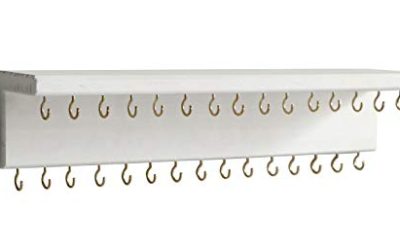
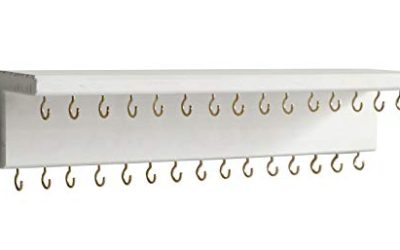
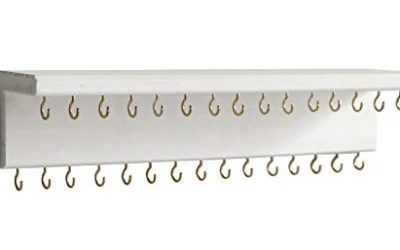
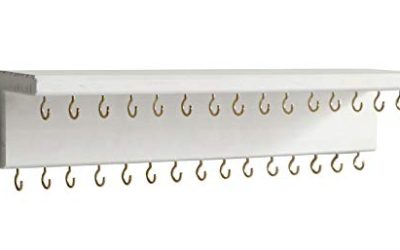
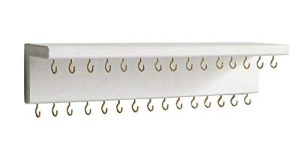
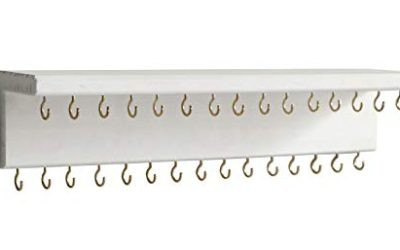
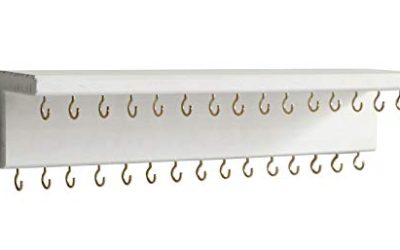
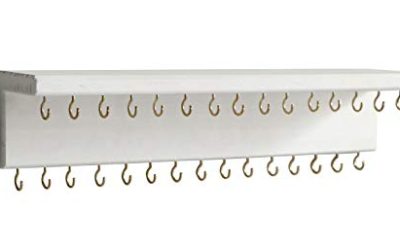
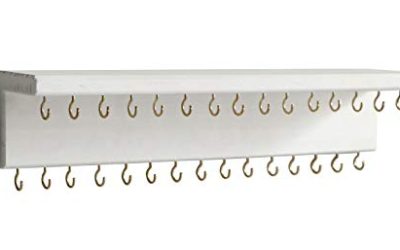
SANY DAYO Jewelry Organizer With 30 Hooks
This pick needs its honest framing first: the SANY DAYO organizer is, plainly, a jewelry organizer — a rail with 30 hooks made for necklaces, bracelets, and similar light pieces. Around a desk, it earns its place repurposed only as a light-duty wall rail for keys, lanyards, and light accessories, the small things that otherwise pile up next to the keyboard or vanish into the cable zone. Hung near the desk, it gives those items a fixed home off the work surface.
The limits matter as much as the use. This rail is explicitly never for consoles, drives, power bricks, heavy tools, or cartridges. Those items are far beyond what small jewelry hooks should carry, and hanging them here would bend hooks and put hardware at risk of a fall. Keep the loads light: a lanyard, a key ring, a charging lead looped loosely over a hook. Treated as a light rail and nothing more, it clears the desk’s edge, where loose items tend to migrate into the cable runs.
Specs
- Product type: wall-mounted jewelry organizer rail
- Hook count: 30 hooks
- Original use: necklaces, bracelets, and similar jewelry
- Desk use here: light-duty rail for keys, lanyards, light accessories
- Explicitly not for: consoles, drives, power bricks, heavy tools, cartridges
- Placement: wall near the desk, away from cable runs
HEKEE Dusk to Dawn Bulbs A19
The HEKEE bulbs are plain automatic sensor bulbs in a standard A19 shape. A built-in light sensor switches them on at dusk and off at dawn, with no app, no hub, and no schedule to set. That simplicity deserves clear framing: these are explicitly not smart bulbs, and they are not task lighting. They will not change color or focus a beam on a desk surface. What they do is keep a room’s ambient light predictable, which suits a steady-start routine.
Two practical notes belong with any sensor bulb. In windowless or garage rooms, where daylight never reaches the sensor, the bulbs may stay on far longer than expected, because the sensor reads the room as permanent dusk; that is normal behavior, not a fault. And before fitting one in a covered fitting, check the enclosed-fixture rating, since heat buildup affects bulb life. Used as background light for the room around the desk, they support the routine without pretending to be desk lighting.
Specs
- Product type: automatic dusk-to-dawn sensor bulbs
- Base and shape: A19 bulb form
- Control: built-in light sensor, on at dusk and off at dawn
- Explicitly not: smart bulbs or task lighting
- Behavior note: may stay on in windowless or garage rooms
- Fitting note: check the enclosed-fixture rating for covered fittings
ULANZI Super Clamp
The ULANZI super clamp is a mount, and only a mount. It has no light, no phone, and no camera of its own; it is a strong jaw on a mounting point, made to hold a separate device the owner supplies. In a cable-tidy context, that holding power keeps a small device — a lightweight camera on a shelf edge, a phone on a holder arm — fixed in one position so its cable run stays predictable. A device that never migrates is a device whose cable never needs retying.
Two cautions define sensible use. Never clamp a monitor screen: the jaw pressure can damage a display panel, and screens should only be supported by their own stands or rated mounts. And pad the jaws on finished wood or painted shelves. Set the clamp somewhere with real substance behind it, tighten once, and check it on the weekly tidy round.
Specs
- Product type: clamp mount only
- Includes: clamp with mounting point; no light, phone, or camera
- Desk use here: holding a separate small device in a fixed position
- Explicitly never: clamping a monitor screen
- Surface care: pad the jaws on finished or painted surfaces
- Placement: desk edge, shelf, or rail with solid material behind it
tomtoc Laptop Case
The tomtoc case is a padded soft case for carrying and storing a laptop, and its framing should stay exact: it is not a hard shell, and it is not waterproof. The padding cushions against everyday bumps and the shuffle of a bag or desk drawer, which is the protection most laptops actually need between rooms or between home and office. It will not survive being crushed under heavy loads or keep water out in the rain.
Fit is the detail to get right first: check the internal dimensions against the laptop’s actual measurements, including thickness with any cover fitted. Too loose lets the machine slide; too tight strains the zipper. In the tidy routine, the case plays a quiet role — when the laptop leaves the desk, its charging cable can be tied into a neat bundle and stored alongside, so the desk run stays undisturbed.
Specs
- Product type: padded soft laptop case
- Protection: cushioning against everyday bumps and knocks
- Explicitly not: a hard shell case, and not waterproof
- Fit check: compare internal dimensions with the laptop before use
- Carry use: between rooms, or between home and office
- Desk role: stores the laptop away so cable runs stay undisturbed
JoyJolt Faye Highball Glasses 13 oz, Set of 6
The JoyJolt Faye glasses are real glassware — a set of six 13 oz highball glasses — and should be treated as exactly that: real, breakable glass. Their place in a steady-start routine is the break, not the desk. A glass of water on a side table is part of starting steady, but glass and liquid have no business beside keyboards or cable runs.
So the rule for this pick is firm: keep the glasses on a side table away from electronics, cards, and collections. A spill on a side table is a wipedown; the same spill across a desk is a damaged keyboard, stained cards, and liquid finding its way into a power strip. Glass also chips and breaks, and a crowded desk is the worst place for either. Used at arm’s length from the setup, the set rounds out the routine’s human side.
Specs
- Product type: highball drinking glasses
- Set size: 6 glasses
- Capacity: 13 oz per glass
- Material: real glass; breakable, handle accordingly
- Placement rule: side table only, away from electronics, cards, collections
- Desk role: none on the desk itself; supports the break beside the routine
FAQ
How many cable ties does a typical desk setup need?
Most single-desk setups settle with a modest handful: one tie per logical bundle, plus a few for the charging corner and spares in the kit box. The exact count matters less than the grouping. If every bundle has its own tie and the box still holds spares, the count is right.
Should cable ties be tightened as much as possible?
No. A tie should be snug enough that the bundle holds its shape and does not slide, and no tighter. Cranking a strap down hard can pinch thin cables and stress connectors where they enter the bundle. Snug and flush-trimmed beats maximum tightness, and a bundle that needs force to stay in place usually wants a different route.
Can the same tie be reused after it is cut?
Standard one-piece ties are single-use: cutting the strap to free a bundle ends that tie’s service. That is why the routine keeps spares in one box and groups cables so most bundles never need opening. Releasable ties exist as a separate product type for spots that change often, but the plain ties here are cut, replace, and move on.
Where should finished bundles run so the desk stays tidy?
Runs stay tidy when they follow the desk’s own lines: along the back edge, down a rear leg, and across to the outlet in as straight a path as the room allows. Keep power leads grouped separately from signal cables where the layout permits, leave a little slack at every device, and keep bundles off the floor where feet and chair casters find them.
Final Verdict
A steady-start cable tidy routine does not ask much of its tools. Plain unbranded cable ties do the binding — one per bundle, tails trimmed flush, spares waiting in one small box — and the person does everything else: planning the runs and grouping the leads. The five companions support that routine from the edges. The SANY DAYO rail, a jewelry organizer repurposed strictly for light items, clears the desk edge. The HEKEE bulbs keep the room’s ambient light automatic without pretending to be smart or task lighting. The ULANZI clamp holds a small device steady, never a screen. The tomtoc soft case moves the laptop without disturbing the wiring. And the JoyJolt glasses stay on the side table, where real glassware belongs. None of them is a cable tie, and that is the point: the ties bind, the companions support, and the person tidies.
Product and ASIN Reference
| # | Product | ASIN |
|---|---|---|
| 1 | SANY DAYO jewelry organizer 30 hooks | B07QFZSVQW |
| 2 | HEKEE dusk to dawn bulbs A19 | B07HGZMYZ4 |
| 3 | ULANZI super clamp | B09C882D4M |
| 4 | tomtoc laptop case | B073TVX735 |
| 5 | JoyJolt Faye highball glasses 13 oz 6 pack | B08BB62QWT |
FAQ
How many cable ties does a typical desk setup need?
Should cable ties be tightened as much as possible?
Can the same tie be reused after it is cut?
Where should finished bundles run so the desk stays tidy?
More from Amazon
Programs that pair well with the guide above. Offers and eligibility are set by Amazon and may change.
Free shipping on eligible items, Prime Video and more. Eligible new members can start with a free trial.
Start a Prime free trialAudiobooks and podcasts to listen to on the go. Eligible new members can start with a free trial.
Try Audible freeAd-free music streaming. Eligible new subscribers can start with a free trial.
Try Music Unlimited freeA free business account with business pricing and bulk-buying tools for work, shop or home office.
Create a business accountAs an Amazon Associate we earn from qualifying purchases.
Write Your Review
No reviews yet. Be the first to share your experience!