
Key takeaways
- Start a simple cable tidy routine with plain cable ties and five desk companions that keep keys, light, mounts and drinks in their proper place.
A desk cable tidy does not need a drawer full of gadgets. Plain, unbranded cable ties with no printed text on them can gather a monitor lead, a charger cord and a lamp cable into a few calm bundles. This guide treats the ties as the simple starting point: plain and easy to trim, they do the binding while a handful of everyday desk companions handle the keys, the light, the mounts and the drink that usually crowd the same square of desk.
To be plain about it from the start: none of the five picks below is itself a cable tie. They are companions that sit around the ties and make the tidy routine easier to keep. The rail keeps loose keys and lanyards off the desk surface, the sensor bulbs handle background light without another switch, the clamp holds a small accessory steady while cables are routed, the padded case gives a laptop a safe parking spot away from the cable run, and the glasses keep a drink on a side table instead of beside the keyboard.
As an Amazon Associate, we earn from qualifying purchases.
How to Choose
Trim tie ends flush so nothing sharp sticks out
Every cable tie leaves a small tail once it is pulled snug, and that tail is the part most likely to catch a wrist or scratch a desk edge. The simple habit is to snip the tail off flush with the locking head right after tightening, using small flush cutters rather than scissors, which tend to leave a slanted stub. Run a fingertip lightly over each finished tie; if anything feels sharp, trim it again. Bundles under the desk, where hands reach blindly, deserve the most care, because a sharp tail is what fingers find first in the dark.
Use one tie per bundle so a single cable can be freed
It is tempting to wrap one long tie around every cable in sight, but that makes the next change miserable: swapping one charger means cutting the whole bundle apart. A calmer rule is one tie per bundle, each bundle holding only the cables that travel together. When a device leaves the desk, only its own bundle needs opening. Keep bundles loose enough to slide a finger under the tie; a tie cranked down hard can pinch insulation and makes later adjustments harder.
Keep spare ties in one small box with the tidy kit
A tidy routine falls apart when the supplies scatter. Keep the spare ties in one small lidded box together with the flush cutters and a few adhesive cable clips, so the whole kit lives in a single place. When a new device arrives, the box comes out, the cable gets its own bundle, the tail gets trimmed, and the box goes away again. Store ties flat and out of direct sunlight, since heat can make them brittle and prone to snapping when tightened. One box, one home, no hunting through drawers.
The tie only binds the bundle; the person does the tidying
It is worth saying plainly: a cable tie does no organising on its own. It only binds whatever bundle it is wrapped around, neatly or badly. The tidy result comes from the person who decides which cables run together and when a cable that no longer belongs gets removed. Revisit the bundles every few months, cut away ties for devices that have moved on, and re-tie what remains. That reviewing habit is what keeps the desk tidy.
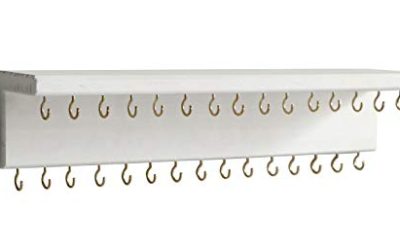
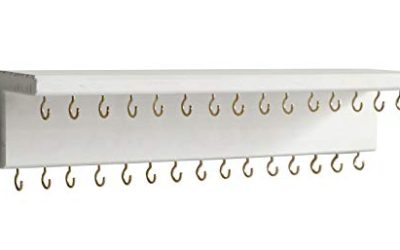
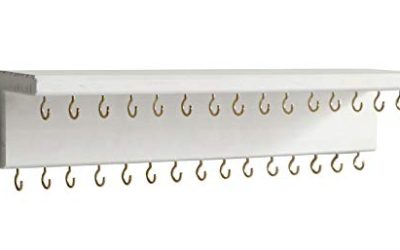
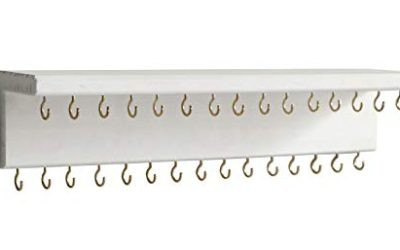
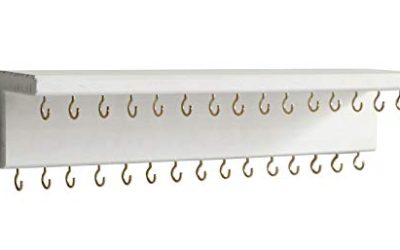
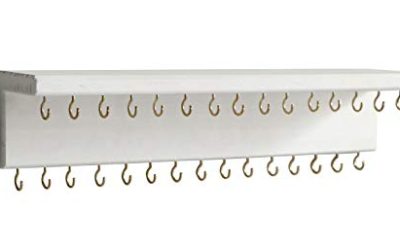
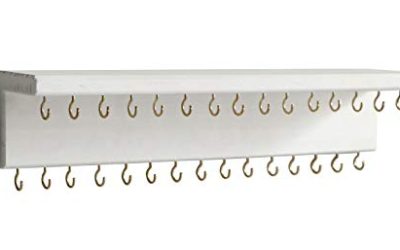
SANY DAYO Jewelry Organizer With 30 Hooks

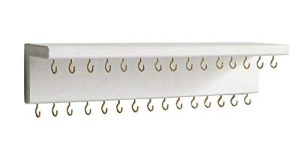
This wall-mounted organizer is, plainly, a jewelry organizer: a rail with thirty small hooks made for necklaces and bracelets. In this routine it is repurposed only as a light-duty wall rail for keys, lanyards and other light accessories that otherwise land in the middle of the desk and tangle with the cables. Hung beside the desk, it gives every key ring and lanyard a hook of its own. A clear desk edge is much easier to route cables along.
The limits need stating just as plainly. This rail is for light items only. It should never be used for consoles, drives, power bricks, heavy tools or cartridges; those belong on a shelf or in a drawer, not hanging from small hooks. Keep the load to keys, lanyards, earbud cases and similar small things. Mounted near the door side of the desk, it becomes the place pockets get emptied, keeping the desk free for the computer.
Specs
- Thirty hooks on a single wall rail
- Designed as a jewelry organizer for necklaces and similar items
- Repurposed here only as a light-duty rail for keys and lanyards
- Wall mounting keeps small items off the desk surface
- Not suitable for consoles, drives, power bricks, heavy tools or cartridges
HEKEE Dusk to Dawn Bulbs A19

The HEKEE bulbs are plain automatic sensor bulbs: they screw into a standard socket, sense the light level around them, and switch themselves on at dusk and off at dawn. They are explicitly not smart bulbs — there is no app, no voice control and no schedule to set — and they are not task lighting either, since their job is gentle background light rather than a focused beam on the desk. For a cable tidy routine, their value is simple: one less lamp and one less cord on the desk.
Two honest caveats come with the sensor design. In a windowless room or a garage, the sensor may never see enough daylight to decide it is morning, so the bulb may stay on far longer than expected; that is normal for a dusk-to-dawn sensor, not a fault. Also, check the enclosed-fixture rating before using any bulb inside a fully enclosed shade. Used in an open hallway or porch fixture, they quietly handle the ambient light so the desk setup can stay simple.
Specs
- A19 bulb shape for standard screw sockets
- Built-in dusk-to-dawn sensor switches the bulb automatically
- Plain automatic bulbs: not smart bulbs, and not task lighting
- May stay on in windowless or garage spaces with no daylight
- Check the enclosed-fixture rating before use in enclosed shades
ULANZI Super Clamp

The ULANZI super clamp is a sturdy grip clamp with a threaded mounting point for small accessories. It is important to be clear about what it is: a mount only. It has no light, no phone and no camera of its own; it simply holds whatever small item is attached to it, steady and in position. During a cable tidy, that makes it handy for pinning a small lamp arm or a cable guide to the edge of a shelf while the bundles are routed underneath.
Used carelessly, a clamp this strong can mark furniture, so pad the jaws with a strip of cloth or felt before tightening onto a desk edge, and never clamp it onto a monitor screen, which cannot take the pressure. It grips best on flat edges and rails within its jaw range, tightened firmly but not forced. Once routing is finished, the clamp can stay as a permanent mount, or go back in the tidy box until the next rearrangement.
Specs
- Heavy-duty clamp with a threaded accessory mount
- A mount only: no light, phone or camera included
- Pad the jaws to protect desk edges and finishes
- Never clamp onto a monitor screen
- Holds small accessories steady while cables are routed
tomtoc Laptop Case

The tomtoc case is a padded soft case for carrying and storing a laptop, and its role in a tidy desk routine is to give the machine a safe parking place that is not on top of the cable run. When the laptop leaves the desk, the case keeps it padded against knocks; when it comes back, the case slides into a shelf instead of sprawling across the work surface. A defined parking spot matters, because a laptop that lands anywhere tends to drag its charger cable across everything else.
The honest framing: this is a padded soft case, not a hard shell, so it softens bumps and scratches rather than protecting against drops or crushing weight, and it is not waterproof, so a spilled drink or a rainy commute still calls for care. Before ordering, check the internal dimensions against your exact laptop, including its thickness with any cover fitted, since a case that is nearly right is usually wrong. It stores upright in the same cupboard as the tidy box, keeping the whole routine compact.
Specs
- Padded soft case for laptop storage and carrying
- Not a hard shell: softens bumps rather than guarding against drops
- Not waterproof
- Check internal dimensions carefully against your laptop before ordering
- Gives the laptop a fixed parking spot away from the cable runs
JoyJolt Faye Highball Glasses, 13 oz, Set of 6

The JoyJolt Faye glasses are a set of six tall highball glasses, and their place in this guide is the drink that accompanies long desk sessions. A proper glass on a side table replaces the mug beside the keyboard and the can that sweats onto the desk. Keeping drinks on a side table, away from the computer and its leads, is one of the simplest protective habits a desk can have.
These are real glass, and they should be treated that way: they are breakable, and they belong on a side table away from electronics, cards and collections, where a knock cannot send a drink across anything valuable. The tall highball shape suits water, iced tea and juice through the working day. Six in the set means a clean one is always ready while others are in the wash.
Specs
- Set of six highball glasses
- 13 oz capacity per glass
- Real glass: breakable, handle and wash with care
- Best kept on a side table away from electronics, cards and collections
- Tall shape suited to water, iced tea and juice
FAQ
How many cable ties does a simple desk tidy actually need?
Most single-desk setups need fewer than expected. One tie per bundle, with a bundle for each device group, usually means somewhere between six and twelve ties for a typical desk. The exact number matters less than the habit: one bundle per device group, tails trimmed flush, and a small box of spares kept with the cutters so adding a device later takes a minute.
Can cable ties damage cables if they are pulled too tight?
Yes, a tie cranked down hard can pinch a cable’s insulation and stress the conductors inside, especially on thinner leads. Tighten only until the bundle holds together, leaving room to slide a fingertip underneath. If a bundle needs to be that tight to stay in place, the routing is the problem, not the tie, so move the bundle to a straighter run or add a second tie partway along.
What should be done with the sharp tail after tightening a tie?
Trim it flush with the locking head using small flush cutters, then run a fingertip over the spot to check for any remaining edge. Scissors usually leave a slanted stub that can still scratch. This matters most for bundles under the desk, where hands reach without looking. If a trimmed end still feels sharp, a second careful snip will usually smooth it.
How often should the bundles be reviewed and re-tied?
A review every few months is enough for most desks. Devices change, and cables for things that have moved to another room often stay tied into the bundle long after they stop being used. Cutting away dead cables and re-tying what remains keeps the runs honest, and it is also the moment to check that no tie has been pulled too tight and every tail is still trimmed flush.
Final Verdict
A simple start is the right start for cable management: plain ties, one per bundle, tails trimmed flush, spares in one box, and a short review every few months. Around that routine, the five companions each clear a different kind of clutter — the SANY DAYO rail takes keys and lanyards off the desk as long as it is kept to light items only, the HEKEE bulbs remove a lamp and its cord while staying plainly automatic rather than smart, the ULANZI clamp holds one small accessory steady as a mount only, the tomtoc case gives the laptop a padded parking spot, and the JoyJolt glasses move drinks to a side table. None of them replaces the ties; together they make the tidy far easier to keep.
Product and ASIN Reference
| Product | ASIN |
|---|---|
| SANY DAYO jewelry organizer 30 hooks | B07QFZSVQW |
| HEKEE dusk to dawn bulbs A19 | B07HGZMYZ4 |
| ULANZI super clamp | B09C882D4M |
| tomtoc laptop case | B073TVX735 |
| JoyJolt Faye highball glasses 13 oz 6 pack | B08BB62QWT |
FAQ
How many cable ties does a simple desk tidy actually need?
Can cable ties damage cables if they are pulled too tight?
What should be done with the sharp tail after tightening a tie?
How often should the bundles be reviewed and re-tied?
More from Amazon
Programs that pair well with the guide above. Offers and eligibility are set by Amazon and may change.
Free shipping on eligible items, Prime Video and more. Eligible new members can start with a free trial.
Start a Prime free trialAudiobooks and podcasts to listen to on the go. Eligible new members can start with a free trial.
Try Audible freeAd-free music streaming. Eligible new subscribers can start with a free trial.
Try Music Unlimited freeA free business account with business pricing and bulk-buying tools for work, shop or home office.
Create a business accountAs an Amazon Associate we earn from qualifying purchases.
Write Your Review
No reviews yet. Be the first to share your experience!