
Key takeaways
- Honest companion picks that work around a monitor light bar in a gaming room corner, from a light wall rail to plain sensor bulbs and a padded case.
A monitor light bar earns its place in a gaming room corner by doing one simple job: it throws a soft wash of light down onto the desk while leaving the screen itself dark and calm, so the display reads as a blank or soft abstract glow instead of a mirror. Around that small bar, though, a room still needs order. Keys and lanyards need a home by the door, the light away from the desk needs to behave on its own, a small mount needs to hold a lamp or camera steady, spare gear needs a safe resting place, and the player needs a drink within reach that never threatens the keyboard.
To be plain about it: none of the five picks in this guide is itself a light bar. They are companions that work around one. Each supports the corner in a different way, and each is described honestly, including what it cannot do. There are no brightness figures anywhere in this guide, because a calm gaming room is built from placement, tidiness, and steady habits rather than numbers on a box.
As an Amazon Associate, we earn from qualifying purchases.
How to Choose
Aim the bar at the desk so the screen stays clear
The whole point of a monitor light bar is direction. It should sit on top of the screen and aim down at the desk, lighting the keyboard and the small working area in front of the player, while the screen face itself stays out of the beam. Aimed well, the display stays a quiet glow and the desk does the shining; aimed badly, light spills onto the screen and the picture washes out. Take a minute when the bar first goes up: tilt it, sit in the chair, and check from the player’s seat, because that is the view that matters.
Dust the bar on the weekly round
Dust settles on top of a monitor, and a light bar lives right where the dust lands. A dusty bar throws a dimmer, uneven wash and looks tired even when it works fine. The fix costs nothing: once a week, on the same round that wipes the desk, run a dry cloth along the bar and the top of the screen. No sprays and no soaking — a dry cloth is enough, and the bar should be off and cool before it is touched. Small habits keep a corner cared for.
Route the cord behind the screen so it stays out of sight
Most light bars draw power through a cord, and a loose cord will drape across the desk, catch on the mouse cable, and spoil the clean look the bar was bought for. Route it down behind the screen, along the back edge of the desk, and out of the play area. A cord that disappears makes the corner feel calm; a wandering cord makes it feel unfinished. Leave a little slack, so the screen can still tilt without dragging the bar out of aim.
A bar lights the desk while the room’s habits set the mood
It helps to say this plainly: a light bar lights the desk, and nothing more. It does not make the room cozy on its own, fix a cluttered corner, or replace the lamps and bulbs that carry the rest of the space. The mood of a gaming room comes from habits — gear put away, surfaces clear, light that behaves predictably, and a seat ready when the player sits down. The bar is one honest part of that picture; the five companions below are the other parts.
SANY DAYO Jewelry Organizer With 30 Hooks

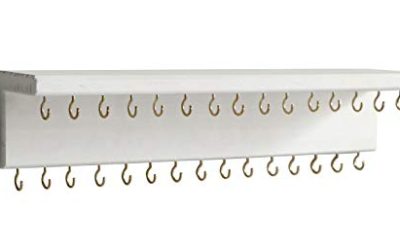
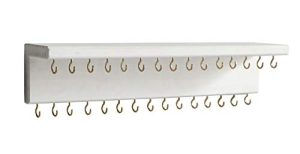
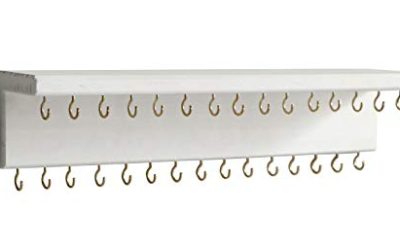
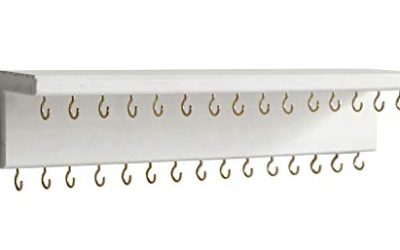
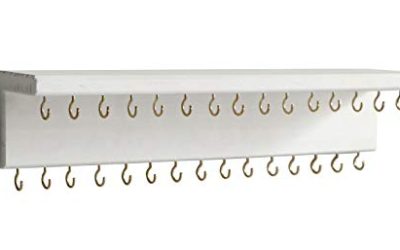
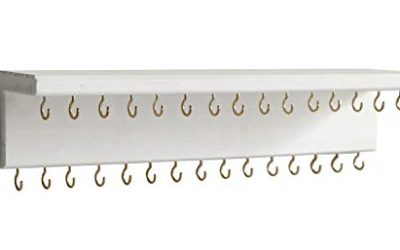
The first companion is a wall-mounted jewelry organizer with thirty hooks, described here exactly as what it is: a jewelry organizer, repurposed in this room only as a light-duty wall rail. Mounted beside the door or along the wall near the desk, its hooks give keys, lanyards, wrist straps, and other light accessories a single home, so they stop collecting on the desk under the light bar’s beam. A gaming corner looks calmer the moment the small daily clutter leaves the desk, and a rail of hooks is the simplest way to make that happen.
The limits matter as much as the uses. This rail is for light things only. It must never hold consoles, drives, power bricks, heavy tools, or cartridges — those belong on shelves, in drawers, or in proper cases. Treat the hooks as a home for the light and the personal, and the rail will serve the room well.
Specs
- Product type: wall-mounted jewelry organizer used as a light-duty rail
- Hooks: 30 hooks for keys, lanyards, and light accessories
- Honest role: a home for small, light items only
- Never used for: consoles, drives, power bricks, heavy tools, or cartridges
- Placement: wall beside the door or next to the desk
HEKEE Dusk-to-Dawn A19 LED Bulbs

Every gaming room has light beyond the desk, and that is where these bulbs fit. The HEKEE bulbs are plain A19 LED bulbs with a dusk-to-dawn sensor: they come on when the room darkens and switch off when daylight returns, with no app, no hub, and no voice control. They are, plainly and explicitly, not smart bulbs, and they are not task lighting either — in this corner, the light bar does the task lighting, and these bulbs simply keep the room’s background light predictable so nobody fumbles for a switch before sitting down to play.
Two honest caveats belong here. First, in a windowless gaming room the sensor may read the space as permanent dusk, so the bulbs may stay on whenever they have power; in such a room, treat them as ordinary bulbs on a switch. Second, check the enclosed-fixture rating before screwing one into a covered fitting, because not every bulb is cleared for enclosed use. Within those limits, they are a quiet, set-and-forget way to keep the room’s ambient light steady.
Specs
- Product type: A19 LED bulbs with a dusk-to-dawn sensor
- Behavior: on at dusk, off at dawn, automatically
- Explicitly not: smart bulbs, and not task lighting
- Windowless-room note: the sensor may keep them on; use the switch instead
- Fitting note: check the enclosed-fixture rating before use
ULANZI Super Clamp

A gaming corner often needs one small thing held steady — a compact lamp aimed at a shelf, a small camera watching the desk, a phone parked at a useful angle. The ULANZI super clamp is the mount for jobs like that. It is important to be exact about what it is: a mount only. It has no light, no phone, and no camera of its own; it simply grips a desk edge, a shelf, or a pole and holds whatever compatible gear is attached to it, at the angle chosen.
Used with care, it keeps extra gear off the desk and out of the light bar’s way. Two rules keep it safe. Never clamp a monitor screen, and never clamp the light bar itself — both are surfaces a strong clamp can damage, and the bar’s aim should never depend on a clamp’s grip. And pad the jaws with cloth or rubber when gripping finished wood or painted edges, so the hold stays firm without leaving marks.
Specs
- Product type: super clamp mount
- Honest role: a mount only — no light, phone, or camera included
- Typical jobs: holding a small lamp, camera, or phone mount steady
- Never clamp: a monitor screen or the light bar itself
- Care note: pad the jaws on finished or painted surfaces
tomtoc Laptop Case

Not every machine in a gaming room lives on the desk. A laptop that travels between rooms, or gets put away when the corner turns into a guest space, needs a resting place that protects it without fuss. The tomtoc case is a padded soft case that does that job: it cushions a laptop against small knocks and keeps it dust-free on a shelf or in a drawer, within reach but out of the play area.
Its limits are simple and worth stating. It is a padded soft case, not a hard shell, so it softens bumps rather than defeating drops or heavy weight stacked on top. It is also not waterproof, so a wet day still calls for keeping the case inside a bag or away from the window. And fit matters: check the case’s internal dimensions against the laptop before ordering, because a case that is nearly right is still wrong. Chosen in the correct size, it is an honest, quiet piece of protection.
Specs
- Product type: padded soft laptop case
- Protection: cushioning against everyday bumps and dust
- Explicitly not: a hard shell, and not waterproof
- Fit note: check internal dimensions against the laptop before ordering
- Placement: shelf or drawer near the desk, out of the play area
JoyJolt Faye Highball Glasses, 13 oz, 6 Pack

Long sessions call for a drink, and a drink near a keyboard calls for a little discipline. The JoyJolt Faye highball glasses are tall, simple glasses that hold a generous pour of water or iced tea and look tidy doing it. A set of six means a clean glass is always ready, for the player or a friend in the second chair, and the evening never depends on rinsing the same glass between rounds.
The honest framing is about placement, not the glass itself. These are real glasses made of real glassware, which means they can break — so they belong on a side table beside the chair, away from the desk, the keyboard, and the electronics entirely. A drink on the side table refreshes the player; a drink beside the mouse eventually tests the hardware. Keep the glasses on the side table, use a coaster, and the ritual stays pleasant and safe.
Specs
- Product type: highball drinking glasses
- Count: 6 glasses per pack
- Capacity: 13 oz per glass
- Material note: real glassware — breakable, so handle with care
- Placement: side table only, away from the desk and electronics
FAQ
Is any pick in this guide actually a light bar?
No. None of the five picks is a light bar, and the guide says so plainly from the start. The rail, bulbs, clamp, case, and glasses are companions that work around a monitor light bar — they organize the corner, steady the background light, hold small gear, protect a laptop, and keep drinks safely placed.
Can the HEKEE bulbs replace the light bar for desk lighting?
No. These are plain automatic sensor bulbs for a room’s general light, explicitly not smart bulbs and not task lighting. They do a fine job of keeping a room’s background predictable, but they do not aim a focused wash onto a desk the way a monitor light bar does. In this corner the bar does the task lighting; the bulbs keep the rest of the room from going dark.
Where should the light bar’s cord go?
Down behind the screen and along the back edge of the desk, out of the play area. A loose cord drapes across the working surface, tangles with the mouse cable, and makes the corner look unfinished. Routed behind the screen with a little slack, the cord disappears from view and still lets the screen tilt without pulling the bar out of aim.
Why keep drinks on a side table instead of the desk?
Because the JoyJolt glasses are real glassware and real glassware can break, and because any drink beside a keyboard is one elbow away from the electronics. On a side table, a glass is easy to reach, stable, and harmless. On the desk, it shares space with the mouse, the keyboard, and the light bar’s cord — a small rule that prevents an expensive accident.
Final Verdict
A monitor light bar does one honest job: it lights the desk while the screen stays calm. Everything around it either supports that job or protects it. The SANY DAYO organizer, used strictly as a light-duty rail, clears the small clutter out of the beam. The HEKEE bulbs keep the room’s background light predictable without pretending to be smart or to be task lighting. The ULANZI clamp holds small gear steady while staying far from the screen and the bar. The tomtoc case gives a laptop padded, honest protection off the desk. And the JoyJolt glasses keep drinks on the side table. Aim the bar well, dust it weekly, hide its cord, and let these companions handle the rest.
Product and ASIN Reference
| Product | ASIN |
|---|---|
| SANY DAYO jewelry organizer with 30 hooks | B07QFZSVQW |
| HEKEE dusk-to-dawn A19 LED bulbs | B07HGZMYZ4 |
| ULANZI super clamp | B09C882D4M |
| tomtoc laptop case | B073TVX735 |
| JoyJolt Faye highball glasses, 13 oz, 6 pack | B08BB62QWT |
FAQ
Is any pick in this guide actually a light bar?
Can the HEKEE bulbs replace the light bar for desk lighting?
Where should the light bar’s cord go?
Why keep drinks on a side table instead of the desk?
More from Amazon
Programs that pair well with the guide above. Offers and eligibility are set by Amazon and may change.
Free shipping on eligible items, Prime Video and more. Eligible new members can start with a free trial.
Start a Prime free trialAudiobooks and podcasts to listen to on the go. Eligible new members can start with a free trial.
Try Audible freeAd-free music streaming. Eligible new subscribers can start with a free trial.
Try Music Unlimited freeA free business account with business pricing and bulk-buying tools for work, shop or home office.
Create a business accountAs an Amazon Associate we earn from qualifying purchases.
Write Your Review
No reviews yet. Be the first to share your experience!